

MogU: Glow Up is made and published by Azim Qudrat. AppBrain is an independent app data site and isn't affiliated with Azim Qudrat. The app name, icon, screenshots and description belong to Azim Qudrat and are shown as published on the App Store.
AppBrain's verdict
- Rating on App Store
- 4.33
- 9 ratings
- Last updated
- October 6, 2026
It doesn't have enough ratings yet to judge what users think.
Rankings
App Store top chartsApp Store Rankings for MogU: Glow Up
Competitors
Similar apps and more from Azim Qudrat


Releases
Updates seen on the App Store- Version
- 1.0.7
- Launched
- July 2026
No changelog data
User feedback
Ratings and reviews on the App StoreComments on MogU: Glow Up for iOS
We don't have enough comments to show example comments. Please check back later.
Technology
Found in the app by AppBrain- Price
- Free
- App size
- 86.9 MB
- Content rating
- Medium
Technologies used by MogU: Glow Up
About the app and developer
About MogU: Glow Up
MogU: Glow Up is a lifestyle app developed by Azim Qudrat.
User Ratings
MogU: Glow Up is rated 4.33 out of 5 stars. The rating is based on 9 ratings.
App Information
MogU: Glow Up is freely available from the App Store. The app size is 86.90 MB. The latest version available is 1.0.7. The last update was on October 6, 2026.
Technical Requirements
The app has a content rating of Medium Maturity. The app has been available on the App Store since July 2026.
Developer information for Azim Qudrat
Address:
Frequently asked questions about MogU: Glow Up
Is MogU: Glow Up free?
Yes. MogU: Glow Up is free on the App Store.
Is MogU: Glow Up still available?
Yes. MogU: Glow Up is on the App Store, and the last update we saw was on October 6, 2026.
How large is MogU: Glow Up?
MogU: Glow Up is 86.90 MB.
Is MogU: Glow Up suitable for children?
App Store gives MogU: Glow Up a medium maturity rating, so it is not meant for young children.
How do people rate MogU: Glow Up?
MogU: Glow Up scores 4.33 out of 5 stars, from 9 ratings on the App Store.
Who made MogU: Glow Up?
MogU: Glow Up was developed by Azim Qudrat. It is listed in the lifestyle category on the App Store.
What are the best alternatives to MogU: Glow Up?
People looking at MogU: Glow Up also look at these lifestyle apps: Sigma: Looksmax AI Face Rater, Looksmaxxing & Glow Up・Nouri, Mog Academy, PSL AI-Morph, Looksmax & Mog, GlowUp AI:Umax.
Store listing
By Azim Qudrat, from the App Store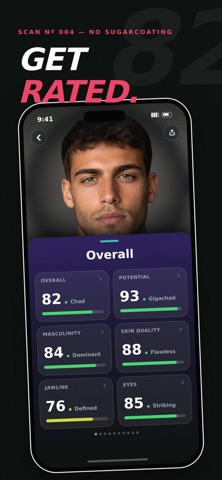


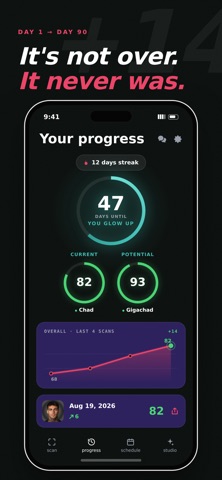

Description by Azim Qudrat Written by the developer, not by AppBrain. Click to read.
HOW IT WORKS
1. Answer a short quiz and add front and side selfies.
2. Subscribe to MogU Pro to unlock your results and app features.
3. Explore category and factor breakdowns.
4. Build a personalized seven-day plan.
5. Save scans to Progress and compare changes.
6. Create personalized AI styling photos in Studio.
7. Track calories, macros, meals, and weigh-ins in Fuel.
8. Share results with a Mog Card.
AI-ASSISTED SCANS
MogU provides a structured read of visible appearance cues, including areas such as skin quality, jawline, eye area, face shape, and overall presentation. Results are subjective estimates—not objective measurements of attractiveness, identity, health, or future outcomes. Lighting, angle, camera quality, pose, grooming, hairstyle, and expression can affect results.
GUIDED VIDEO COURSES
Learn practical steps for Skin, Eyes, Jaw & Cheekbones, and Hair. Weekly members start with a personalized course and more courses open over time. Yearly members get all courses immediately. Weekly members can optionally buy an early unlock for a locked course. An active subscription is always required, including after an early unlock.
PROGRESS AND PLANS
Save completed scans to Progress and compare your photos, scores, and observations over time. MogU Pro can use your latest scan and preferences to generate an editable seven-day routine. Plans provide general self-improvement guidance and are not medical, nutritional, or fitness advice.
FUEL
MogU Pro includes calorie and macro targets based on the stats and goals you enter, meal logging by photo, description, barcode, or food search, meal history, and weigh-ins. AI meal estimates are approximate, and Fuel is not medical or nutritional advice.
STUDIO
Choose a photo, Studio engine, and preset to create an AI-powered styling image. Explore multiple looks, save completed images in Your Photos, and share them. MogU Pro includes one Studio photo on a rolling seven-day schedule beginning after your previous included photo is successfully generated. A one-time Studio Photo Pass adds one extra Studio photo without starting a subscription.
MOGU PRO
MogU Pro unlocks full scan results, category scores, visual insights, factor breakdowns, face-shape guidance, Progress comparisons, personalized seven-day plans, Fuel calorie and macro tracking, Vibe style rankings, and the included Studio photo allowance. Available subscription options are shown on the purchase screen.
Completed scans are normally spaced seven days apart. Eligible users who want to scan before the timer ends can purchase a one-time Early Scan Pass. This pass skips the current wait for one scan; it does not renew or unlock MogU Pro.
If you purchase through Apple, payment is charged to your Apple Account at confirmation. Subscriptions renew automatically until canceled and can be managed in Apple subscription settings. Eligible U.S. App Store customers may also see a separate website offer processed by Stripe; its checkout displays its price, renewal terms, and management instructions.
MogU analyzes appearance and does not identify you or use face recognition for identity. Remote AI analysis or styling occurs only after the app explains what is sent and you consent.
IMPORTANT
MogU is for informational, entertainment, self-improvement, and general wellness use only. It does not provide medical, dermatological, psychological, nutritional, fitness, or other professional advice. Do not use MogU to diagnose, treat, prevent, or monitor any health condition. If you have health concerns, consult a qualified professional.
Terms of Use (EULA):
https://www.apple.com/legal/internet-services/itunes/dev/stdeula/