

Money Forecast: CashFlow
Money Forecast: CashFlow is made and published by Klaus Schöffmann. AppBrain is an independent app data site and isn't affiliated with Klaus Schöffmann. The app name, icon, screenshots and description belong to Klaus Schöffmann and are shown as published on the App Store.
AppBrain's verdict
Established- Rating on App Store
- 4.33
- 76 ratings
- Last updated
- September 22, 2026
It doesn't have enough ratings yet to judge what users think.
Rankings
App Store top chartsApp Store Rankings for Money Forecast: CashFlow
Competitors
Similar apps and more from Klaus SchöffmannAlternatives to Money Forecast: CashFlow







More from Klaus Schöffmann


Releases
Updates seen on the App Store- Version
- 5.40
- Launched
- August 2015
No changelog data
User feedback
Ratings and reviews on the App StoreComments on Money Forecast: CashFlow for iOS
We don't have enough comments to show example comments. Please check back later.
Technology
Found in the app by AppBrain- Price
- Free
- App size
- 1.47 MB
- Content rating
- Everyone
Technologies used by Money Forecast: CashFlow
About the app and developer
About Money Forecast: CashFlow
Money Forecast: CashFlow is a finance app developed by Klaus Schöffmann.
User Ratings
Money Forecast: CashFlow is rated 4.33 out of 5 stars. The rating is based on 76 ratings.
App Information
Money Forecast: CashFlow is freely available from the App Store. The app size is 1.47 MB. The latest version available is 5.40. The last update was on September 22, 2026.
Technical Requirements
The app has a content rating of Everyone. The app has been available on the App Store since August 2015.
Developer information for Klaus Schöffmann
Address:
Frequently asked questions about Money Forecast: CashFlow
Is Money Forecast: CashFlow free?
Yes. Money Forecast: CashFlow is free on the App Store.
Is Money Forecast: CashFlow still available?
Yes. Money Forecast: CashFlow is on the App Store, and the last update we saw was on September 22, 2026.
How large is Money Forecast: CashFlow?
Money Forecast: CashFlow is 1.47 MB.
Is Money Forecast: CashFlow suitable for children?
App Store rates the content of Money Forecast: CashFlow as suitable for everyone.
How do people rate Money Forecast: CashFlow?
Money Forecast: CashFlow scores 4.33 out of 5 stars, from 76 ratings on the App Store.
Who made Money Forecast: CashFlow?
Money Forecast: CashFlow was developed by Klaus Schöffmann. It is listed in the finance category on the App Store.
What are the best alternatives to Money Forecast: CashFlow?
People looking at Money Forecast: CashFlow also look at these finance apps: Balance Forecasting, Foreseenly™ Cash Flow Forecast, Kualto - Forecast Budgeting, ForecastAI: Budget Tracking, Cashflows Pro.
Store listing
By Klaus Schöffmann, from the App Store




Description by Klaus Schöffmann Written by the developer, not by AppBrain. Click to read.
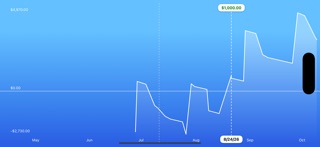
This way it helps you to plan your financial situation, and also to decide if an investment should be made now or better later, for example. Also, this app allows you to avoid situations where you forgot about some outgoing transactions and end up with an overdrawn account balance.
The best thing about Money Forecast, however, is that you do not need to constantly add new micro transactions - just enter the balance on a particular date, create estimated recurring income/expenses and correct either the balance or actual payments later (for a particular date).
First use instructions:
1) Enter the current balance.
2) Add recurrent or one-time transactions (i.e., income and expenses).
3) See how your finances will develop over the next few weeks, months, and years!
4) Adjust the actual account balance for specific (future) dates. This will correct wrong estimations.
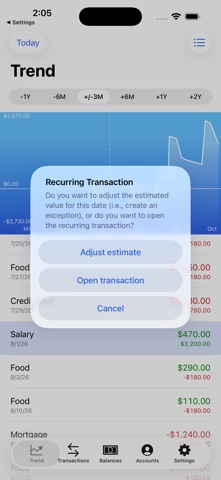
5) Adjust the actual value of a recurrent transaction for specific dates only. Simply double-tap the recurring entry in the trends view to adjust (by creating a 'Transaction Exception')!
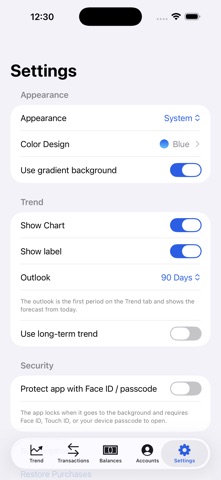
You can manage several accounts with this app (e.g., for several people in your family) and you can also use a PIN (or Touch ID / Face ID) to protect your data! Since the app synchronizes via iCloud, you can also see/edit the data from several devices and restore your data after a complete re-install.