

Mononoke is made and published by Bram Bos. AppBrain is an independent app data site and isn't affiliated with Bram Bos. The app name, icon, screenshots and description belong to Bram Bos and are shown as published on the App Store.
AppBrain's verdict
EstablishedLoved by users- Rating on App Store
- 4.78
- 103 ratings
- Last updated
- September 17, 2021
Users love it: 4.8 stars from 103 ratings.
Rankings
App Store top chartsApp Store Rankings for Mononoke
Competitors
Similar apps and more from Bram BosAlternatives to Mononoke




More from Bram Bos








Releases
Updates seen on the App Store- Version
- 1.2.2
- Launched
- January 2020
No changelog data
User feedback
Ratings and reviews on the App StoreComments on Mononoke for iOS
We don't have enough comments to show example comments. Please check back later.
Technology
Found in the app by AppBrain- Price
- $8.99
- App size
- 6.00 MB
- Content rating
- Everyone
Technologies used by Mononoke
About the app and developer
About Mononoke
Mononoke is a music app developed by Bram Bos.
User Ratings
Mononoke is rated 4.78 out of 5 stars. The rating is based on 100 ratings.
App Information
Mononoke costs $8.99. The app size is 6.00 MB. The latest version available is 1.2.2. The last update was on September 17, 2021.
Technical Requirements
The app has a content rating of Everyone. The app has been available on the App Store since January 2020.
Developer information for Bram Bos
Address:
Frequently asked questions about Mononoke
Is Mononoke free?
No. Mononoke costs $8.99 on the App Store.
Is Mononoke still available?
Yes. Mononoke is on the App Store, and the last update we saw was on September 17, 2021.
How large is Mononoke?
Mononoke is 6.00 MB.
Is Mononoke suitable for children?
App Store rates the content of Mononoke as suitable for everyone.
How do people rate Mononoke?
Mononoke scores 4.78 out of 5 stars, from 103 ratings on the App Store.
Who made Mononoke?
Mononoke was developed by Bram Bos. It is listed in the music category on the App Store.
What are the best alternatives to Mononoke?
People looking at Mononoke also look at these music apps: rymdigare, Velvet Machine, tardigrain, BLEASS Granulizer, ID700.
Store listing
By Bram Bos, from the App Store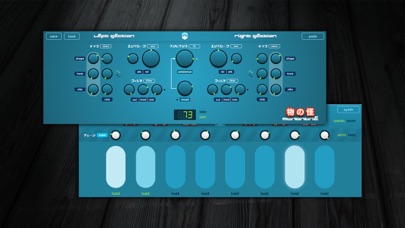
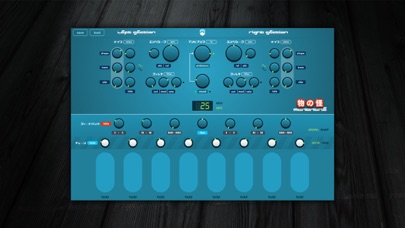
Description by Bram Bos Written by the developer, not by AppBrain. Click to read.
Feedback routing
What sets Mononoke apart from other synths is that its voices (4 in each section) can be routed back into each other in multiple ways, creating all sorts of overtones and pulsating resonant frequencies. Sometimes harmonic, sometimes weirdly atonal. Sometimes clear and delicate as icicles, sometimes harsh as metallic blades, sometimes soft as fresh snow. This interaction between voices helps fuse all layers together into a coherent musical landscape.
A tale of two engines
The synthesizer engines (each of the two sections has its own independent engine) have relatively simple controls, which influence a complex system of many invisible, interconnected LFOs. But this is not your bread-and-butter general purpose synthesizer: think of Mononoke as one huge FM synthesizer where each voice is an independently playable operator. Together all operators contribute to a single soundscape.
Expressive pads
Complex soundscapes can be created live, using the 8 performance pads which let you modulate each voice independently in several dimensions. Your interactions with the pads will also be sent out as MPE/MIDI (when loaded as an AU plugin in a compatible host) so you can record and tweak your session. The onscreen pads can be latched individually so some voices can be used as drones, while others as can be added and removed as extra sonic layers. The pads are fully integrated in the Audio Unit plugin.
Connectivity
Mononoke is designed as an AUv3 plugin, with advanced Audio Unit features such as MPE input and output (!), a fully exposed array of AU parameters for automation and all the connectivity and scalability you can expect from modern plugins.
The standalone mode is basic (just meant for jamming and creating presets) and does not offer any connectivity, so if you want to use Mononoke in conjunction with other apps and effects you'll need to load it into a host, such as Garageband, Audiobus, AUM or Cubasis.
Summary:
- Audio Unit (AUv3) plugin
- 8 voice polyphony, 2 independent engines with 4 voices each
- Compatible with MPE (MIDI Polyphonic Expression) and MIDI
- MIDI Input and Output (only available when used as an Audio Unit plugin)
- Limited standalone mode for jamming (full screen, no connectivity)
- 8 independently tunable performance pads for expressive interaction
- Universal, fully scalable to any screen size, supports fullscreen mode in AU hosts
- Freely tunable voices, or quantized to semitones (with overall finetuning)
- iOS10 (MIDI/MPE output from the plugin requires iOS11) or higher
Also contains Mononoke Pads: an extra AUv3 MIDI controller plugin for playing MPE compatible synths using Mononoke's pads. Note: this is a separate plugin which will be installed in your MIDI Plugin collection. Mononoke Pads requires iOS 11.