

Moro Reality 3D is made and published by BMAC Infotech. AppBrain is an independent app data site and isn't affiliated with BMAC Infotech. The app name, icon, screenshots and description belong to BMAC Infotech and are shown as published on the App Store.
AppBrain's verdict
- Last updated
- May 28, 2025
Rankings
App Store top chartsApp Store Rankings for Moro Reality 3D
Competitors
Similar apps and more from BMAC InfotechAlternatives to Moro Reality 3D





More from BMAC Infotech


Releases
Updates seen on the App Store- Version
- 1.0
- Launched
- May 2025
No changelog data
User feedback
Ratings and reviews on the App StoreComments on Moro Reality 3D for iOS
We don't have enough comments to show example comments. Please check back later.
Technology
Found in the app by AppBrain- Price
- Free
- App size
- 51.9 MB
- Content rating
- Everyone
Technologies used by Moro Reality 3D
About the app and developer
About Moro Reality 3D
Moro Reality 3D is an utilities app developed by BMAC Infotech.
User Ratings
The app has no ratings yet.
App Information
Moro Reality 3D is freely available from the App Store. The app size is 51.85 MB. The latest version available is 1.0. The last update was on May 28, 2025.
Technical Requirements
The app has a content rating of Everyone. The app has been available on the App Store since May 2025.
Developer information for BMAC Infotech
Address:
Store listing
By BMAC Infotech, from the App Store


Description by BMAC Infotech Written by the developer, not by AppBrain. Click to read.
Transform real-world objects into high-quality 3D models in seconds with Moro Reality 3D — the easiest and most intuitive 3D scanning app on iOS. Whether you're a designer, developer, student, artist, or simply curious about 3D tech, this powerful tool brings the magic of 3D modeling right to your fingertips.
No complex setups. No expensive gear. Just your iPhone or iPad camera and Moro Reality 3D.
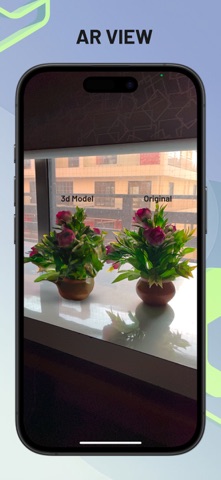
Moro Reality 3D is an advanced object-scanning app that uses your iPhone or iPad’s camera to create precise 3D models from real-world objects. Powered by The app walks you through a step-by-step scanning process, making it incredibly easy—even for beginners.
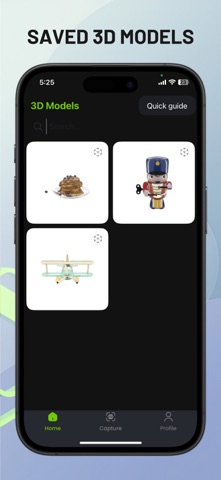
Once scanning is complete, the app generates a downloadable .USDZ file—a widely supported 3D file format perfect for AR, 3D design, eCommerce, gaming, and more. You can also view the 3D object in the app's built-in preview.
How It Works
1) Launch the App
Open Moro Reality 3D on your iOS device.
2) Scan the Object
Follow the guided instructions to move around the object while the app captures it from all angles.
3) Preview in 3D
After scanning, instantly preview the realistic 3D model on-screen.
4) Export the File
Download the model in .USDZ format—perfect for ARKit, 3D design tools, or sharing.
Who Is It For?
Moro Reality 3D is perfect for:
- 3D Designers – Quickly digitize objects for creative workflows.
- AR/VR Developers – Get instant USDZ files for use in augmented or virtual reality projects.
- Product Designers – Scan prototypes or products for 3D modeling and visualization.
- eCommerce Sellers – Showcase real products in 3D for immersive online shopping.
- Students & Educators – Use for interactive learning and design assignments.
- Hobbyists – Turn everyday objects into cool digital 3D assets.
Key Features
- Easy Step-by-Step Guidance
Scan any object with simple on-screen instructions, ideal for all skill levels.
- No Extra Hardware Needed
Only your iPhone or iPad camera is required. No LiDAR? No problem—our algorithm works with standard cameras too.
- High-Quality Output
Get precise, clean 3D models with sharp textures and geometry.
- Export in .USDZ Format
Industry-standard for Apple ARKit and widely compatible with design software like Xcode, Reality Composer, and more.
- Fast Processing
No long waits—your 3D object is ready within minutes.
- Offline Capability
Scan and preview even without an internet connection (some features may require cloud processing).
Use Cases
- eCommerce: Create interactive 3D product previews.
- Architecture & Interior Design: Scan decor pieces or models.
- Game Development: Add real-world assets to your game projects.
- AR Filters & Experiences: Use the USDZ models in AR scenes or Snapchat/Instagram filters.
- 3D Printing: Convert scanned models for 3D print formats using external tools.
- Education: Teach scanning, 3D modeling, and digital storytelling.
Download Moro Reality 3D Today
Stop imagining. Start scanning.
With Moro Reality 3D, creating high-quality 3D models has never been easier, faster, or more accessible. Whether you're building for the metaverse, enhancing your eCommerce, or just having fun with 3D, this app is your gateway to a whole new dimension.
Download now and bring the real world into your digital projects!