

Morse Code: Keyboard & Trainer
Morse Code: Keyboard & Trainer is made and published by OCUTECH, LLC. AppBrain is an independent app data site and isn't affiliated with OCUTECH, LLC. The app name, icon, screenshots and description belong to OCUTECH, LLC and are shown as published on the App Store.
AppBrain's verdict
- Last updated
- September 1, 2026
Rankings
App Store top chartsApp Store Rankings for Morse Code: Keyboard & Trainer
Competitors
Similar apps and more from OCUTECH, LLCAlternatives to Morse Code: Keyboard & Trainer


More from OCUTECH, LLC


Releases
Updates seen on the App Store- Version
- 1.0
- Launched
- September 2026
No changelog data
User feedback
Ratings and reviews on the App StoreComments on Morse Code: Keyboard & Trainer for iOS
We don't have enough comments to show example comments. Please check back later.
Technology
Found in the app by AppBrain- Price
- Free
- App size
- 2.54 MB
- Content rating
- Everyone
Technologies used by Morse Code: Keyboard & Trainer
About the app and developer
About Morse Code: Keyboard & Trainer
Morse Code: Keyboard & Trainer is an education app developed by OCUTECH, LLC.
User Ratings
The app has no ratings yet.
App Information
Morse Code: Keyboard & Trainer is freely available from the App Store. The app size is 2.54 MB. The latest version available is 1.0. The last update was on September 1, 2026.
Technical Requirements
The app has a content rating of Everyone. The app has been available on the App Store since September 2026.
Developer information for OCUTECH, LLC
Address:
Store listing
By OCUTECH, LLC, from the App Store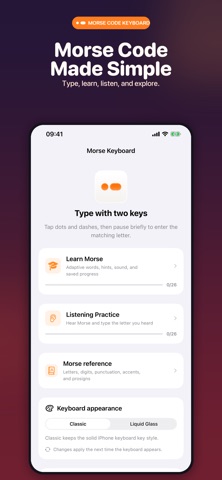


Description by OCUTECH, LLC Written by the developer, not by AppBrain. Click to read.
Morse Keyboard turns dot-and-dash sequences into letters, numbers, punctuation, accents, and prosigns. Tap DOT and DASH, pause briefly, and the matching character appears in messages, notes, search fields, and other apps that support custom keyboards.
TYPE WITH MORSE
• Two large keys for fast, focused input
• Automatic Morse code decoding
• Shift, space, delete, and return controls
• Classic and Liquid Glass keyboard styles
• Optional haptic feedback
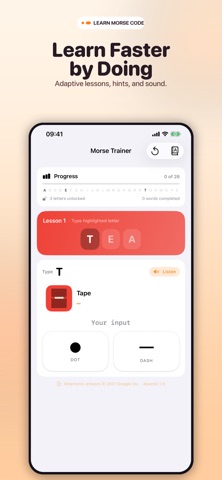
LEARN MORSE CODE
• Adaptive lessons that introduce letters gradually
• Mnemonic illustrations, hints, and audio playback
• Saved progress and letter mastery tracking
• Word practice as your skills grow
TRAIN YOUR EAR
• Listen to Morse and identify each letter
• Replay audio or reveal a hint when needed
• Perfect the alphabet to unlock word listening
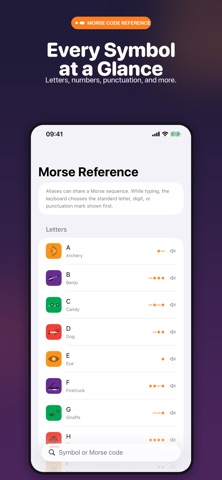
REFERENCE EVERYTHING
Browse and search letters, digits, punctuation, accented characters, and prosigns. View each Morse pattern, hear it aloud, and learn with memorable visual associations.
PRIVATE BY DESIGN
No accounts, tracking, or collected data. Learning progress stays on your device. Full Access is optional and enables keyboard haptics; without it, the keyboard uses the standard key click.
Whether you are learning the Morse alphabet, practicing CW, exploring ham radio, or simply want a different way to type, Morse Keyboard puts the code at your fingertips.