

MP3 Converter: Audio Extractor
MP3 Converter: Audio Extractor is made and published by 成威 占. AppBrain is an independent app data site and isn't affiliated with 成威 占. The app name, icon, screenshots and description belong to 成威 占 and are shown as published on the App Store.
AppBrain's verdict
- Rating on App Store
- 5.00
- 3 ratings
- Last updated
- October 15, 2026
It doesn't have enough ratings yet to judge what users think.
Rankings
App Store top chartsApp Store Rankings for MP3 Converter: Audio Extractor
Competitors
Similar apps and more from 成威 占Alternatives to MP3 Converter: Audio Extractor


More from 成威 占

Releases
Updates seen on the App Store- Version
- 1.1.0
- Launched
- February 2026
No changelog data
User feedback
Ratings and reviews on the App StoreComments on MP3 Converter: Audio Extractor for iOS
We don't have enough comments to show example comments. Please check back later.
Technology
Found in the app by AppBrain- Price
- Free
- App size
- 160.9 MB
- Content rating
- Everyone
Technologies used by MP3 Converter: Audio Extractor
About the app and developer
About MP3 Converter: Audio Extractor
MP3 Converter: Audio Extractor is a music app developed by 成威 占.
User Ratings
MP3 Converter: Audio Extractor is rated 5.00 out of 5 stars. The rating is based on 3 ratings.
App Information
MP3 Converter: Audio Extractor is freely available from the App Store. The app size is 160.86 MB. The latest version available is 1.1.0. The last update was on October 15, 2026.
Technical Requirements
The app has a content rating of Everyone. The app has been available on the App Store since February 2026.
Developer information for 成威 占
Address:
Frequently asked questions about MP3 Converter: Audio Extractor
Is MP3 Converter: Audio Extractor free?
Yes. MP3 Converter: Audio Extractor is free on the App Store.
Is MP3 Converter: Audio Extractor still available?
Yes. MP3 Converter: Audio Extractor is on the App Store, and the last update we saw was on October 15, 2026.
How large is MP3 Converter: Audio Extractor?
MP3 Converter: Audio Extractor is 160.86 MB.
Is MP3 Converter: Audio Extractor suitable for children?
App Store rates the content of MP3 Converter: Audio Extractor as suitable for everyone.
How do people rate MP3 Converter: Audio Extractor?
MP3 Converter: Audio Extractor scores 5.00 out of 5 stars, from 3 ratings on the App Store.
Who made MP3 Converter: Audio Extractor?
MP3 Converter: Audio Extractor was developed by 成威 占. It is listed in the music category on the App Store.
What are the best alternatives to MP3 Converter: Audio Extractor?
People looking at MP3 Converter: Audio Extractor also look at these music apps: Noise Reducer AI - Shhh!, Noise Reducer & Audio Cleaner, Groovy – Local Music Player, Audio Editor & Music,Mp3, AI MIDI Maker.
Store listing
By 成威 占, from the App Store


Description by 成威 占 Written by the developer, not by AppBrain. Click to read.
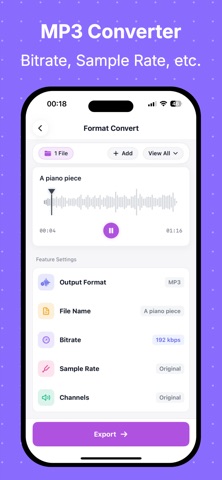
MP3 Converter: Audio Extractor streamlines the full workflow from import to edit to export. After selecting a file, you can trim, merge, change speed, adjust pitch, reduce noise, and export in just a few steps. Great for content creation, recording cleanup, and audio asset processing.
Key Features
- Video to Audio: Quickly extract audio tracks from video and export to common audio formats.
- Audio Format Conversion: Convert between popular formats for different upload platforms.
- Audio Trimming: Precisely cut clips and keep only the parts you need.
- Audio Merging: Combine multiple files into one track for narrations or compilations.
- Audio Enhancement: Volume, EQ, speed, pitch, fade in, and fade out.
- Smart Processing: Noise reduction and voice-related processing to improve usability.
- Flexible Import Options: Local files, Photos, recording, Wi-Fi transfer, and more.
Why Choose Us
- Clear workflow: Fewer steps from file selection to export.
- Local-first: Core editing is processed on device.
- Better control: Adjust key export settings before saving for quality and file size balance.
- Broad use cases: Short videos, podcasts, course recordings, and meeting audio.
Who It's For
- Content creators: Short videos, podcasts, voice-over, and BGM asset editing.
- Students and teachers: Lecture recording edits, key segment extraction, assignment audio export.
- Professionals: Meeting recording cleanup, training audio extraction, and archiving.
- Social media and operations teams: Multi-platform format adaptation and secondary audio editing.
- Music and audio enthusiasts: Daily trimming, merging, speed/pitch adjustment, and effects.
- Everyday users: Video audio extraction and personal audio management.
Subscription Information
- Some advanced features (such as batch processing, selected advanced parameters, or premium audio capabilities) require a VIP subscription.
- Subscriptions auto-renew, and payment is charged to your Apple ID account upon purchase confirmation.
- Unless auto-renew is turned off at least 24 hours before the end of the current period, the subscription will renew automatically.
- Renewal charges are applied within 24 hours before the current period ends.
- You can manage or cancel subscriptions in iPhone Settings > Apple ID > Subscriptions.
- Pricing, billing cycles, and trial availability are shown on the in-app purchase page.
If you're looking for an all-in-one tool for video to audio + audio editing + MP3 conversion, MP3 Converter: Audio Extractor helps you finish every audio task faster.
Privacy Policy:
https://honeysuckle-chili-8e1.notion.site/Privacy-Policy-for-MP3-Converter-Audio-Extractor-2f483e0d4e028021a8a2eed10ea17727?pvs=74
EULA:
https://www.apple.com/legal/internet-services/itunes/dev/stdeula/