






AppBrain's verdict
- Last updated
- October 6, 2026
- Size
- 31.5 MB
User feedback
Ratings and reviews on the App StoreComments on mrkdwn — Markdown Notes Editor for iOS
We don't have enough comments to show example comments. Please check back later.
Store listing
By BuenaGames LLC, from the App StoreDescription by BuenaGames LLC Written by the developer, not by AppBrain. Click to read.
Other note apps ask you to trust a database. This one writes plain text to disk, where Finder, git, grep and any editor you ever switch to can already read it.
No account. No subscription. No analytics — mrkdwn collects nothing and sends nothing.
NOTES THAT STAY YOURS
• Every note is a plain .md file in a folder you picked, not a row in our database
• Edit one in another app and mrkdwn picks up the change
• The same files open in any other editor, today or in ten years
• Lock a note and it is encrypted on disk until you unlock it
• iCloud sync merges three ways and marks conflicts, instead of overwriting the older copy
• Version history keeps 30 days or 100 versions per note, with word-level diffs and a restore that leaves the current draft intact
• Deleted notes go to a trash you can recover from
NOTES THAT FIND EACH OTHER
• Wiki-style [[links]] resolve as you type
• A backlinks panel shows every note pointing at this one
• The knowledge graph draws the whole library, filtered by tag or search
• Tag a note, then open the tag to read everything filed under it
• Quick Open fuzzy-finds any note in a keystroke
• Link autocomplete the moment you type [[
• Daily notes arrive dated, every day you write
MARKDOWN THAT RENDERS PROPERLY
• CommonMark and GitHub Flavored Markdown, with footnotes and callouts
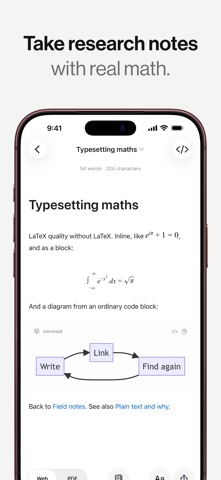
• LaTeX math, inline and block, rendered offline
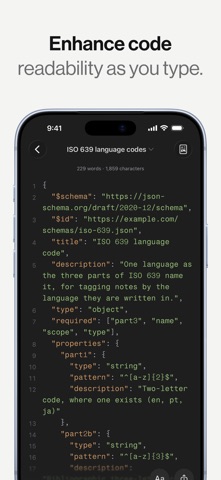
• Syntax highlighting for more than 180 languages
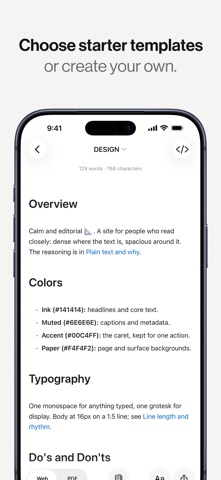
• Six built-in themes, and you can make your own
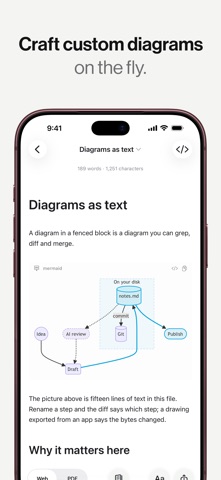
• Mermaid, Graphviz and Markmap diagrams from ordinary code blocks
A SURFACE BUILT FOR DRAFTING
• Focus mode fades every paragraph except the one you are writing
• Read as editor only, preview only, or both side by side
• Typewriter scrolling holds your line in the middle of the screen
• Live counts for words, characters, sentences and reading time
• Put the command bar in the order you actually work in
• Give a folder an icon, a color, and a place at the top of the list
• Writing goals track a daily word target and your streak
• Authorship marks which passages you typed and which you pasted
• Apple's Writing Tools work in the editor, where your device offers them
NOTES THAT COME TO YOU
• Ask Siri for today's note; find, append and read notes from Shortcuts
• Paste a URL and the article comes back as markdown
• Clip a page straight from Safari (Mac)
• Import from 19 formats, including PDF, PowerPoint, Excel and text read out of images
SEE THE SHAPE OF A SENTENCE
• Color nouns, verbs, adjectives, adverbs and conjunctions as you type
• Style checks flag filler, hedging, repetition and passive voice
• Nothing is corrected for you — a flag is information, not an instruction
• Every highlight stays off until you switch it on
LEAVE WHENEVER YOU LIKE
• Export to PDF, EPUB, HTML, RTF, plain text and markdown
• Word and OpenDocument export, and Word import (Mac)
• Everything works offline, apart from fetching a web page you paste
• Or copy the folder and go — the notes were never ours
Native on Mac, iPad and iPhone, from one Swift core rather than a web page in a window.
A knowledge base you own, for students, teachers, authors, and anyone who would rather keep their thinking in plain files than rent a notes app.
Questions? www.buenalabs.io/support
Safety and technology
Found in the app by AppBrain- Price
- Free
- App size
- 31.5 MB
- Content rating
- Everyone
Technologies used by mrkdwn — Markdown Notes Editor
Releases
Updates seen on the App Store- Version
- 1.5.2
- Launched
- October 2026
No changelog data
Alternatives
Similar apps and more from BuenaGames LLCAlternatives to mrkdwn — Markdown Notes Editor


Rankings
App Store top chartsApp Store Rankings for mrkdwn — Markdown Notes Editor
About the app and developer
About mrkdwn — Markdown Notes Editor
mrkdwn — Markdown Notes Editor is a productivity app developed by BuenaGames LLC.
What is the rating of mrkdwn — Markdown Notes Editor?
mrkdwn — Markdown Notes Editor has no ratings yet.
Is mrkdwn — Markdown Notes Editor free?
mrkdwn — Markdown Notes Editor is free. The app size is 31.51 MB. The latest version available is 1.5.2. The last update was on October 6, 2026.
What are the requirements for mrkdwn — Markdown Notes Editor?
The app has a content rating of Everyone. The app has been available on the App Store since October 2026.
mrkdwn — Markdown Notes Editor is made and published by BuenaGames LLC. AppBrain is an independent app data site and isn't affiliated with BuenaGames LLC. The app name, icon, screenshots and description belong to BuenaGames LLC and are shown as published on the App Store.
Developer information for BuenaGames LLC
Address:
Frequently asked questions about mrkdwn — Markdown Notes Editor
Is mrkdwn — Markdown Notes Editor free?
Yes. mrkdwn — Markdown Notes Editor is free on the App Store.
Is mrkdwn — Markdown Notes Editor still available?
Yes. mrkdwn — Markdown Notes Editor is on the App Store, and the last update we saw was on October 6, 2026.
How large is mrkdwn — Markdown Notes Editor?
mrkdwn — Markdown Notes Editor is 31.51 MB.
Is mrkdwn — Markdown Notes Editor suitable for children?
App Store rates the content of mrkdwn — Markdown Notes Editor as suitable for everyone.
Who made mrkdwn — Markdown Notes Editor?
mrkdwn — Markdown Notes Editor was developed by BuenaGames LLC. It is listed in the productivity category on the App Store.
What are the best alternatives to mrkdwn — Markdown Notes Editor?
People looking at mrkdwn — Markdown Notes Editor also look at these productivity apps: Wikilayer: Second Brain, Rinne by yalkey, NewPractice, Notera - Notes & Todos, reDeck: Markdown Slides.