

Levity Markdown Notes
Levity Markdown Notes is made and published by S Tan. AppBrain is an independent app data site and isn't affiliated with S Tan. The app name, icon, screenshots and description belong to S Tan and are shown as published on the App Store.
AppBrain's verdict
- Last updated
- August 18, 2026
Rankings
App Store top chartsApp Store Rankings for Levity Markdown Notes
Competitors
Similar apps and more from S TanAlternatives to Levity Markdown Notes


More from S Tan


Releases
Updates seen on the App Store- Version
- 1.0
- Launched
- August 2026
No changelog data
User feedback
Ratings and reviews on the App StoreComments on Levity Markdown Notes for iOS
We don't have enough comments to show example comments. Please check back later.
Technology
Found in the app by AppBrain- Price
- Free
- App size
- 5.06 MB
- Content rating
- Everyone
Technologies used by Levity Markdown Notes
About the app and developer
About Levity Markdown Notes
Levity Markdown Notes is a productivity app developed by S Tan.
User Ratings
The app has no ratings yet.
App Information
Levity Markdown Notes is freely available from the App Store. The app size is 5.06 MB. The latest version available is 1.0. The last update was on August 18, 2026.
Technical Requirements
The app has a content rating of Everyone. The app has been available on the App Store since August 2026.
Developer information for S Tan
Address:
Frequently asked questions about Levity Markdown Notes
Is Levity Markdown Notes free?
Yes. Levity Markdown Notes is free on the App Store.
Is Levity Markdown Notes still available?
Yes. Levity Markdown Notes is on the App Store, and the last update we saw was on August 18, 2026.
How large is Levity Markdown Notes?
Levity Markdown Notes is 5.06 MB.
Is Levity Markdown Notes suitable for children?
App Store rates the content of Levity Markdown Notes as suitable for everyone.
Who made Levity Markdown Notes?
Levity Markdown Notes was developed by S Tan. It is listed in the productivity category on the App Store.
What are the best alternatives to Levity Markdown Notes?
People looking at Levity Markdown Notes also look at these productivity apps: Metis: Markdown Notes, MDReader: Markdown Editor, BeFree: Voice to Tasks & Lists, Nodus - Zettelkasten, MemX: AI Memory Agent.
Store listing
By S Tan, from the App Store



Description by S Tan Written by the developer, not by AppBrain. Click to read.
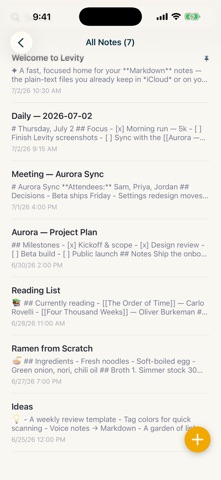
Built for speed on your phone and read-compatible with Obsidian vaults. Levity opens, scrolls, and searches instantly, even in a large vault. It's tuned for mobile from the first line of code. If you already keep an Obsidian vault, Levity reads it as-is: the same files, the same folders, the same frontmatter.
Your notes are just text files. They live in your own iCloud Drive or on your device, sync through your own Apple account, and open in any other editor.
A live, clean editor:
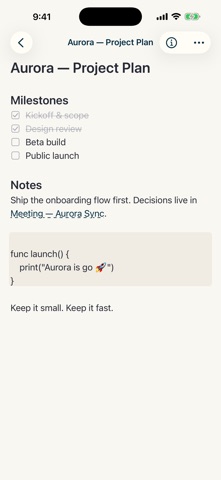
• Formatting appears as you type. The raw Markdown symbols stay out of your way, while your files stay pure Markdown on disk
• Headings, bold, italic, task lists, checkboxes, blockquotes, code blocks, and tables you can edit cell by cell
• [[Wiki-links]] between notes, with autocomplete
• Inline images
• A formatting bar, so you never have to hunt for a raw symbol
Organize without a database:
• Tag your notes and filter by tag
• YAML frontmatter — add any property you like (status, type, dates, lists) and build filtered views around it
• Folders, templates, archive, and trash
• Full-text search across every note, instantly
Made yours:
• Seven themes, plus an automatic day / night mode that follows your surroundings
• Adjustable font, size, and spacing
• Designed for both iPhone and iPad
Levity is focused and supports text, tags, and links; no graph view or plugins, just the fastest way to write and read Markdown on iOS, on top of files you already own.
Free to start. One optional yearly subscription unlocks unlimited note creation and editing; reading your notes is never limited.
Your privacy, by design: your notes stay in your own iCloud or device storage.
Levity Premium is an auto-renewing subscription billed yearly. Payment is charged to your Apple Account at confirmation of purchase. The subscription renews automatically unless it is canceled at least 24 hours before the end of the current period. Manage or cancel anytime in your Apple Account settings.
Terms of Use: https://www.apple.com/legal/internet-services/itunes/dev/stdeula/