

mSecure: Password Manager
mSecure: Password Manager is made and published by mSeven Software, LLC. AppBrain is an independent app data site and isn't affiliated with mSeven Software, LLC. The app name, icon, screenshots and description belong to mSeven Software, LLC and are shown as published on the App Store.
AppBrain's verdict
EstablishedLoved by users- Best rank
- #76
- Top Grossing, Finland
- Rating on App Store
- 4.82
- 51,368 ratings
- Last updated
- August 13, 2026
Users love it: 4.8 stars from 51,368 ratings. Its best ranking is #76 in Top Grossing, Productivity in Finland.
Rankings
App Store top charts- Highest rank
- #76
- Chart
- Top Grossing
- Productivity
- Country
- Finland
App Store Rankings for mSecure: Password Manager
Top rankings
| Rank | Country | Category | List |
|---|---|---|---|
| 76 | Finland | Productivity | Top Grossing |
Ranking history in Finland
Competitors
Similar apps and more from mSeven Software, LLCAlternatives to mSecure: Password Manager




More from mSeven Software, LLC

Releases
Updates seen on the App Store- Version
- 7.0.2
- Launched
- May 2017
No changelog data
User feedback
Ratings and reviews on the App StoreComments on mSecure: Password Manager for iOS
We don't have enough comments to show example comments. Please check back later.
Technology
Found in the app by AppBrain- Price
- Free
- App size
- 128.1 MB
- Content rating
- High
Technologies used by mSecure: Password Manager
About the app and developer
About mSecure: Password Manager
mSecure: Password Manager is a productivity app developed by mSeven Software, LLC.
What is the rating of mSecure: Password Manager?
mSecure: Password Manager is rated 4.82 out of 5 stars, based on 51 thousand ratings.
Is mSecure: Password Manager free?
mSecure: Password Manager is free. The app size is 128.12 MB. The latest version available is 7.0.2. The last update was on August 13, 2026.
What are the requirements for mSecure: Password Manager?
The app has a content rating of High Maturity. The app has been available on the App Store since May 2017.
Developer information for mSeven Software, LLC
Address:
Frequently asked questions about mSecure: Password Manager
Is mSecure: Password Manager free?
Yes. mSecure: Password Manager is free on the App Store.
Is mSecure: Password Manager still available?
Yes. mSecure: Password Manager is on the App Store, and the last update we saw was on August 13, 2026.
How large is mSecure: Password Manager?
mSecure: Password Manager is 128.12 MB.
Is mSecure: Password Manager suitable for children?
App Store gives mSecure: Password Manager a high maturity rating. It is meant for adults.
How do people rate mSecure: Password Manager?
mSecure: Password Manager scores 4.82 out of 5 stars, from 51,368 ratings on the App Store.
Who made mSecure: Password Manager?
mSecure: Password Manager was developed by mSeven Software, LLC. It is listed in the productivity category on the App Store.
What are the best alternatives to mSecure: Password Manager?
People looking at mSecure: Password Manager also look at these productivity apps: Keeper Password Manager, Password Manager', iPassworder Password Manager, RoboForm Password Manager, SecureSafe Password Manager.
Store listing
By mSeven Software, LLC, from the App Store




Description by mSeven Software, LLC Written by the developer, not by AppBrain. Click to read.
WHAT'S NEW IN MSECURE 7
● Passkeys — sign in to passkey-enabled sites without a password.
● Built-in one-time passwords (OTP) — keep your 2FA codes alongside your logins, no separate authenticator app required.
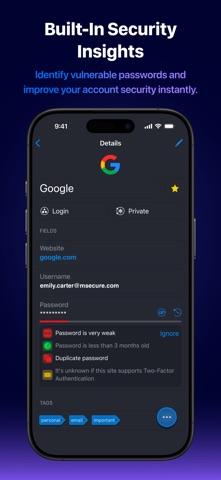
● Two-Factor Aware — see which of your logins support two-factor authentication, so you know where it's worth turning on.
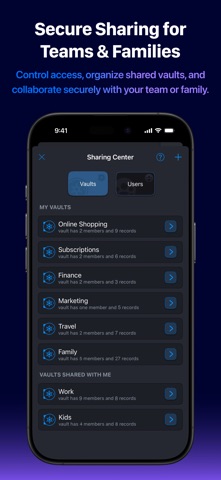
● Sharing Center — a unified place to manage vaults and shared records.
● Redesigned Record Details, Edit, and Recents views.
● Custom filters — save up to 5 views.
● Enhanced search with the search bar pinned to the top.
● Improved password generator and a refreshed light mode.
—————————————————
CHOOSE THE PLAN THAT FITS
Every tier is protected by the same AES-256 encryption and zero-knowledge architecture.
● Free — unlimited records, password generator, smart search and sorting, over 20 built-in templates, and AES-256 encryption with auto-lock.
● Essentials — adds AutoFill, cloud syncing (mSecure Cloud, Dropbox, iCloud, or Wi-Fi), Face ID and Touch ID unlock, passkeys, built-in one-time passwords, Two-Factor Aware, Security Center, custom templates, custom icons, file attachments, backup and CSV import, and Apple Watch support.
● Premium — adds the Sharing Center, custom filters, advanced field settings, multiple tags per record, and username selection.
● Family — every Premium feature for you plus 4 family members, with shared vaults and a Family Sharing Center for admins.
● Teams — 10 licenses so you and up to 9 colleagues are covered under one plan, with shared vaults, monthly add and remove of members, more licenses available at cost, and a separate Family plan included for the team admin.
—————————————————
SECURE — Protect your information with confidence
● AES-256 encryption, end to end, on every plan.
● Zero-knowledge architecture — your master password never leaves your device.
● Biometric unlock with Face ID or Touch ID.
● Auto-lock keeps your vault safe when you step away.
● Security Center surfaces weak, duplicate, and old passwords, and flags which accounts support two-factor authentication.
● Password generator with customizable length, symbols, and complexity.
SIMPLE — Add, find, and organize without friction
● iOS Password AutoFill in Safari and supported third-party apps.
● Over 20 built-in templates, plus full custom templates.
● Powerful search, smart sorting, tags, and custom filters.
● Redesigned Record Details and Edit views speed up data entry.
● Apple Watch support for quick lookups on the go.
SEAMLESS — Sync all of your devices seamlessly. Choose to sync via mSecure Cloud, Dropbox, iCloud, or Wi-Fi to access your records on all of your devices across multiple platforms. Keep your data safe and secure with mSecure.
—————————————————
SUPPORT
Questions or feedback? Visit support.msecure.com/support/discussions or email support@msevensoftware.com.
Terms of Use: https://www.apple.com/legal/internet-services/itunes/dev/stdeula/
Privacy Policy: https://redirect.msecure.com/ios/privacy