AppBrain
AppBrain
  • Apps
  • Apps being viewed right now Trending apps today Most popular apps All-time most installed apps Top rated apps iPhone and iPad apps
  • Intelligence ▾
    Intelligence overview → Track any Android app or your whole market
    Track & analyze
    Keyword Tracker & OptimizerTrack & improve Play rankings App Performance ReportOne-off PDF for any app StatisticsFree Android & Play market stats
    Promote your app
    Featured Apps App Links
  • Intelligence
  • Pricing
  • Dashboard
  • Sign up
  • Log in
App Store Apps > Utilities > Multicast - Screen Mirroring
Multicast - Screen Mirroring icon

Multicast - Screen Mirroring

by 正福 邹 · Utilities · Free
On the App Store since December 2025 · Data updated 2026-10-31

Multicast - Screen Mirroring is made and published by 正福 邹. AppBrain is an independent app data site and isn't affiliated with 正福 邹. The app name, icon, screenshots and description belong to 正福 邹 and are shown as published on the App Store.

AppBrain's verdict

Rating on App Store
4.00
3 ratings
Last updated
September 2, 2026
Size
49.4 MB

It doesn't have enough ratings yet to judge what users think.

Official page on the App Store

User feedback

Ratings and reviews on the App Store

Comments on Multicast - Screen Mirroring for iOS

We don't have enough comments to show example comments. Please check back later.

Store listing

By 正福 邹, from the App Store
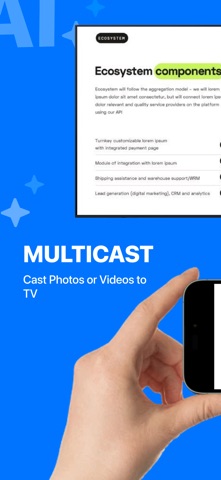
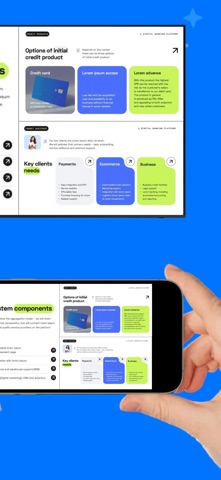
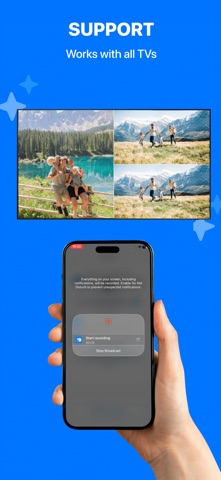
Multicast - Screen Mirroring Screenshot 1 of 6
Multicast - Screen Mirroring Screenshot 2 of 6
Multicast - Screen Mirroring Screenshot 3 of 6
Multicast - Screen Mirroring Screenshot 4 of 6
Multicast - Screen Mirroring Screenshot 5 of 6
Multicast - Screen Mirroring Screenshot 6 of 6
Screenshots by 正福 邹, from the the App Store listing
Description by 正福 邹 Written by the developer, not by AppBrain. Click to read.
This is a professional split-screen casting app that allows you to cast multiple photos or videos to your TV simultaneously, displaying them in side-by-side or grid layouts for a richer visual experience. Whether for teaching presentations, team collaboration, showroom displays, or home entertainment, it easily meets multi-content viewing needs.

FEATURES
Split-Screen Casting
- Cast multiple photos or videos to your TV at the same time, with automatic side-by-side or grid layout rendering.

Multiple Modes
- Supports one-to-one casting, one-to-many casting, and other modes to adapt to different usage scenarios.

No Delay
- Uses an optimized, stable transmission scheme to ensure smooth and synchronized playback.

Compatibility
- Supports AirPlay and DLNA casting protocols, enabling connection with most smart TVs on the market.

Support
- Thoroughly tested and optimized for many mainstream TV brands and models.

USE CASES
Education & Training
- Teachers can cast multiple photos, videos, and materials side by side for comparison and interactive teaching.

Meetings & Collaboration
- Allows multiple presenters to cast their content simultaneously, enabling clearer discussion and improved communication efficiency.

Showroom & Retail Displays
- Perfect for exhibitions and retail spaces to present ads, product demos, and social content in parallel, increasing information density.

Home Entertainment
- Can be used as a “TV photo wall,” displaying multiple photos or videos at once—ideal for family gatherings or showcasing travel albums in a lively, engaging way.

TIPS FOR USE
- Make sure your phone and TV are connected to the same Wi-Fi network.
- For a more stable casting experience, consider disabling VPN or proxy services.

COMPATIBILITY
We have conducted extensive testing on many popular TV devices and continue to optimize compatibility across more models. Due to differences in TV brands, systems, and firmware, casting experiences may vary. If you encounter any issues, feel free to contact us—we are committed to continuous improvement.
Official page on the App Store

Safety and technology

Found in the app by AppBrain
Price
Free
App size
49.4 MB
Content rating
Everyone

Technologies used by Multicast - Screen Mirroring

Releases

Updates seen on the App Store
Version
1.1.0
Launched
December 2025

No changelog data

Alternatives

Similar apps and more from 正福 邹

Alternatives to Multicast - Screen Mirroring

Screen Mirroring | Cast to TV+ icon Screen Mirroring | Cast to TV+
Turbofast VPN Free Unlimited Super Internet Apps
3.9
Free
21 ratings
Screen Mirroring・Smart TV Cast icon Screen Mirroring・Smart TV Cast
Poster App LLP
4.1
Free
595 ratings
Cast to TV & Screen Mirror icon Cast to TV & Screen Mirror
Matan Yamin
4.3
Free
15 ratings
Screen Mirroring+ ™ icon Screen Mirroring+ ™
怡君 林
4.0
Free
3 ratings
Mirroring for Chromecast CastX icon Mirroring for Chromecast CastX
Yash Mandhyan
4.0
Free
10 ratings
Screen Mirroring・Cast to TV + icon Screen Mirroring・Cast to TV +
BonDevPro
3.8
Free
8 ratings
Screen Mirroring : Miracast icon Screen Mirroring : Miracast
Vishal Sorathiya
4.6
Free
262 ratings

More from 正福 邹

Mp3tag - Music Tag Editor icon Mp3tag - Music Tag Editor
正福 邹
4.0
Free
24 ratings
Screen Recorder - RecGen icon Screen Recorder - RecGen
正福 邹
3.8
Free
17 ratings
Live Wallpaper Maker Engine - icon Live Wallpaper Maker Engine -
正福 邹
5.0
Free
6 ratings
حاسبة بلوت - قيد بلوت icon حاسبة بلوت - قيد بلوت
正福 邹
5.0
Free
1 ratings

Rankings

App Store top charts

App Store Rankings for Multicast - Screen Mirroring

This app is not ranked

About the app and developer

About Multicast - Screen Mirroring

Multicast - Screen Mirroring is an utilities app developed by 正福 邹.

User Ratings

Multicast - Screen Mirroring is rated 4.00 out of 5 stars. The rating is based on 3 ratings.

App Information

Multicast - Screen Mirroring is freely available from the App Store. The app size is 49.43 MB. The latest version available is 1.1.0. The last update was on September 2, 2026.

Technical Requirements

The app has a content rating of Everyone. The app has been available on the App Store since December 2025.

Developer information for 正福 邹

正福 邹

Address:

Share Multicast - Screen Mirroring

Top new apps Price drops on Google Play Popular Utilities Apps Apps other people are watching Today's trending apps
Screen Mirroring | Cast to TV+ icon Screen Mirroring | Cast to TV+
Screen Mirroring・Smart TV Cast icon Screen Mirroring・Smart TV Cast
Cast to TV & Screen Mirror icon Cast to TV & Screen Mirror
Screen Mirroring+ ™ icon Screen Mirroring+ ™
Mirroring for Chromecast CastX icon Mirroring for Chromecast CastX
Screen Mirroring・Cast to TV + icon Screen Mirroring・Cast to TV +
Screen Mirroring : Miracast icon Screen Mirroring : Miracast
Overview Alternatives Reviews Rankings Technology
AppBrain Intelligence premium content

Subscribe now to get full and unlimited access to AppBrain Intelligence. You'll have access to:

  • App Intelligence dashboard (performance timeline, competitor comparison, country rankings, insight cards)
  • Detailed ranking data per app
  • Full timeline per developer
  • Device market shares data per country
  • Unlimited keyword tracking
1 Month

$75/mo
(billed every month)

SAVE 0%
Subscribe
3 Months

$65/mo
($195 billed every 3 months)

SAVE 13%
Subscribe
1 Year

$57.50/mo
($690 billed every year)

SAVE 23%
Subscribe
Each subscription will automatically renew 3 days before the expiration date for the same time period. Subscriptions can be cancelled at any time before the renewal.

AppBrain is an app data site, we track rankings, ratings, installs for all apps and games on Google Play and the App Store. AppBrain doesn't host app files or APKs, all install links go directly to the official store. All trademarks are owned by their respective owners.

More apps

  • Top Android apps being viewed
  • Remontada 90: Soccer Puzzle
  • Tile Bloom: Triple Match Game
  • DramaShorts:MiniSeries

App statistics

  • Android statistics
  • Google Play Developer stats
  • Trending Android Apps
  • Trending iOS apps
  • Top popular Apps
  • Buy the best Android phone
  • Buy & sell app businesses

About AppBrain

  • Contact
  • Privacy
  • Documentation
  • DMCA takedowns
  • Blog
  • Top Free Games Apps for your iPhone or iPad
© 2010-2026 - AppBrain