




AppBrain's verdict
- Last updated
- November 16, 2026
- Size
- 253.7 MB
User feedback
Ratings and reviews on the App StoreComments on MultiEdit: Batch Photo Editor for iOS
We don't have enough comments to show example comments. Please check back later.
Store listing
By SK Corp., from the App StoreDescription by SK Corp. Written by the developer, not by AppBrain. Click to read.
EDIT FROM THE PHOTOS SHARE MENU
Select photos in Photos, tap Share and choose MultiEdit to start editing. Import multiple photos, including transparent PNG images.
EDIT TOGETHER, REFINE INDIVIDUALLY
Adjust brightness, contrast, saturation, color temperature and more. Apply the same adjustments to multiple photos, then switch to individual editing for the finishing touches. Compare your edits with the original.
RESIZE & SAVE AS JPEG OR PNG
Export at 10%–200% of the original dimensions and check each photo’s output pixel size. Choose JPEG or PNG; transparent results automatically select PNG. Save all photos or choose several favorites, to Photos or Files.
MAGIC TOOLS FOR YOUR PHOTOS
• Background Removal: cut out subjects across selected photos, keep the background transparent or choose a color, and refine edges with an eraser.
• Watermarks: add text or your logo to multiple photos. Adjust font, color, size, angle, opacity, repetition and grid lines.
• Face Stickers: cover detected faces with emoji and adjust size, angle and position.
• Face Blur: blur faces with adjustable strength, coverage and soft edges. Adjust all photos, one photo or one face.
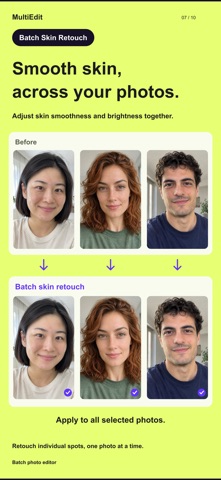
• Skin Retouch: adjust skin smoothness and brightness across selected photos, and retouch individual blemishes.
• Background Blur: soften the background while keeping the subject clear.
• Magic Eraser: brush over unwanted objects, zoom in for detail, and undo changes.
• Batch Crop: choose an aspect ratio and refine the framing of each photo.
• Match With Reference: use a reference image to guide color and light adjustments across selected photos.
• Borders & Polaroid: add margins, choose design frames and background colors, adjust inner shadows, and move or resize photos in the preview.
FILTERS, FILM & CREATIVE EDITING
Choose from 12 retro film looks and adjust grain, motion blur and fade. Add filters, blur or mosaic. Place multiple text elements with different fonts, paint with adjustable brushes, or layer photos into a collage. Transparent collage images keep their transparency.
SAVE PROJECTS & CONTINUE LATER
Keep photos and edits together in up to 5 projects for free, or 50 with Pro. Restore interrupted edits from the separate backup space.
Photo processing takes place on your device.
MULTIEDIT PRO
Magic includes 1 free use per day, resetting at local midnight. Each batch counts as one use, including background removal for up to 50 photos.
Pro removes ads and Magic usage limits, and supports 50 saved projects. Monthly and annual plans are available. Only eligible new annual subscribers receive a 3-day free trial; monthly billing starts immediately. See the purchase screen for local pricing and eligibility.
Subscriptions renew automatically unless canceled at least 24 hours before renewal. Manage or cancel in your App Store account settings. Previous lifetime ad-removal purchases remain valid.
Official guide: https://skcp.net/en/guides/multiedit/
Terms of Use: https://www.apple.com/legal/internet-services/itunes/dev/stdeula/
Privacy Policy: https://skcp.net/privacy
Safety and technology
Found in the app by AppBrain- Price
- Free
- App size
- 253.7 MB
- Content rating
- Everyone
Technologies used by MultiEdit: Batch Photo Editor
Releases
Updates seen on the App Store- Version
- 1.1.12
- Launched
- September 2026
No changelog data
Alternatives
Similar apps and more from SK Corp.Alternatives to MultiEdit: Batch Photo Editor


Rankings
App Store top chartsApp Store Rankings for MultiEdit: Batch Photo Editor
About the app and developer
About MultiEdit: Batch Photo Editor
MultiEdit: Batch Photo Editor is a photo & video app developed by SK Corp.
User Ratings
The app has no ratings yet.
App Information
MultiEdit: Batch Photo Editor is freely available from the App Store. The app size is 253.69 MB. The latest version available is 1.1.12. The last update was on November 16, 2026.
Technical Requirements
The app has a content rating of Everyone. The app has been available on the App Store since September 2026.
MultiEdit: Batch Photo Editor is made and published by SK Corp. AppBrain is an independent app data site and isn't affiliated with SK Corp. The app name, icon, screenshots and description belong to SK Corp. and are shown as published on the App Store.
Developer information for SK Corp.
Address: