
Music Spectrograph
Music Spectrograph is made and published by HotPaw Productions. AppBrain is an independent app data site and isn't affiliated with HotPaw Productions. The app name, icon, screenshots and description belong to HotPaw Productions and are shown as published on the App Store.
AppBrain's verdict
Established- Rating on App Store
- 2.50
- 4 ratings
- Last updated
- October 5, 2023
It doesn't have enough ratings yet to judge what users think.
Rankings
App Store top chartsApp Store Rankings for Music Spectrograph
Competitors
Similar apps and more from HotPaw ProductionsAlternatives to Music Spectrograph






More from HotPaw Productions





Releases
Updates seen on the App Store- Version
- 1.9.5
- Launched
- April 2011
No changelog data
User feedback
Ratings and reviews on the App StoreComments on Music Spectrograph for iOS
We don't have enough comments to show example comments. Please check back later.
Technology
Found in the app by AppBrain- Price
- $9.99
- App size
- 1.21 MB
- Content rating
- Everyone
Technologies used by Music Spectrograph
About the app and developer
About Music Spectrograph
Music Spectrograph is a music app developed by HotPaw Productions.
What is the rating of Music Spectrograph?
Music Spectrograph is rated 2.50 out of 5 stars, based on 4 ratings.
Is Music Spectrograph free?
Music Spectrograph costs $9.99. The app size is 1.21 MB. The latest version available is 1.9.5. The last update was on October 5, 2023.
What are the requirements for Music Spectrograph?
The app has a content rating of Everyone. The app has been available on the App Store since April 2011.
Developer information for HotPaw Productions
Address:
Frequently asked questions about Music Spectrograph
Is Music Spectrograph free?
No. Music Spectrograph costs $9.99 on the App Store.
Is Music Spectrograph still available?
Yes. Music Spectrograph is on the App Store, and the last update we saw was on October 5, 2023.
How large is Music Spectrograph?
Music Spectrograph is 1.21 MB.
Is Music Spectrograph suitable for children?
App Store rates the content of Music Spectrograph as suitable for everyone.
How do people rate Music Spectrograph?
Music Spectrograph scores 2.50 out of 5 stars, from 4 ratings on the App Store.
Who made Music Spectrograph?
Music Spectrograph was developed by HotPaw Productions. It is listed in the music category on the App Store.
What are the best alternatives to Music Spectrograph?
People looking at Music Spectrograph also look at these music apps: Soniq Viewer, Music Player One, Forte SE Sound Editor, Tritone Jazz, Drums Transcriber.
Store listing
By HotPaw Productions, from the App Store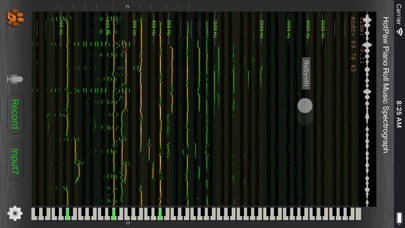


Description by HotPaw Productions Written by the developer, not by AppBrain. Click to read.
Music Spectrograph is being using in college music programs to aid in learning music transcription.
The Hotpaw Music Spectrograph presents a high-resolution scrolling spectrogram as you listen, so that you can see these patterns in sound and music, as well as how sound corresponds to notes on a piano keyboard. This piano alignment makes it far easier to spot which frequencies in sounds correspond to which musical notes.
Features include:
- 12th-octave MIDI-pitch-centered spectrograph (also called a sonogram)
- Usable with live audio, tunes from your iOS device's music library, or a file downloaded via a URL (web address)
- Records up to a 4 minute spectrograph history you can stop, scroll back and review
- Slow Down music files by up to 8X, or speed music up by 3X to skip sections faster
- Stop music in time, and still hear the music frequencies present via re-synthesis (scroll back a little in time to bring up the ReSynth switch).
- Play tunes in mono, left or right channel only, or with center-panned vocals reduced
- Color the pitch graph to see if notes are in-tune or out-of-tune
- Color the spectrograph for loudness, or graph in black-and-white or with Pastel colors
- Mid-pitch filtering to remove some of the higher overtones
Use the Input? button to select a tune from your library (DRM protected iTunes files not supported). Use the Gear button to select among several viewing modes. There's a volume control to manually set the sensitivity threshold. Stop playing or recording to scroll back and review or resynthesize sound. Touch the keyboard during resynthesis to isolate one note.
For many musical sounds, this app will show you many overtones and harmonics, not just the fundamental pitch of notes. Some musical experience is required to tell musical notes from their overtones and harmonic frequencies.