

My Files: File Manager & Saver
My Files: File Manager & Saver is made and published by ZENBYTE DIJITAL TEKNOLOJILER LIMITED SIRKETI. AppBrain is an independent app data site and isn't affiliated with ZENBYTE DIJITAL TEKNOLOJILER LIMITED SIRKETI. The app name, icon, screenshots and description belong to ZENBYTE DIJITAL TEKNOLOJILER LIMITED SIRKETI and are shown as published on the App Store.
AppBrain's verdict
- Last updated
- October 12, 2026
Rankings
App Store top chartsApp Store Rankings for My Files: File Manager & Saver
Competitors
Similar apps and more from ZENBYTE DIJITAL TEKNOLOJILER LIMITED SIRKETIAlternatives to My Files: File Manager & Saver


Releases
Updates seen on the App Store- Version
- 1.4.6
- Launched
- March 2026
No changelog data
User feedback
Ratings and reviews on the App StoreComments on My Files: File Manager & Saver for iOS
We don't have enough comments to show example comments. Please check back later.
Technology
Found in the app by AppBrain- Price
- Free
- App size
- 26.9 MB
- Content rating
- Everyone
Technologies used by My Files: File Manager & Saver
About the app and developer
About My Files: File Manager & Saver
My Files: File Manager & Saver is an utilities app developed by ZENBYTE DIJITAL TEKNOLOJILER LIMITED SIRKETI.
What is the rating of My Files: File Manager & Saver?
My Files: File Manager & Saver has no ratings yet.
Is My Files: File Manager & Saver free?
My Files: File Manager & Saver is free. The app size is 26.93 MB. The latest version available is 1.4.6. The last update was on October 12, 2026.
What are the requirements for My Files: File Manager & Saver?
The app has a content rating of Everyone. The app has been available on the App Store since March 2026.
Developer information for ZENBYTE DIJITAL TEKNOLOJILER LIMITED SIRKETI
Store listing
By ZENBYTE DIJITAL TEKNOLOJILER LIMITED SIRKETI, from the App Store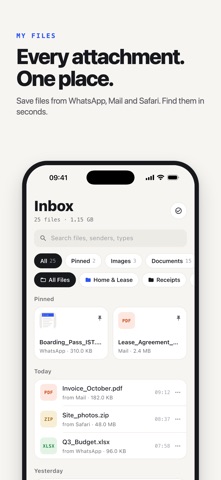


Description by ZENBYTE DIJITAL TEKNOLOJILER LIMITED SIRKETI Written by the developer, not by AppBrain. Click to read.
My Files collects the files you receive across your apps and keeps them in one place: sorted, searchable and on your iPhone. No account, no sign-up, works offline.
HOW IT WORKS
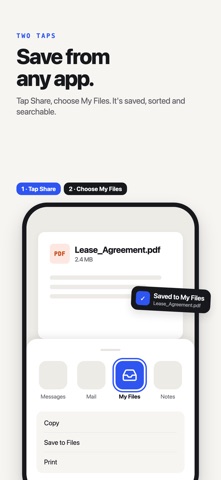
1. Open a file or attachment in any app
2. Tap the Share button
3. Choose "My Files"
That's it. Your file is saved to your inbox.
SAVE FILES FROM ANY APP
- WhatsApp photos, videos and documents
- Mail attachments: PDFs, spreadsheets, images
- Safari downloads and web files
- Files app, Telegram and more
- Save up to 10 files in one share
- Duplicate files are detected automatically
FIND ANY FILE IN SECONDS
- Files grouped by Today, Yesterday and Earlier
- Filter by type: PDF, images, documents, videos, audio
- Instant search by file name (Pro)
- Pin important files to the top (Pro)
ORGANIZE YOUR WAY
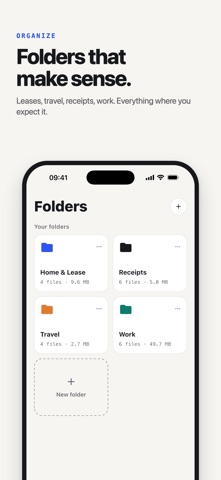
- Create custom folders (Pro)
- Move files between folders in one tap
- Batch select to move, share or delete several files at once (Pro)
SMART STORAGE TOOLS
- Storage tab: see what takes up space, by category
- Smart Clean: find files you never opened and files older than 30 days (Pro)
- Storage insights (Pro)
- Temporary files that delete themselves after a set time (Pro)
PRIVATE & SECURE
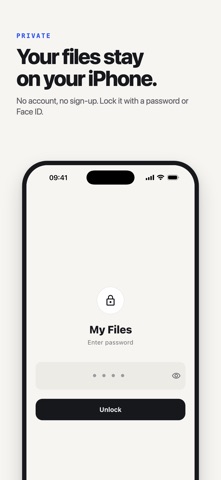
- Your files stay on your device
- No account and no cloud upload
- Lock the app with a password, Face ID or Touch ID (Pro)
FREE AND PRO
Free:
- Save and organize up to 20 files (up to 25 MB each)
- Filter by type and see your storage overview
- Files shared over the free limit wait safely until you upgrade or free up space
My Files Pro:
- Unlimited files and no file size limit
- Instant search, folders, pinning and batch select
- Smart Clean, storage insights and temporary files
- Password and Face ID / Touch ID lock
- Monthly or yearly subscription, or a one-time lifetime purchase
Subscriptions renew automatically unless cancelled at least 24 hours before the end of the current period. Manage or cancel them anytime in your Apple Account settings.
Download My Files and keep every attachment in one place.
Privacy Policy: https://www.zenbyte.app/smartfile/privacy.html
Terms of Use: https://www.apple.com/legal/internet-services/itunes/dev/stdeula/