

My NAS Manager is made and published by Hung Tien Pham. AppBrain is an independent app data site and isn't affiliated with Hung Tien Pham. The app name, icon, screenshots and description belong to Hung Tien Pham and are shown as published on the App Store.
AppBrain's verdict
- Last updated
- June 19, 2026
Rankings
App Store top chartsApp Store Rankings for My NAS Manager
Competitors
Similar apps and more from Hung Tien PhamAlternatives to My NAS Manager


More from Hung Tien Pham


Releases
Updates seen on the App Store- Version
- 1.0.2
- Launched
- June 2026
No changelog data
User feedback
Ratings and reviews on the App StoreComments on My NAS Manager for iOS
We don't have enough comments to show example comments. Please check back later.
Technology
Found in the app by AppBrain- Price
- Free
- App size
- 5.99 MB
- Content rating
- Everyone
Technologies used by My NAS Manager
About the app and developer
About My NAS Manager
My NAS Manager is an utilities app developed by Hung Tien Pham.
User Ratings
The app has no ratings yet.
App Information
My NAS Manager is freely available from the App Store. The app size is 5.99 MB. The latest version available is 1.0.2. The last update was on June 19, 2026.
Technical Requirements
The app has a content rating of Everyone. The app has been available on the App Store since June 2026.
Developer information for Hung Tien Pham
Address:
Store listing
By Hung Tien Pham, from the App Store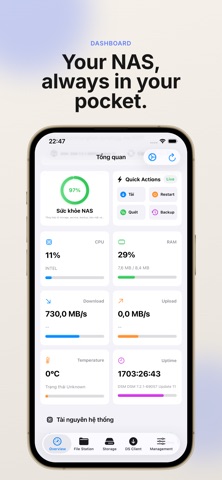


Description by Hung Tien Pham Written by the developer, not by AppBrain. Click to read.
Built entirely using Apple's modern SwiftUI framework, the app delivers a responsive, gorgeous, and feature-rich interface to keep your private cloud running smoothly.
KEY FEATURES:
1. REAL-TIME RESOURCE UTILIZATION DASHBOARD
- Instantly monitor CPU usage and RAM allocation.
- Track real-time network upload/download speeds.
- Check storage pool health, RAID configurations, and individual drive S.M.A.R.T. diagnostics.
- View active system processes running on DSM.
2. FULL-FEATURED FILE STATION
- Seamlessly browse files and folder structures.
- Delete, rename, or create folders remotely.
- Upload files with detailed, real-time background progress bars.
- Download files to a temporary location and export them natively to iCloud Drive, local storage, or other apps.
- Generate and share public download links (gofile.me) in seconds.
3. SSH SERVICE & TERMINAL SIMULATION
- View and toggle system SSH status and change listening port numbers.
- Execute basic management commands (ls, df -h, top, uptime) using an integrated interactive terminal simulator.
4. PACKAGE CONTROL CENTER
- List installed DSM applications.
- Remotely start or stop packages such as Download Station with a single tap.
5. COMPREHENSIVE DEMO MODE
- No Synology NAS setup yet? Try our fully-featured Demo Login to experience all UI features with simulated mock data.
SECURE CONNECTIONS:
Your security is our priority. My NAS Manager supports HTTPS encryption and two-factor authentication (2FA) OTP verification codes to ensure your server credentials remain fully protected.