


AppBrain's verdict
- Rating on App Store
- 4.00
- 2 ratings
- Last updated
- November 3, 2026
- Size
- 64.5 MB
It doesn't have enough ratings yet to judge what users think.
User feedback
Ratings and reviews on the App StoreComments on Pad Code AI: Code Editor & IDE for iOS
We don't have enough comments to show example comments. Please check back later.
Store listing
By Hung Tien Pham, from the App StoreDescription by Hung Tien Pham Written by the developer, not by AppBrain. Click to read.
WRITE AND RUN
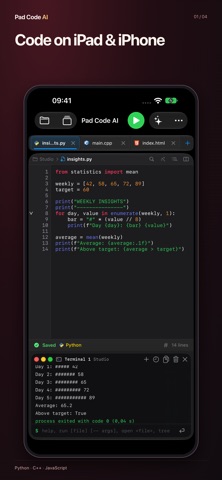
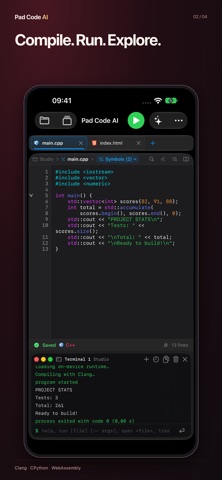
Run C, C++, Python, JavaScript, TypeScript, Ruby, PHP, Lua and SQLite queries on your device with bundled compilers and interpreters. Use interactive input, command-line arguments and project files. Preview HTML and CSS projects. Language and library support depends on the included runtime.
EDIT AND ORGANIZE
Work with syntax highlighting, find in files, individual-file replacement, code folding and snippets. Open project folders through Files, manage multiple files, review Git changes, commit and push, and export projects as ZIP.
SMARTER EDITING AND GIT SYNC
Code completion suggests keywords, types and names from your file as you type, and works with VoiceOver. Pull changes from GitHub: edits made on both sides are merged line by line, and overlapping lines are marked for you to choose. Your projects also appear in the Files app.
AI, WHEN YOU WANT IT
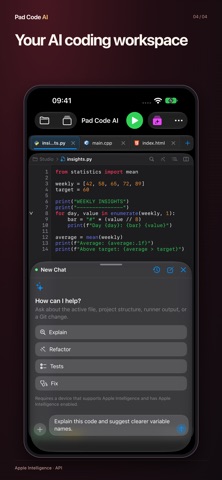
Ask for explanations, refactoring ideas, tests or fixes. Review suggested changes before applying them. On-device AI requires a compatible system and device with Apple Intelligence enabled. Optional third-party AI requires your own credentials and an internet connection; availability varies by region. You choose what context to share.
LEARN AND BUILD ANYWHERE
Practice programming, try small scripts and develop project ideas. Local code execution works offline; Git network operations and remote AI require internet access. The interface is available in 20 languages.
Support: https://phamhungtien.com/PadCodeAI
PREVIEW SUPPORT
Preview HTML, CSS and browser JavaScript with WebKit. Swift/SwiftUI, Metal and native OpenGL visual previews are not supported. Swift and other unsupported languages are editing-only.
WORKSPACE AGENT
With a compatible configured provider, the optional Workspace Agent can inspect code, create and edit text files, rename or delete files, and run supported code inside the project you open. Agent Changes shows saved changes, before/after diffs and Undo. The app checks for intervening edits before writing or restoring. You explicitly enable access and choose what context to share. Provider credentials are your own; multi-step requests may incur additional provider charges. This is a bounded project workflow, not an unrestricted system shell or package installer.
New editor color themes and a refined interface.
Git over HTTPS now supports GitHub, GitLab, Bitbucket and compatible servers, using standard repositories with branches, commits, stash, push and pull.
Python can import compatible packages, including NumPy and pandas. Package downloads require internet; not every PyPI package is supported. Programs using only the bundled standard library can run offline.
Improved language icons and links to video guides.
Start faster with ready-to-run Python, web, C and JavaScript project templates.
Safety and technology
Found in the app by AppBrain- Price
- Free
- App size
- 64.5 MB
- Content rating
- Everyone
Technologies used by Pad Code AI: Code Editor & IDE
Releases
Updates seen on the App Store- Version
- 2.2.0
- Launched
- May 2026
No changelog data
Alternatives
Similar apps and more from Hung Tien PhamAlternatives to Pad Code AI: Code Editor & IDE


More from Hung Tien Pham


Rankings
App Store top chartsApp Store Rankings for Pad Code AI: Code Editor & IDE
About the app and developer
About Pad Code AI: Code Editor & IDE
Pad Code AI: Code Editor & IDE is an overall app developed by Hung Tien Pham.
User Ratings
Pad Code AI: Code Editor & IDE is rated 4.00 out of 5 stars. The rating is based on 2 ratings.
App Information
Pad Code AI: Code Editor & IDE is freely available from the App Store. The app size is 64.50 MB. The latest version available is 2.2.0. The last update was on November 3, 2026.
Technical Requirements
The app has a content rating of Everyone. The app has been available on the App Store since May 2026.
Pad Code AI: Code Editor & IDE is made and published by Hung Tien Pham. AppBrain is an independent app data site and isn't affiliated with Hung Tien Pham. The app name, icon, screenshots and description belong to Hung Tien Pham and are shown as published on the App Store.
Developer information for Hung Tien Pham
Address:
Frequently asked questions about Pad Code AI: Code Editor & IDE
Is Pad Code AI: Code Editor & IDE free?
Yes. Pad Code AI: Code Editor & IDE is free on the App Store.
Is Pad Code AI: Code Editor & IDE still available?
Yes. Pad Code AI: Code Editor & IDE is on the App Store, and the last update we saw was on November 3, 2026.
How large is Pad Code AI: Code Editor & IDE?
Pad Code AI: Code Editor & IDE is 64.50 MB.
Is Pad Code AI: Code Editor & IDE suitable for children?
App Store rates the content of Pad Code AI: Code Editor & IDE as suitable for everyone.
How do people rate Pad Code AI: Code Editor & IDE?
Pad Code AI: Code Editor & IDE scores 4.00 out of 5 stars, from 2 ratings on the App Store.
Who made Pad Code AI: Code Editor & IDE?
Pad Code AI: Code Editor & IDE was developed by Hung Tien Pham. It is listed in the overall category on the App Store.
What are the best alternatives to Pad Code AI: Code Editor & IDE?
People looking at Pad Code AI: Code Editor & IDE also look at these overall apps: Tmux Bridge, MCU BLE Terminal, Cmux Remote, Script: JS & TS Editor, NetScanner - HTTP Catcher.