

Cmux Remote is made and published by jaehyun jang. AppBrain is an independent app data site and isn't affiliated with jaehyun jang. The app name, icon, screenshots and description belong to jaehyun jang and are shown as published on the App Store.
AppBrain's verdict
- Rating on App Store
- 4.00
- 3 ratings
- Last updated
- October 16, 2026
It doesn't have enough ratings yet to judge what users think.
Rankings
App Store top chartsApp Store Rankings for Cmux Remote
Competitors
Similar apps and more from jaehyun jangAlternatives to Cmux Remote


More from jaehyun jang

Releases
Updates seen on the App Store- Version
- 1.1.3
- Launched
- May 2026
No changelog data
User feedback
Ratings and reviews on the App StoreComments on Cmux Remote for iOS
We don't have enough comments to show example comments. Please check back later.
Technology
Found in the app by AppBrain- Price
- Free
- App size
- 4.57 MB
- Content rating
- Everyone
Technologies used by Cmux Remote
About the app and developer
About Cmux Remote
Cmux Remote is an overall app developed by jaehyun jang.
User Ratings
Cmux Remote is rated 4.00 out of 5 stars. The rating is based on 3 ratings.
App Information
Cmux Remote is freely available from the App Store. The app size is 4.57 MB. The latest version available is 1.1.3. The last update was on October 16, 2026.
Technical Requirements
The app has a content rating of Everyone. The app has been available on the App Store since May 2026.
Developer information for jaehyun jang
Address:
Frequently asked questions about Cmux Remote
Is Cmux Remote free?
Yes. Cmux Remote is free on the App Store.
Is Cmux Remote still available?
Yes. Cmux Remote is on the App Store, and the last update we saw was on October 16, 2026.
How large is Cmux Remote?
Cmux Remote is 4.57 MB.
Is Cmux Remote suitable for children?
App Store rates the content of Cmux Remote as suitable for everyone.
How do people rate Cmux Remote?
Cmux Remote scores 4.00 out of 5 stars, from 3 ratings on the App Store.
Who made Cmux Remote?
Cmux Remote was developed by jaehyun jang. It is listed in the overall category on the App Store.
What are the best alternatives to Cmux Remote?
People looking at Cmux Remote also look at these overall apps: AgentsRoom: Dev Remote Control, Telecmux, VibeTerm, Yebo — AI Agent Authorization, sshido: SSH Client & Terminal.
Store listing
By jaehyun jang, from the App Store


Description by jaehyun jang Written by the developer, not by AppBrain. Click to read.
WHAT IT IS
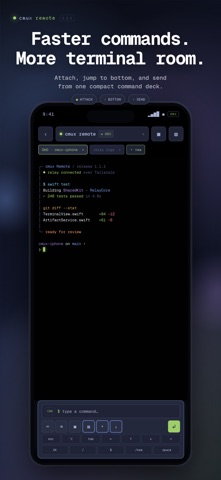
Cmux (https://cmux.com) is a modern terminal multiplexer with native splits, workspaces, and rich integrations for AI agents like Claude Code, Codex, omx, and Cursor. Cmux Remote mirrors the cmux surface you choose, lets you type into it, send keys,
manage workspaces, upload photos and documents, preview images, and receive notifications — all from this mobile app.
WHO IT IS FOR
- Developers who run long-lived agents such as Claude Code, Codex, and omx and want to check or control them away from their desk
- People who access their own development machine remotely and want a focused terminal experience
- Anyone already using Tailscale and looking for a private way to reach their terminal
HOW IT WORKS
1. Install the open-source cmux-relay binary on the computer that runs cmux.
2. Make sure that computer is connected to Tailscale.
3. Open this app, enter the computer’s Tailscale hostname, and tap Connect.
4. Your cmux workspaces appear. Select a surface and start working.
The relay communicates directly with cmux through its local Unix socket. This app communicates with the relay over a WireGuard-encrypted Tailscale tunnel. Nothing leaves your private network.
FEATURES
- Performance-tuned live mirroring of cmux terminal surfaces with Korean/CJK width support, an opaque-black viewport, and ANSI truecolor
- Long-press drag selection with adjustable handles and one-tap copy
- Keyboard accessory controls for Esc, Enter, Tab, arrows, Ctrl-C, other Ctrl combinations, /new, and Space
- Keyboard-safe command layout with automatic dismissal after sending and an inline scroll-to-bottom control
- Paste text and securely upload photos or documents to Downloads/cmux-remote
- Browse recent uploads and terminal-visible files with image thumbnails and a full-screen zoom viewer
- Local notifications and a native Inbox for cmux events and AI-agent needs-input prompts
- Create, rename, and close workspaces and switch between multiple surfaces
- Connected computer battery status when provided by the relay
- Pinch-to-zoom terminal font sizing
- Demo Mode with populated sample data so you can try the app before setting up a relay
PRIVACY
No analytics. No advertising. No third-party tracking SDKs. The bearer token issued by your relay is stored only in secure credential storage on your device.
Source code and privacy details:
https://github.com/NewTurn2017/cmux-remote
REQUIREMENTS
- A personal computer running cmux 0.64 or later and cmux-relay
- Both devices signed in to the same Tailscale tailnet
- iOS 17 or later
Cmux Remote is open source under the MIT license. Issues and pull requests are welcome.