

sshido: SSH Client & Terminal
sshido: SSH Client & Terminal is made and published by JUNGHYUN SON. AppBrain is an independent app data site and isn't affiliated with JUNGHYUN SON. The app name, icon, screenshots and description belong to JUNGHYUN SON and are shown as published on the App Store.
AppBrain's verdict
- Last updated
- October 3, 2026
Rankings
App Store top chartsApp Store Rankings for sshido: SSH Client & Terminal
Competitors
Similar apps and more from JUNGHYUN SONAlternatives to sshido: SSH Client & Terminal


Releases
Updates seen on the App Store- Version
- 0.1.7
- Launched
- May 2026
No changelog data
User feedback
Ratings and reviews on the App StoreComments on sshido: SSH Client & Terminal for iOS
We don't have enough comments to show example comments. Please check back later.
Technology
Found in the app by AppBrain- Price
- Free
- App size
- 17.1 MB
- Content rating
- Everyone
Technologies used by sshido: SSH Client & Terminal
About the app and developer
About sshido: SSH Client & Terminal
sshido: SSH Client & Terminal is an overall app developed by JUNGHYUN SON.
User Ratings
The app has no ratings yet.
App Information
sshido: SSH Client & Terminal is freely available from the App Store. The app size is 17.10 MB. The latest version available is 0.1.7. The last update was on October 3, 2026.
Technical Requirements
The app has a content rating of Everyone. The app has been available on the App Store since May 2026.
Developer information for JUNGHYUN SON
Address:
Frequently asked questions about sshido: SSH Client & Terminal
Is sshido: SSH Client & Terminal free?
Yes. sshido: SSH Client & Terminal is free on the App Store.
Is sshido: SSH Client & Terminal still available?
Yes. sshido: SSH Client & Terminal is on the App Store, and the last update we saw was on October 3, 2026.
How large is sshido: SSH Client & Terminal?
sshido: SSH Client & Terminal is 17.10 MB.
Is sshido: SSH Client & Terminal suitable for children?
App Store rates the content of sshido: SSH Client & Terminal as suitable for everyone.
Who made sshido: SSH Client & Terminal?
sshido: SSH Client & Terminal was developed by JUNGHYUN SON. It is listed in the overall category on the App Store.
What are the best alternatives to sshido: SSH Client & Terminal?
People looking at sshido: SSH Client & Terminal also look at these overall apps: Veelops, SSH Client – Terminal & SFTP, Pi Relay, VisuStruct, Cmux Remote.
Store listing
By JUNGHYUN SON, from the App Store


Description by JUNGHYUN SON Written by the developer, not by AppBrain. Click to read.
AGENT MODE
• Ask once in a chat. An orchestrator plans the task, runs subagents in Podman on your host, and checks their work before it answers.
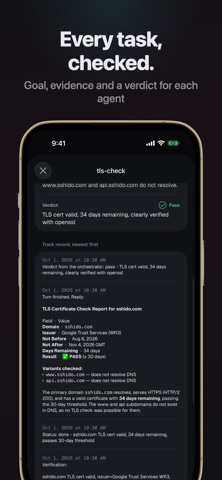
• Every agent keeps a work record with its goal, evidence and a pass or fail verdict.
• Agents can browse websites, use a desktop, and send screenshots, videos and files back to the chat.
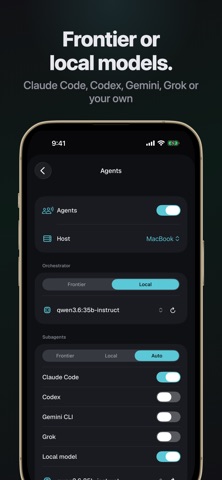
• Use frontier models (Claude Code, Codex, Gemini CLI, Grok) with your own subscriptions, or a local model you run yourself.
• Run many chats at once, and give agents read-only access to the host folders you choose.
TERMINAL
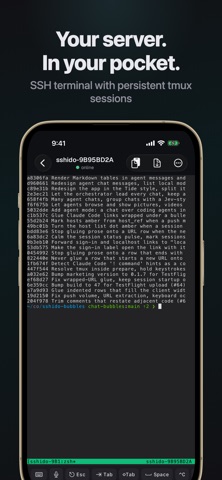
• Full xterm-256color terminal, Metal-rendered for smooth scrolling even on heavy output.
• tmux sessions survive reconnects, network drops and app switches. Sessions are named after tmux, and you can rename them.
• A customizable shortcut bar, smart copy of URLs and output, a one-tap sign-in helper, and image upload into your session.
NOTIFICATIONS
• Get an alert the moment an agent finishes or needs your input. Hosts and sessions turn amber when Claude is waiting.
• Alerts go through the hosted relay at push.sshido.com. Its source is public, and it never stores the alert text.
PRIVATE BY DESIGN
• Ed25519 and RSA keys are stored in the iOS Keychain. A server's host key is remembered on first connect and checked every time after.
• Your keys and terminal content only travel to your own server. Crash reports leave out terminal content and credentials, and you can turn them off in Settings.
Bring your own server over SSH.