

SSH Client – Terminal & SFTP
SSH Client – Terminal & SFTP is made and published by HANSIFY TECHNOLOGIES. AppBrain is an independent app data site and isn't affiliated with HANSIFY TECHNOLOGIES. The app name, icon, screenshots and description belong to HANSIFY TECHNOLOGIES and are shown as published on the App Store.
AppBrain's verdict
- Rating on App Store
- 5.00
- 3 ratings
- Last updated
- September 20, 2026
It doesn't have enough ratings yet to judge what users think.
Rankings
App Store top chartsApp Store Rankings for SSH Client – Terminal & SFTP
Competitors
Similar apps and more from HANSIFY TECHNOLOGIESAlternatives to SSH Client – Terminal & SFTP


More from HANSIFY TECHNOLOGIES





Releases
Updates seen on the App Store- Version
- 2.3.1
- Launched
- May 2026
No changelog data
User feedback
Ratings and reviews on the App StoreComments on SSH Client – Terminal & SFTP for iOS
We don't have enough comments to show example comments. Please check back later.
Technology
Found in the app by AppBrain- Price
- Free
- App size
- 62.4 MB
- Content rating
- Everyone
Technologies used by SSH Client – Terminal & SFTP
About the app and developer
About SSH Client – Terminal & SFTP
SSH Client – Terminal & SFTP is an overall app developed by HANSIFY TECHNOLOGIES.
User Ratings
SSH Client – Terminal & SFTP is rated 5.00 out of 5 stars. The rating is based on 3 ratings.
App Information
SSH Client – Terminal & SFTP is freely available from the App Store. The app size is 62.43 MB. The latest version available is 2.3.1. The last update was on September 20, 2026.
Technical Requirements
The app has a content rating of Everyone. The app has been available on the App Store since May 2026.
Developer information for HANSIFY TECHNOLOGIES
Address:
Frequently asked questions about SSH Client – Terminal & SFTP
Is SSH Client – Terminal & SFTP free?
Yes. SSH Client – Terminal & SFTP is free on the App Store.
Is SSH Client – Terminal & SFTP still available?
Yes. SSH Client – Terminal & SFTP is on the App Store, and the last update we saw was on September 20, 2026.
How large is SSH Client – Terminal & SFTP?
SSH Client – Terminal & SFTP is 62.43 MB.
Is SSH Client – Terminal & SFTP suitable for children?
App Store rates the content of SSH Client – Terminal & SFTP as suitable for everyone.
How do people rate SSH Client – Terminal & SFTP?
SSH Client – Terminal & SFTP scores 5.00 out of 5 stars, from 3 ratings on the App Store.
Who made SSH Client – Terminal & SFTP?
SSH Client – Terminal & SFTP was developed by HANSIFY TECHNOLOGIES. It is listed in the overall category on the App Store.
What are the best alternatives to SSH Client – Terminal & SFTP?
People looking at SSH Client – Terminal & SFTP also look at these overall apps: Moshell, GlassTerm — SSH Terminal, XV: Release Radar, sshido: SSH Client & Terminal, Helmrig Agents.
Store listing
By HANSIFY TECHNOLOGIES, from the App Store




Description by HANSIFY TECHNOLOGIES Written by the developer, not by AppBrain. Click to read.
SSH Client – Terminal & SFTP is built for developers, sysadmins, and anyone who needs reliable remote access on the go.
CONNECT IN SECONDS
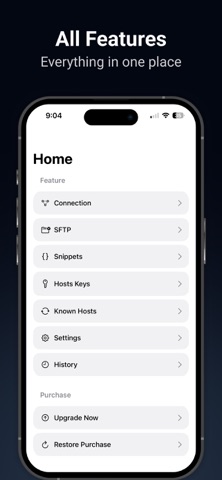
• Save hosts with an alias, hostname, port, and username
• Sign in with a password or SSH key
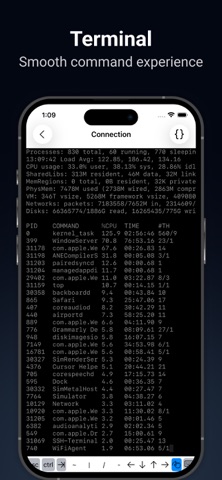
• Open a full SSH terminal session from your saved connections
• Choose a colour theme (Midnight, Light, Matrix, Solarised) and font size
SFTP FILE TRANSFER
• Browse remote directories
• Download files to your device
• Upload from the Files app
• Show or hide hidden files
KEYS AND SECURITY
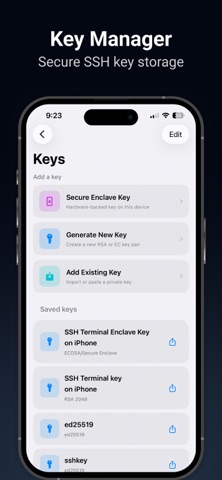
• Generate ed25519, RSA, or ECDSA keys
• Create Secure Enclave keys on device
• Import existing private keys
• Manage known hosts
• Store passwords in the Keychain
FASTER WORKFLOWS
• Save and reuse command snippets
• Keep connection history
• Sync hosts and data with iCloud across your Apple devices
WHO IT’S FOR
• Linux, Ubuntu, and Unix servers
• VPS and cloud hosts
• Raspberry Pi and home labs
• Day-to-day remote admin from iPhone or iPad
Try it with one saved host. Upgrade to Pro when you need more servers.
Pro is available as weekly, monthly, or yearly auto-renewing subscriptions, or as a one-time Lifetime purchase. Prices are shown in the app and on the App Store and may vary by region. Payment is charged to your Apple ID account. Subscriptions renew automatically unless canceled at least 24 hours before the end of the current period. Manage or cancel anytime in Settings > Apple ID > Subscriptions. Deleting the app does not cancel a subscription.
Privacy Policy: https://www.freeprivacypolicy.com/live/de501fa3-782a-48dd-b33f-83d8bc220c5c
Terms of Use: https://www.privacypolicies.com/live/ec0062f6-bde6-4a8d-b665-9df7cf6f5d6e
Support: help.app007@gmail.com
Feel free to reach out with feedback or feature requests—we’re always improving the app.