




AppBrain's verdict
- Rating on App Store
- 5.00
- 1 ratings
- Last updated
- September 20, 2026
- Size
- 34.7 MB
It doesn't have enough ratings yet to judge what users think.
User feedback
Ratings and reviews on the App StoreComments on My PDF Scanner: Scan Documents for iOS
We don't have enough comments to show example comments. Please check back later.
Store listing
By Hangzhou Xiaoyuan Future Technology Co., Ltd., from the App StoreDescription by Hangzhou Xiaoyuan Future Technology Co., Ltd. Written by the developer, not by AppBrain. Click to read.
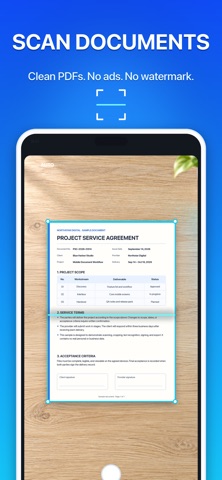
My PDF Scanner combines automatic edge detection, auto crop, perspective correction, document filters, signatures, folders, page organization, and on-device OCR in one practical workflow. Basic scanning and PDF export work without ads, watermarks, or an account.
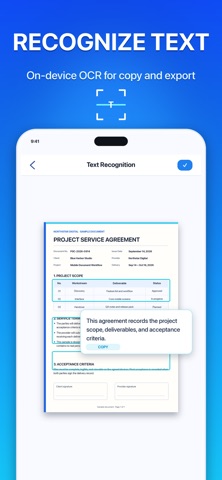
Your documents stay local by default. OCR is designed to run on device where supported, so you can recognize text without uploading scans to a document cloud just for that step.
Scan and edit:
- Capture single-page or multi-page documents
- Import photos, images, and supported files
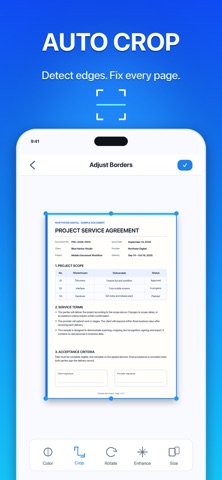
- Detect document edges and correct perspective
- Crop, rotate, reorder, and merge pages
- Apply document filters for clearer, more readable scans
- Add signatures and clean unwanted marks
OCR and export:
- Recognize text on your device
- Export scans as PDF or JPG
- Export recognized text as TXT or Word (.docx) with Pro
- Share files through email, messaging apps, cloud drives, or the system share sheet
Organize and protect:
- Keep scans in folders with search and sorting
- Use an App PIN or in-app password tools to limit access
Basic scanning and basic PDF export include:
- No ads
- No watermark
- No account requirement
My PDF Scanner is useful for students, freelancers, field workers, small business owners, and anyone who needs to digitize paper documents on the go.
Everyday document scanning workflows:
- Receipt and invoice scanner: capture expense receipts, purchase records, bills, and invoices, then crop and organize them as PDF files
- ID and passport scanner: keep readable copies of identity cards, passport pages, licenses, membership cards, and travel paperwork
- Contract and form scanner: scan agreements, applications, registration forms, and work documents, then add a signature before sharing
- Notes and book scanner: digitize class notes, handouts, worksheets, whiteboards, book pages, and printed reference material
- Photo and image to PDF: import camera photos, screenshots, or JPG images, rotate and reorder them, and build a multi-page PDF
A scan can stay editable instead of becoming a single unorganized photo. Use edge detection, perspective correction, cropping, rotation, and document filters to improve each page. Reorder pages in multi-page documents, group related scans into folders, and merge, export, or share them when the document is ready.
On-device OCR is useful for recognizing text from receipts, invoices, contracts, forms, notes, and printed pages. Keeping the page flat, evenly lit, and free of shadows can produce more readable OCR results.
Local-first organization lets you create folders, search and sort files, and choose when to export a PDF or JPG through the system share sheet. Core scanning does not require an account. Network access is used only for actions such as optional sign-in, purchase restoration, support, legal pages, and platform services.
Pro unlocks OCR text export to TXT or Word, batch workflows, merge tools, and in-app document protection. Choose monthly, yearly, or lifetime Pro access.
Subscriptions renew automatically unless canceled in your App Store account settings. The lifetime option is a one-time purchase for Pro access.
Note: If you subscribe via Apple, payment will be charged to App Store Account at confirmation of purchase. Subscription automatically renews unless auto-renew is turned off at least 24 hours before the end of the current period. Account will be charged for renewal within 24 hours prior to the end of the current period at the rate of the selected plan. Subscriptions and auto-renewal may be managed by going to Account Settings after purchase. service terms: https://www.entlearn.com/terms.
Privacy policy: https://www.entlearn.com/privacy
Privacy note: In-app password protection and App PIN features limit access inside the app. Exported files are not automatically encrypted.
Safety and technology
Found in the app by AppBrain- Price
- Free
- App size
- 34.7 MB
- Content rating
- Everyone
Technologies used by My PDF Scanner: Scan Documents
Releases
Updates seen on the App Store- Version
- 1.1.6
- Launched
- July 2026
No changelog data
Alternatives
Similar apps and more from Hangzhou Xiaoyuan Future Technology Co., Ltd.Alternatives to My PDF Scanner: Scan Documents


Also available on Google Play

Rankings
App Store top chartsApp Store Rankings for My PDF Scanner: Scan Documents
About the app and developer
About My PDF Scanner: Scan Documents
My PDF Scanner: Scan Documents is a business app developed by Hangzhou Xiaoyuan Future Technology Co., Ltd.
User Ratings
My PDF Scanner: Scan Documents is rated 5.00 out of 5 stars. The rating is based on one rating ratings.
App Information
My PDF Scanner: Scan Documents is freely available from the App Store. The app size is 34.67 MB. The latest version available is 1.1.6. The last update was on September 20, 2026.
Technical Requirements
The app has a content rating of Everyone. The app has been available on the App Store since July 2026.
My PDF Scanner: Scan Documents is made and published by Hangzhou Xiaoyuan Future Technology Co., Ltd. AppBrain is an independent app data site and isn't affiliated with Hangzhou Xiaoyuan Future Technology Co., Ltd. The app name, icon, screenshots and description belong to Hangzhou Xiaoyuan Future Technology Co., Ltd. and are shown as published on the App Store.
Developer information for Hangzhou Xiaoyuan Future Technology Co., Ltd.
Frequently asked questions about My PDF Scanner: Scan Documents
Is My PDF Scanner: Scan Documents free?
Yes. My PDF Scanner: Scan Documents is free on the App Store.
Is My PDF Scanner: Scan Documents still available?
Yes. My PDF Scanner: Scan Documents is on the App Store, and the last update we saw was on September 20, 2026.
How large is My PDF Scanner: Scan Documents?
My PDF Scanner: Scan Documents is 34.67 MB.
Is My PDF Scanner: Scan Documents suitable for children?
App Store rates the content of My PDF Scanner: Scan Documents as suitable for everyone.
How do people rate My PDF Scanner: Scan Documents?
My PDF Scanner: Scan Documents has one rating of 5.00 stars on the App Store.
Who made My PDF Scanner: Scan Documents?
My PDF Scanner: Scan Documents was developed by Hangzhou Xiaoyuan Future Technology Co., Ltd. It is listed in the business category on the App Store.
What are the best alternatives to My PDF Scanner: Scan Documents?
People looking at My PDF Scanner: Scan Documents also look at these business apps: Pure PDF Scanner, Quick PDF Scanner, InstaPDF Scanner, ScanLeap - PDF Scanner App, DocAura: PDF Scanner & OCR.