

My Scanner: Scan to PDF & Edit
My Scanner: Scan to PDF & Edit is made and published by Dream App Studio UAB. AppBrain is an independent app data site and isn't affiliated with Dream App Studio UAB. The app name, icon, screenshots and description belong to Dream App Studio UAB and are shown as published on the App Store.
AppBrain's verdict
EstablishedLoved by usersTop 10- Rating on App Store
- 4.70
- 20,340 ratings
- Last updated
- September 28, 2026
- Size
- 352.5 MB
Users love it: 4.7 stars from 20,340 ratings. Its best ranking is #3 in Top Grossing, Business in Norway.
User feedback
Ratings and reviews on the App StoreComments on My Scanner: Scan to PDF & Edit for iOS
We don't have enough comments to show example comments. Please check back later.
Store listing
By Dream App Studio UAB, from the App Store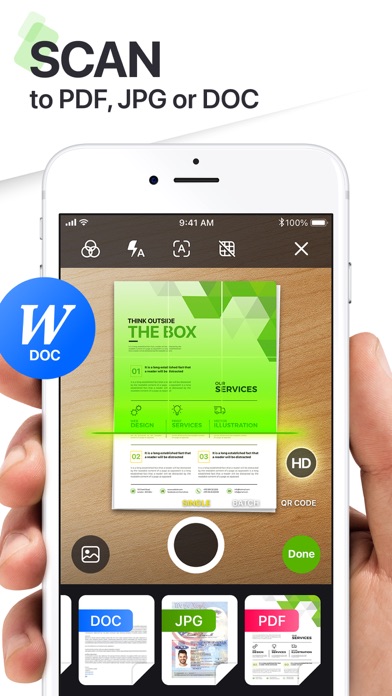


Description by Dream App Studio UAB Written by the developer, not by AppBrain. Click to read.
SCAN. EDIT. WRITE. SOLVE. ALL IN ONE PLACE.
Designed for professionals, students, and everyday users alike, My Scanner delivers the tools you need to take control of your documents and solve your office and educational tasks - all from your iPhone or iPad.
ULTRA-FAST PDF SCANNER
• Scan documents, books, notes, or whiteboards in seconds
• Smart edge detection & auto-enhancement for crystal-clear quality
• Export as high-resolution PDFs or JPGs
ADVANCED PDF EDITOR
• Add text, highlight, underline, or draw directly on your PDFs
• Fill out forms, add e-signatures, or annotate effortlessly
• Rearrange, merge, split, and organize pages with drag-and-drop simplicity
BUILT-IN AI WRITING ASSISTANT
• Write smarter with your personal AI writing companion
• Draft emails, create essays, brainstorm ideas, summarize text & more
• Rewrite, correct grammar, and even generate content tailored to your style
• Available 24/7—no typing limits, no creative blocks
SECURE & PRIVATE
• Keep your documents safe with Face ID, Touch ID, or passcode protection
• Offline scanning and editing to protect your privacy
MORE SMART TOOLS & UTILITIES
- AR Ruler: Instantly measure objects or distances using augmented reality
- Object Counter: Use your camera to count multiple items in real time
- ID Photo Maker: Create compliant ID photos in seconds—passport, visa & more
- Math & Science Solver: Scan handwritten or printed equations and get instant solutions
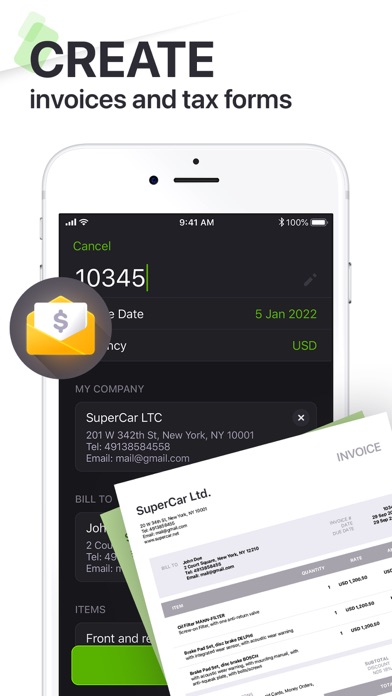
- Invoice Creator: Generate professional invoices on the go
- Tax Form Filler: Easily complete and export tax documents
- Text Extractor (OCR): Pull editable text from any image or scanned page
- E-Sign Documents: Sign contracts and official documents digitally and securely
- PDF Converter: Quickly convert PDFs to and from various formats including Word, Excel, PowerPoint, images, and more — all without leaving the app
WHY USERS LOVE MY SCANNER
• Combines powerful scanning with intelligent AI writing
• Replaces multiple apps with one seamless productivity tool
• Works offline for scanning & editing, with full privacy control
• Sleek, intuitive interface that gets out of your way
Whether you're in the office, classroom, or on the go, My Scanner is your trusted partner for document management and writing assistance.
Download now and experience the freedom of smart productivity.
Your documents, your words—enhanced by AI.
Created with passion by Dream App Studio team.
The app contains the following subscription options:
Weekly subscription
Monthly subscription
Quarterly subscription
Annual subscription
Subscription automatically renews unless auto-renew is turned off at least 24-hours prior to the end of the current period. The cost of renewal is equal to the value that “Apple’s App Store Matrix” determines as the equivalent of the subscription price in $USD. Payment will be charged to iTunes Account at confirmation of purchase. Any unused portion of a free trial period, if offered, will be forfeited when the user purchases a subscription to that publication. Subscriptions may be managed by the user and auto-renewal may be turned off by going to the user’s Account Settings after purchase.
Privacy Policy:
http://dreamappstudio.com/privacy_policy.html
Terms of Service:
http://www.dreamappstudio.com/terms_of_use.html
Safety and technology
Found in the app by AppBrain- Price
- Free
- App size
- 352.5 MB
- Content rating
- Everyone
Technologies used by My Scanner: Scan to PDF & Edit
Releases
Updates seen on the App Store- Version
- 10.6
- Launched
- May 2020
No changelog data
Alternatives
Similar apps and more from Dream App Studio UABAlternatives to My Scanner: Scan to PDF & Edit






More from Dream App Studio UAB



Rankings
App Store top charts- Highest rank
- #3
- Chart
- Top Grossing
- Business
- Country
- Norway
App Store Rankings for My Scanner: Scan to PDF & Edit
Top rankings
| Rank | Country | Category | List |
|---|---|---|---|
| 3 | Norway | Business | Top Grossing |
| 9 | Denmark | Business | Top Grossing |
| 27 | France | Business | Top Grossing |
| 53 | United States | Business | Top Grossing |
| 18 | Switzerland | Business | Top Grossing |
| 38 | Japan | Business | Top Grossing |
| 56 | Canada | Business | Top Grossing |
| 38 | Brazil | Business | Top Grossing |
| 39 | Norway | Business | Top Free |
| 46 | Czech Republic | Business | Top Grossing |
Ranking history in Norway
About the app and developer
About My Scanner: Scan to PDF & Edit
My Scanner: Scan to PDF & Edit is a business app developed by Dream App Studio UAB.
User Ratings
My Scanner: Scan to PDF & Edit is rated 4.70 out of 5 stars. The rating is based on 20 thousand ratings.
App Information
My Scanner: Scan to PDF & Edit is freely available from the App Store. The app size is 352.49 MB. The latest version available is 10.6. The last update was on September 28, 2026.
Technical Requirements
The app has a content rating of Everyone. The app has been available on the App Store since May 2020.
Developer information for Dream App Studio UAB
Address:
Frequently asked questions about My Scanner: Scan to PDF & Edit
Is My Scanner: Scan to PDF & Edit free?
Yes. My Scanner: Scan to PDF & Edit is free on the App Store.
Is My Scanner: Scan to PDF & Edit still available?
Yes. My Scanner: Scan to PDF & Edit is on the App Store, and the last update we saw was on September 28, 2026.
How large is My Scanner: Scan to PDF & Edit?
My Scanner: Scan to PDF & Edit is 352.49 MB.
Is My Scanner: Scan to PDF & Edit suitable for children?
App Store rates the content of My Scanner: Scan to PDF & Edit as suitable for everyone.
How do people rate My Scanner: Scan to PDF & Edit?
My Scanner: Scan to PDF & Edit scores 4.70 out of 5 stars, from 20,340 ratings on the App Store.
Who made My Scanner: Scan to PDF & Edit?
My Scanner: Scan to PDF & Edit was developed by Dream App Studio UAB. It is listed in the business category on the App Store.
What are the best alternatives to My Scanner: Scan to PDF & Edit?
People looking at My Scanner: Scan to PDF & Edit also look at these business apps: PDF Scanner to scan Document.s, My Scans, best PDF Scanner App, PDF Scanner・Document Scanner, PDF Scanner App: Scan Document, Camera Scanner - PDF.