

My WebID is made and published by WebID Solutions GmbH. AppBrain is an independent app data site and isn't affiliated with WebID Solutions GmbH. The app name, icon, screenshots and description belong to WebID Solutions GmbH and are shown as published on the App Store.
AppBrain's verdict
EstablishedWell rated- Best rank
- #14
- Top Free, Germany
- Rating on App Store
- 4.41
- 496 ratings
- Last updated
- September 30, 2026
Users rate it well: 4.4 stars from 496 ratings. Its best ranking is #14 in Top Free, Finance in Germany.
Rankings
App Store top charts- Highest rank
- #14
- Chart
- Top Free
- Finance
- Country
- Germany
Competitors
Similar apps and more from WebID Solutions GmbH





Releases
Updates seen on the App Store- Version
- 10.2.0
- Launched
- June 2019
No changelog data
User feedback
Ratings and reviews on the App StoreComments on My WebID for iOS
We don't have enough comments to show example comments. Please check back later.
Technology
Found in the app by AppBrain- Price
- Free
- App size
- 185.2 MB
- Content rating
- Everyone
Technologies used by My WebID
About the app and developer
About My WebID
My WebID is a finance app developed by WebID Solutions GmbH.
User Ratings
My WebID is rated 4.41 out of 5 stars. The rating is based on 500 ratings.
App Information
My WebID is freely available from the App Store. The app size is 185.21 MB. The latest version available is 10.2.0. The last update was on September 30, 2026.
Technical Requirements
The app has a content rating of Everyone. The app has been available on the App Store since June 2019.
Developer information for WebID Solutions GmbH
Address:
Store listing
By WebID Solutions GmbH, from the App Store



Description by WebID Solutions GmbH Written by the developer, not by AppBrain. Click to read.
• all identification procedures and e-signature via one app
• data protection compliant according to GDPR, server in Germany
• from the inventor of online video identification for the highest level of security (anti money laundering law-compliant video identification for banks)
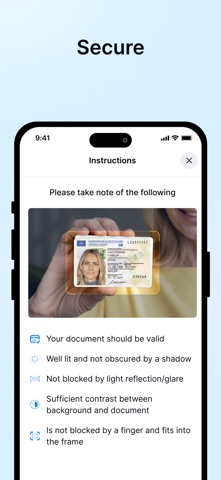
With the My WebID app you carry out every identification - with video, online banking, ID card photos, digital identity or eID function - in just a few steps.
1. Download the app 2. Follow the instructions 3. Enter your TAN - done. Your legally valid electronic signature with e-signature is just as easy.
The My WebID app only needs authorization for the camera.
Tips:
• Make sure you have a stable internet connection to ensure smooth operation. WiFi is better than mobile data.
• Good lighting helps to identify the ID card.
• The ID document should be clean and undamaged and not covered by your hand.