

My Weekly Budget Planner-Save
My Weekly Budget Planner-Save is made and published by 永文 胡. AppBrain is an independent app data site and isn't affiliated with 永文 胡. The app name, icon, screenshots and description belong to 永文 胡 and are shown as published on the App Store.
AppBrain's verdict
Established- Rating on App Store
- 1.00
- 1 ratings
- Last updated
- September 8, 2025
It doesn't have enough ratings yet to judge what users think.
Rankings
App Store top chartsApp Store Rankings for My Weekly Budget Planner-Save
Competitors
Similar apps and more from 永文 胡Alternatives to My Weekly Budget Planner-Save

 Budget Expense Tracker/Manager






More from 永文 胡






Releases
Updates seen on the App Store- Version
- 1.71
- Launched
- July 2017
No changelog data
User feedback
Ratings and reviews on the App StoreComments on My Weekly Budget Planner-Save for iOS
We don't have enough comments to show example comments. Please check back later.
Technology
Found in the app by AppBrain- Price
- $1.99
- App size
- 1.41 MB
- Content rating
- Everyone
Technologies used by My Weekly Budget Planner-Save
About the app and developer
About My Weekly Budget Planner-Save
My Weekly Budget Planner-Save is a finance app developed by 永文 胡.
What is the rating of My Weekly Budget Planner-Save?
My Weekly Budget Planner-Save is rated 1.00 out of 5 stars, based on one rating ratings.
Is My Weekly Budget Planner-Save free?
My Weekly Budget Planner-Save costs $1.99. The app size is 1.41 MB. The latest version available is 1.71. The last update was on September 8, 2025.
What are the requirements for My Weekly Budget Planner-Save?
The app has a content rating of Everyone. The app has been available on the App Store since July 2017.
Developer information for 永文 胡
Address:
Store listing
By 永文 胡, from the App Store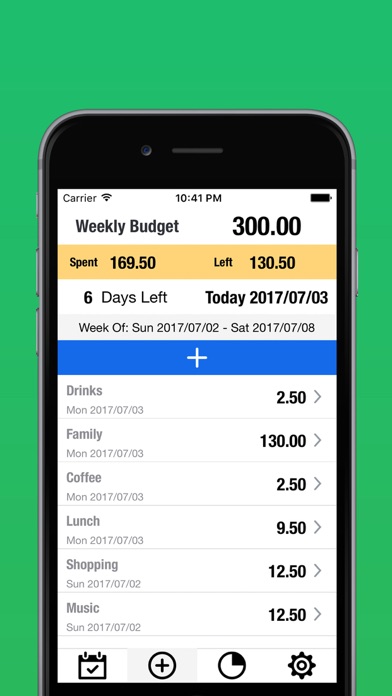


Description by 永文 胡 Written by the developer, not by AppBrain. Click to read.
It's easy to use and very intuitive! Hope it helps you control your spending and save money! All expenses are within the weekly budget, and unnecessary expenses are controlled.
Visualize the date range and remaining available amount for the current week
Complete weekly budget management
You can set a weekly budget amount
Custom start day of the week (Sunday to Saturday)
Real-time display of budget usage progress
Smart Budget Alert:
An orange warning is displayed when spending exceeds 80% of the budget
A red warning is displayed when spending exceeds budget
The color of the progress bar changes with the usage scale
Categorical Spend Management:
Budget limits and color differentiation can be set for each category
Displays the budget usage for each category
Historical Data Tracking:
View budget performance for the past 12 weeks
Showcase weekly spending and remaining budgets
The progress bar visualizes the percentage of budget used
Delete expenses: support left swipe to delete and confirm delete function
Data Visualization:
The bar chart shows the monthly spending trend
The pie chart shows the weekly percentage of spend for each category