





AppBrain's verdict
- Last updated
- July 11, 2026
- Size
- 1.86 MB
User feedback
Ratings and reviews on the App StoreComments on SmallBiz Attendance-Time Sheet for iOS
We don't have enough comments to show example comments. Please check back later.
Store listing
By 永文 胡, from the App StoreDescription by 永文 胡 Written by the developer, not by AppBrain. Click to read.
Whether employees are working in the office, at construction sites, or remotely, they can complete clock-in and clock-out tasks simply through their phones. All records are instantly synced to the cloud, so there's no worry about lost phones or missing data.
It is suitable for retail stores, restaurants, construction sites, design studios, freelancer teams, and any small business owner who needs a simple, reliable, and easy-to-use attendance management tool.
#Core Features#
One-Tap Check-In, Accurate Recording
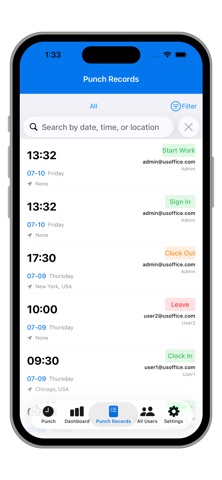
- Supports multiple check-in types: Clock In, Clock Out, Start Work, End Work, Sign In, Leave, Full Day Leave, AM Leave, PM Leave, Overtime Start, Overtime End, Admin Registration.
- Each check-in automatically records the time and GPS location, making it easy for employers to track real attendance.
Admin Make-Up Check-In
- When employees forget to check in, administrators can use the "Admin Registration" feature to make up the missed record.
- Admins can select the date, time, check-in type, and add remarks.
- Make-up records are labeled with the source "Admin Make-Up" to ensure traceability.
Check-In Record Ledger
- All check-in records are displayed in a clear ledger format.
- Users can filter by date and check-in type and search using keywords.
- Past attendance data is clear at a glance, making it easy to review and analyze.
Admin-Specific Backend Support
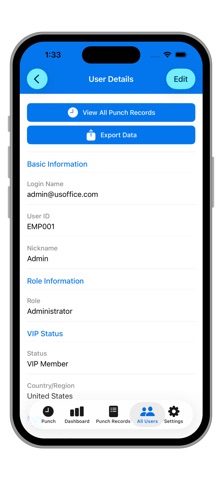
- Add or delete employee accounts.
- View all members' check-in records.
- Export CSV and PDF reports for payroll or attendance verification.
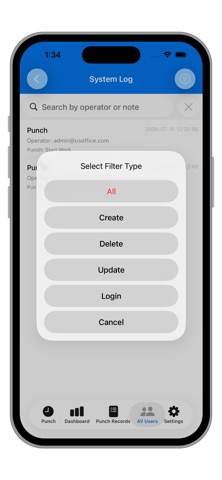
- View system operation logs at any time to ensure management accountability.
Cloud Sync, Safe and Reliable
- Data uses a master-slave sync mechanism; the App automatically syncs with the server upon launch.
- Check-ins can still be made offline, and data will update automatically once reconnected.
- Ensures local and cloud data consistency with no risk of data loss.
Flexible Upgrades to Meet Growth Needs
- The basic version is completely free and covers core functions such as clock-in and clock-out.
- As your team grows or if you need advanced features like leave management, overtime, or report exports, you can upgrade to the VIP plan via in-app purchase.
- The VIP plan unlocks more employee seats and all check-in types.
Data Security and Privacy Protection
- All check-in records are encrypted during transmission and storage.
- We do not sell or leak your personal information.
- You can review the privacy policy and terms of use anytime within the App.
#User FAQs#
User Management
- Administrators can create multiple employee accounts at once through the "User Management" page.
- Employees do not need to sign up themselves; all accounts are created and assigned by the administrator.
- Admins can set login names, passwords, and employee IDs, and can also edit or delete accounts.
In-App Purchase
- VIP cloud service plans are available through the App Store.
- Subscription period: 1 year (the system will remind you before expiration).
- Purchase price: Please refer to the in-app display.
- Payment method: One-time purchase using your own Apple ID, safe and convenient.
Check-In Location Settings
- You can choose whether to record GPS location for each check-in.
- If privacy or location sensitivity is a concern, you can disable "Record Location on Check-In" in Settings.
- When disabled, only the time and check-in type are recorded; location information will not be uploaded.
Check-In Records and Reports
- All check-in data is presented in a clear ledger format.
- Supports filtering by date and check-in type.
- Administrators can export CSV or PDF reports for easy reconciliation or payroll.
Cloud Sync and Data Security
- The App automatically syncs with the server upon launch.
Safety and technology
Found in the app by AppBrain- Price
- Free
- App size
- 1.86 MB
- Content rating
- Everyone
Technologies used by SmallBiz Attendance-Time Sheet
Releases
Updates seen on the App Store- Version
- 1.2
- Launched
- November 2024
No changelog data
Alternatives
Similar apps and more from 永文 胡Alternatives to SmallBiz Attendance-Time Sheet


More from 永文 胡








Rankings
App Store top chartsApp Store Rankings for SmallBiz Attendance-Time Sheet
About the app and developer
About SmallBiz Attendance-Time Sheet
SmallBiz Attendance-Time Sheet is a business app developed by 永文 胡.
What is the rating of SmallBiz Attendance-Time Sheet?
SmallBiz Attendance-Time Sheet has no ratings yet.
Is SmallBiz Attendance-Time Sheet free?
SmallBiz Attendance-Time Sheet is free. The app size is 1.86 MB. The latest version available is 1.2. The last update was on July 11, 2026.
What are the requirements for SmallBiz Attendance-Time Sheet?
The app has a content rating of Everyone. The app has been available on the App Store since November 2024.
SmallBiz Attendance-Time Sheet is made and published by 永文 胡. AppBrain is an independent app data site and isn't affiliated with 永文 胡. The app name, icon, screenshots and description belong to 永文 胡 and are shown as published on the App Store.
Developer information for 永文 胡
Address: