

MyEditor - Easy Video Editor!
MyEditor - Easy Video Editor! is made and published by MekeFactory. AppBrain is an independent app data site and isn't affiliated with MekeFactory. The app name, icon, screenshots and description belong to MekeFactory and are shown as published on the App Store.
AppBrain's verdict
Established- Rating on App Store
- 4.82
- 17 ratings
- Last updated
- July 9, 2021
- Size
- 63.6 MB
It doesn't have enough ratings yet to judge what users think.
User feedback
Ratings and reviews on the App StoreComments on MyEditor - Easy Video Editor! for iOS
We don't have enough comments to show example comments. Please check back later.
Store listing
By MekeFactory, from the App Store
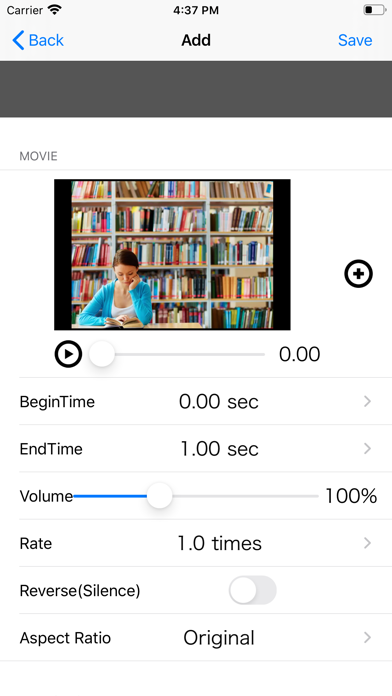
Description by MekeFactory Written by the developer, not by AppBrain. Click to read.
In addition, it provides transition, playback speed, reverse playback, volume and trimming.
◆ Watch the tutorial video.
1. If no video is loaded, the tutorial video will be displayed.
2. Press the play button at the top left of the top screen to play the tutorial video.
◆ Import and edit videos.
1. Press the "round icon button" at the bottom center of the top screen to display the list.
2. Press the "New button (blue)" to open the editor screen.
3. Edit the video on the editor screen.
・ Video
Video selection: Select the video you want to edit from the photo album.
Start position: Set the start position of the part you want to use in the video.
End position: Set the end position of the part you want to use in the video.
Volume: Set the video volume.
Playback speed: Set the video playback speed.
Reverse playback: Plays back the video in reverse.
・ Transition
Type: Select the transition at the end of the video and the junction with the next video.
: None: No transition
* Crossfade: The video disappears while fading out.
If there is the following video, the video will appear while fading in.
: Zoom: The movie disappears while zooming out.
If there is the following video, the video will appear while zooming in.
Page turning: The video disappears as the page turns.
Slide slide (to the left): The video slides to the left.
If there is the following movie, it will appear from the right end and slide to the left.
Slide slide (to the right): The video slides to the right.
If there is the following movie, it will appear from the left end and slide to the right.
* Slide (Up): The video slides upward.
If there is the following movie, it will appear from the bottom and slide upward.
* Slide (down): The video slides downward.
If there is the following movie, it will appear from the top and slide down.
Period: Set the period of the transition effect.
The longer the period, the slower the transition effect will work.
4. To confirm editing, press the “Save button” in the upper right, and to cancel, press the “Back” button in the upper left.
* By repeatedly loading multiple videos in the above procedure, the videos are automatically linked.
◆ I want to re-edit a video that has already been created.
1. Press the "round icon button" at the bottom center of the top screen to display the list.
2. Press the "arrow button" at the right end of the line you want to re-edit to open the editor screen.
3. Edit the video in the same way as the new creation procedure on the editor screen.
◆ I want to change the link order of videos.
1. Press the "round icon button" at the bottom center of the top screen to display the list.
2. Press the “edit button (green)” to put the list into “edit mode”.
3. Swipe the icon at the right end of the line you want to change the order to move to the line you want to change.
4). Press the "edit button (green)" again to confirm the change of order.
◆ I want to delete a created video.
1. Press the "round icon button" at the bottom center of the top screen to display the list.
2. There are two ways to delete videos from the list.
Individual deletion: Press the "Delete button" displayed by swiping left or right on the line you want to delete.
Delete all: Press the “Delete all button (red)”.
◆ I want to play the edited video.
1. Slide the slider at the top of the top screen to the left edge and press the "Play button" at the top left.
◆ I want to save the edited video in the photo album.
1. Select "Save" from the arrow button on the right side of the toolbar to save the video.
Safety and technology
Found in the app by AppBrain- Price
- Free
- App size
- 63.6 MB
- Content rating
- Everyone
Technologies used by MyEditor - Easy Video Editor!
Releases
Updates seen on the App Store- Version
- 8.0.0
- Launched
- August 2013
No changelog data
Alternatives
Similar apps and more from MekeFactoryAlternatives to MyEditor - Easy Video Editor!


More from MekeFactory








Rankings
App Store top chartsApp Store Rankings for MyEditor - Easy Video Editor!
About the app and developer
About MyEditor - Easy Video Editor!
MyEditor - Easy Video Editor! is a photo & video app developed by MekeFactory.
User Ratings
MyEditor - Easy Video Editor! is rated 4.82 out of 5 stars. The rating is based on 17 ratings.
App Information
MyEditor - Easy Video Editor! is freely available from the App Store. The app size is 63.56 MB. The latest version available is 8.0.0. The last update was on July 9, 2021.
Technical Requirements
The app has a content rating of Everyone. The app has been available on the App Store since August 2013.
Developer information for MekeFactory
Address: