

MyImageToVideo
MyImageToVideo is made and published by MekeFactory. AppBrain is an independent app data site and isn't affiliated with MekeFactory. The app name, icon, screenshots and description belong to MekeFactory and are shown as published on the App Store.
AppBrain's verdict
Established- Rating on App Store
- 4.30
- 10 ratings
- Last updated
- July 10, 2021
- Size
- 9.18 MB
It doesn't have enough ratings yet to judge what users think.
User feedback
Ratings and reviews on the App StoreComments on MyImageToVideo for iOS
We don't have enough comments to show example comments. Please check back later.
Store listing
By MekeFactory, from the App Store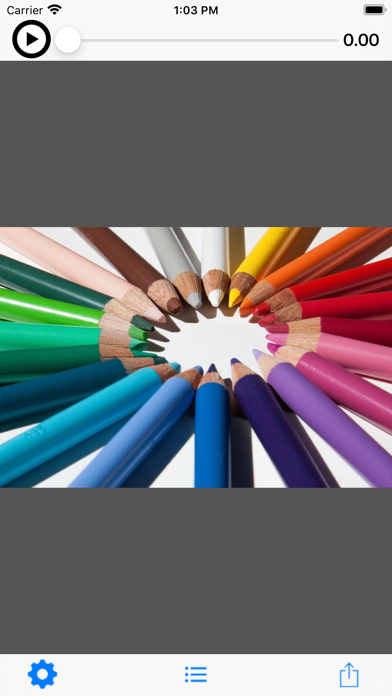
Description by MekeFactory Written by the developer, not by AppBrain. Click to read.
---- Function
* Tutorial video
1. Press the play button at the top left of the top screen to play the tutorial video.
* Make videos from images.
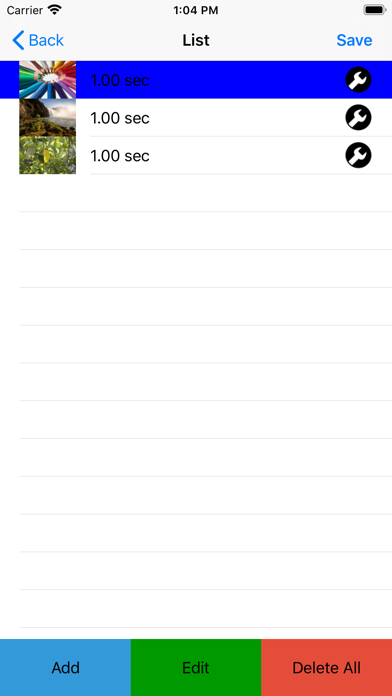
1. Press the icon circle button in the center of the tool bar at the bottom of the top screen to move to the image list screen.
2. Select an image.
-You can select the image you want to add to the video from the ADD button. (Multiple selections are possible).
If you want to add between lines, select the line you want to add first (the background color changes to blue) and then add it with the ADD button.
If you press the i button at the right end of the line, you can change the image and change the playback time.
-Press the EDIT button to change or delete the image playback order.
-Press the DEL button to delete all lines.
3. Once you have selected an image, press the Create Movie button on the top right to return to the top screen.
4. Press the play button on the top left of the top screen to play the created video.
5. From the arrow button on the right side of the toolbar, select “Save” to save the video.
* Set the movie playback time (initial value 1 second) for each image.
1. Press the gear button on the left of the tool bar at the bottom of the top screen to move to the setting screen.
2. After changing the playback time, confirm with the save button in the upper right.
Safety and technology
Found in the app by AppBrain- Price
- Free
- App size
- 9.18 MB
- Content rating
- Everyone
Technologies used by MyImageToVideo
Releases
Updates seen on the App Store- Version
- 6.0.0
- Launched
- August 2014
No changelog data
Alternatives
Similar apps and more from MekeFactoryAlternatives to MyImageToVideo








More from MekeFactory








Rankings
App Store top chartsApp Store Rankings for MyImageToVideo
About the app and developer
About MyImageToVideo
MyImageToVideo is a photo & video app developed by MekeFactory.
User Ratings
MyImageToVideo is rated 4.30 out of 5 stars. The rating is based on 10 ratings.
App Information
MyImageToVideo is freely available from the App Store. The app size is 9.18 MB. The latest version available is 6.0.0. The last update was on July 10, 2021.
Technical Requirements
The app has a content rating of Everyone. The app has been available on the App Store since August 2014.
Developer information for MekeFactory
Address:
Frequently asked questions about MyImageToVideo
Is MyImageToVideo free?
Yes. MyImageToVideo is free on the App Store.
Is MyImageToVideo still available?
Yes. MyImageToVideo is on the App Store, and the last update we saw was on July 10, 2021.
How large is MyImageToVideo?
MyImageToVideo is 9.18 MB.
Is MyImageToVideo suitable for children?
App Store rates the content of MyImageToVideo as suitable for everyone.
How do people rate MyImageToVideo?
MyImageToVideo scores 4.30 out of 5 stars, from 10 ratings on the App Store.
Who made MyImageToVideo?
MyImageToVideo was developed by MekeFactory. It is listed in the photo & video category on the App Store.
What are the best alternatives to MyImageToVideo?
People looking at MyImageToVideo also look at these photo & video apps: SkipMov - Pick Best Moments, Cartoon Yourself: Cartoon Face, Depth Discover, Deep Filters, PIXEL86: Retro Media Editor.