

myPDF: PDF Editor & Scanner
myPDF: PDF Editor & Scanner is made and published by Future Software Solutions S.R.L. AppBrain is an independent app data site and isn't affiliated with Future Software Solutions S.R.L. The app name, icon, screenshots and description belong to Future Software Solutions S.R.L. and are shown as published on the App Store.
AppBrain's verdict
- Rating on App Store
- 4.69
- 32 ratings
- Last updated
- October 25, 2026
- Size
- 65.7 MB
It doesn't have enough ratings yet to judge what users think.
User feedback
Ratings and reviews on the App StoreComments on myPDF: PDF Editor & Scanner for iOS
We don't have enough comments to show example comments. Please check back later.
Store listing
By Future Software Solutions S.R.L., from the App Store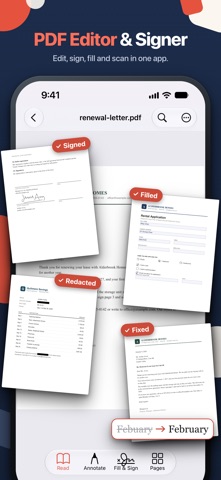




Description by Future Software Solutions S.R.L. Written by the developer, not by AppBrain. Click to read.
Merge, compress, split, convert and scan to PDF in the same app.
myPDF is a PDF editor for the everyday stuff: the lease you have to sign tonight, the form that wants your address in tiny boxes, the scan that's too big to email.
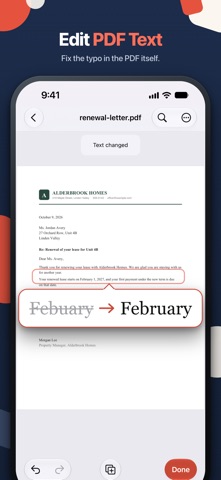
EDIT THE PDF ITSELF
- Edit text: tap a line, fix the typo or the date, done
- Edit images: move, resize or replace a photo on the page
- Add pages from Files, Photos or a new scan
- Reorder, rotate, duplicate, extract or delete pages
- Watermark, plus Header & footer with page numbers: two tools, each with a live preview
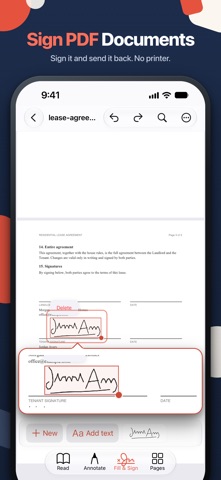
SIGN AND FILL
- Draw your signature once or take it from a photo, then reuse it
- Fill out PDF forms: text fields, checkboxes, radio buttons and lists
- Add text anywhere on the page
- Sign it and send it back, no printer needed
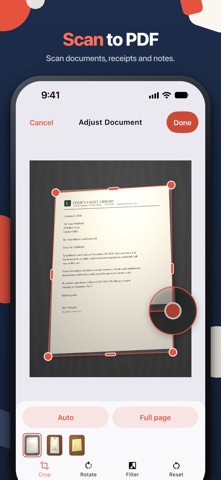
SCAN TO PDF
- Scan documents, receipts and notes with edge detection, then crop, rotate and filter each page
- Save as a searchable PDF (OCR), so you can find and copy the text later
- Clean up shadows on scans
- Turn photos into a PDF
MERGE, SPLIT, COMPRESS, CONVERT
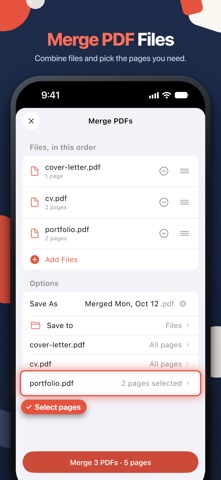
- Merge PDF files and pick the pages you need from each one
- Split a PDF into ranges or single pages
- Compress a PDF that's too big to email, with the text still selectable
- Word, PowerPoint, Excel and EPUB to PDF
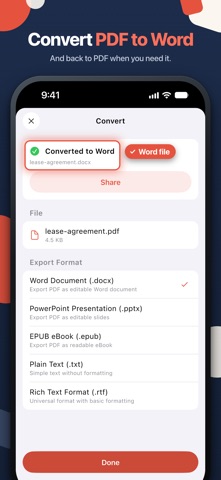
- PDF to Word, PowerPoint, EPUB, plain text or RTF
PRIVATE DETAILS
- Redact: mark an area or search for a name or number.
- Passwords: lock a PDF with an open password, and add an owner password that limits printing and editing
- Sanitize: remove hidden metadata, scripts and attachments
- Secure Wallet: keep private PDFs behind Face ID or a PIN
READ AND MARK UP
- Highlight, underline, strike out, draw with your finger or Apple Pencil, add notes, stamps and links
- Search, bookmarks, table of contents and folders
- Night and Sepia reading modes, and the screen stays on while you read
CHAT WITH YOUR PDF
Ask a long contract or manual a question and get the answer from its own text, with the page it came from. Tap it to jump there.
GOOD TO KNOW
- Signatures are drawn or taken from a photo. They are not certificate-based.
- Edit text works on PDFs that have real text. Scanned pages and some fonts can't be edited, and myPDF tells you when that's the case.
- Chat uses Apple Intelligence where it's available. Otherwise it needs a one-time download of about 1.6 GB, then it runs on your device.
- Password-protected PDFs work in the tools. Compressed and greyscale copies keep the password, split and merged files are saved without one.
Safety and technology
Found in the app by AppBrain- Price
- Free
- App size
- 65.7 MB
- Content rating
- Everyone
Technologies used by myPDF: PDF Editor & Scanner
Releases
Updates seen on the App Store- Version
- 2.0.5
- Launched
- August 2025
No changelog data
Alternatives
Similar apps and more from Future Software Solutions S.R.L.Alternatives to myPDF: PDF Editor & Scanner


More from Future Software Solutions S.R.L.


Rankings
App Store top chartsApp Store Rankings for myPDF: PDF Editor & Scanner
About the app and developer
About myPDF: PDF Editor & Scanner
myPDF: PDF Editor & Scanner is a business app developed by Future Software Solutions S.R.L.
What is the rating of myPDF: PDF Editor & Scanner?
myPDF: PDF Editor & Scanner is rated 4.69 out of 5 stars, based on 32 ratings.
Is myPDF: PDF Editor & Scanner free?
myPDF: PDF Editor & Scanner is free. The app size is 65.72 MB. The latest version available is 2.0.5. The last update was on October 25, 2026.
What are the requirements for myPDF: PDF Editor & Scanner?
The app has a content rating of Everyone. The app has been available on the App Store since August 2025.
Developer information for Future Software Solutions S.R.L.
Future Software Solutions S.R.L.
Address:
Frequently asked questions about myPDF: PDF Editor & Scanner
Is myPDF: PDF Editor & Scanner free?
Yes. myPDF: PDF Editor & Scanner is free on the App Store.
Is myPDF: PDF Editor & Scanner still available?
Yes. myPDF: PDF Editor & Scanner is on the App Store, and the last update we saw was on October 25, 2026.
How large is myPDF: PDF Editor & Scanner?
myPDF: PDF Editor & Scanner is 65.72 MB.
Is myPDF: PDF Editor & Scanner suitable for children?
App Store rates the content of myPDF: PDF Editor & Scanner as suitable for everyone.
How do people rate myPDF: PDF Editor & Scanner?
myPDF: PDF Editor & Scanner scores 4.69 out of 5 stars, from 32 ratings on the App Store.
Who made myPDF: PDF Editor & Scanner?
myPDF: PDF Editor & Scanner was developed by Future Software Solutions S.R.L. It is listed in the business category on the App Store.
What are the best alternatives to myPDF: PDF Editor & Scanner?
People looking at myPDF: PDF Editor & Scanner also look at these business apps: Compress-san, MediaPurge: Delete Old Photos, Flashlight - NO ADS, AI recording, VPD Tool.