PDF Scan – Scanner & Reader turns your iPhone into a fast, private document scanner for everyday paperwork. Scan receipts, invoices, contracts, notes, IDs, forms, books, whiteboards and business cards in seconds, then save clean PDF files or image exports from one simple app.
Built for real work
Use PDF Scan when you need a portable scanner at home, in the office, on the road, at school or while traveling. Capture a page, review the result, organize it into a project and export it when you are ready. The app is designed for people who want a scanner that is quick, clear and practical without forcing an account or sending private documents through a cloud service.
Clean scans from your camera
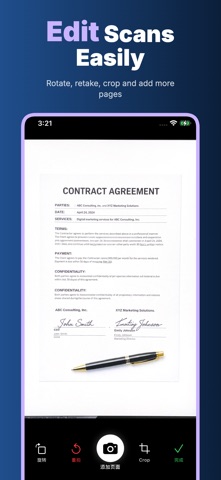
Smart edge detection helps frame the page automatically. Perspective correction straightens angled shots, and automatic image enhancement adjusts shadows, contrast and sharpness so documents are easier to read. Use it for paper forms, printed letters, handwritten notes, receipts, class handouts, meeting documents and signed pages.
PDF tools in one place
Create multi-page PDFs, reorder pages, save projects, export smaller or higher quality PDF files, and share documents through the standard iOS share sheet. You can also save pages as images, keep original images when needed, add a watermark, sign a document and place the signature on the page. For sensitive files, use PDF lock tools to help protect a document with a password before sharing.
Text recognition and smart tools
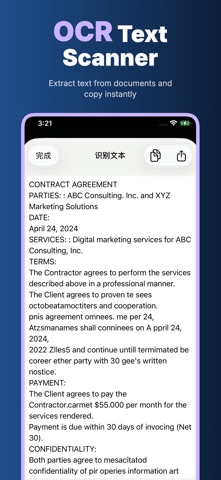
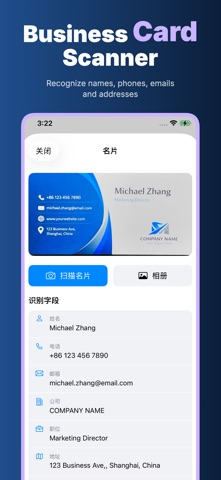
OCR text recognition helps pull editable and searchable text from scans, so you can copy, review and share the words inside a document instead of retyping everything. Business card scanning can recognize contact details and help save them to Contacts. Receipt and invoice tools can extract useful fields and export line items as CSV for expense tracking.
Organize paperwork without a mess
Keep different scans in separate projects: tax documents, school notes, rental papers, travel receipts, work contracts, medical forms, invoices, business cards, warranties and signed agreements. A project-based library makes it easier to find what you scanned, add more pages later and export the right file when someone asks for it.
Privacy-first scanning
PDF Scan is built around five practical privacy promises:
Offline: core scanning, organizing, OCR, PDF creation and export workflows can be used without depending on a web account.
No Login: open the app and scan; no sign-up, no user profile and no password just to manage your own documents.
Privacy First: receipts, IDs, contracts, signatures, business cards and personal notes are treated as private files.
On Device: document capture, image processing, OCR, PDF generation, signatures and exports are handled on your device.
No Cloud Upload: PDF Scan does not upload your scans, recognized text, contacts, receipts, signatures or projects to its own cloud.
For students, freelancers, small business owners, travelers, teachers, parents and anyone with paper to manage, PDF Scan keeps the workflow simple: scan, review, recognize, sign, convert and share. Some advanced tools and unlimited access may require an active subscription, clearly shown before purchase.
Privacy Policy
https://5gotogo.github.io/PDFScan-privacy/privacy-policy.html
Terms of Use (EULA)
https://www.apple.com/legal/internet-services/itunes/dev/stdeula/
Show more
Show less