

MyScreenTime
MyScreenTime is made and published by seijiro takada. AppBrain is an independent app data site and isn't affiliated with seijiro takada. The app name, icon, screenshots and description belong to seijiro takada and are shown as published on the App Store.
AppBrain's verdict
- Last updated
- October 2, 2026
Rankings
App Store top chartsApp Store Rankings for MyScreenTime
Competitors
Similar apps and more from seijiro takadaAlternatives to MyScreenTime



Releases
Updates seen on the App Store- Version
- 1.0.2
- Launched
- August 2026
No changelog data
User feedback
Ratings and reviews on the App StoreComments on MyScreenTime for iOS
We don't have enough comments to show example comments. Please check back later.
Technology
Found in the app by AppBrain- Price
- Free
- App size
- 4.85 MB
- Content rating
- Medium
Technologies used by MyScreenTime
About the app and developer
About MyScreenTime
MyScreenTime is a productivity app developed by seijiro takada.
What is the rating of MyScreenTime?
MyScreenTime has no ratings yet.
Is MyScreenTime free?
MyScreenTime is free. The app size is 4.85 MB. The latest version available is 1.0.2. The last update was on October 2, 2026.
What are the requirements for MyScreenTime?
The app has a content rating of Medium Maturity. The app has been available on the App Store since August 2026.
Developer information for seijiro takada
Address:
Frequently asked questions about MyScreenTime
Is MyScreenTime free?
Yes. MyScreenTime is free on the App Store.
Is MyScreenTime still available?
Yes. MyScreenTime is on the App Store, and the last update we saw was on October 2, 2026.
How large is MyScreenTime?
MyScreenTime is 4.85 MB.
Is MyScreenTime suitable for children?
App Store gives MyScreenTime a medium maturity rating, so it is not meant for young children.
Who made MyScreenTime?
MyScreenTime was developed by seijiro takada. It is listed in the productivity category on the App Store.
What are the best alternatives to MyScreenTime?
People looking at MyScreenTime also look at these productivity apps: MomoFish: Screen Time Pet, finit: Screen Time & Life, Logline: Timeline Notes & Log, Remy: Screenshot Calendar AI, Daily routine app | Reco.
Store listing
By seijiro takada, from the App Store


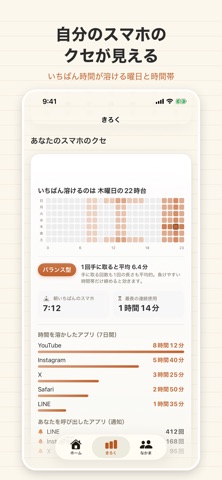


Description by seijiro takada Written by the developer, not by AppBrain. Click to read.
MyScreenTimeは、あなた自身が決めたルールで、あなた自身のスマホを止めるアプリです。
誰かに監視されるのではなく、未来の自分との約束を守るための道具です。
■ 3つの止め方
・時間帯ブロック
「22時から7時はSNSを開かない」など、決めた時間だけ自動で止まります。
・セッション制
「10分を1日3回まで」。使い切ったらその日はもう開けません。
・場所ブロック
「会社にいる間だけ止める」。指定した場所に着くと自動でブロックされます。
■ 甘えを許さない3つのモード
・ノーマル … いつでも解除できます。まずはここから。
・タイムアウト … 解除するには待ち時間が必要です。
・ロックアウト … ブロック中は設定の変更そのものができません。
「あとでオフにすればいいや」を潰すための仕組みです。
■ 「なぜ負けたか」がわかる
使いすぎた量を見せられても、人は変わりません。
このアプリは、あなたが負ける原因を見せます。
・何時に負けやすいか
・どこにいると負けるか
・どのアプリに時間を溶かしているか
「夜11時の自分が弱い」とわかれば、そこだけ手を打てます。
■ 相棒がいる
選んだキャラクターが、ブロック中に声をかけてきます。
続けるほど仲良くなり、レベルが上がっていきます。
■ 続いた分が、ちゃんと残る
連続日数は途切れるとゼロに戻りますが、
「最長記録」と「累計達成日数」は減りません。
■ なかま(任意)
友達コードを交換した相手とだけ、その日の記録を見せ合えます。
公開範囲は自分で決められ、オフにした情報は端末から送信されません。
■ ぜんぶ無料
全機能を無料で使えます。
課金は「開発を応援する」だけで、払っても機能は一切変わりません。
■ プライバシー
・アプリごとの利用時間は、Appleの仕組み上、端末の外に出せません。開発者も見られません。
・位置情報は常時追跡しません。設定でいつでもオフにできます。
・広告は表示しません。情報を第三者に売ることもありません。
スマホに使われる側から、使う側へ。