AppBrain
AppBrain
  • Apps
  • Apps being viewed right now Trending apps today Most popular apps All-time most installed apps Top rated apps iPhone and iPad apps
  • Intelligence ▾
    Intelligence overview → Track any Android app or your whole market
    Track & analyze
    Keyword Tracker & OptimizerTrack & improve Play rankings App Performance ReportOne-off PDF for any app StatisticsFree Android & Play market stats
    Promote your app
    Featured Apps App Links
  • Intelligence
  • Pricing
  • Dashboard
  • Sign up
  • Log in
App Store Apps > Productivity > Daily routine app | Reco
Daily routine app | Reco icon

Daily routine app | Reco

by SPELLA CO. LTD. · Productivity · Free
On the App Store since January 2022 · Data updated 2026-10-15
App Store

Daily routine app | Reco is made and published by SPELLA CO. LTD. AppBrain is an independent app data site and isn't affiliated with SPELLA CO. LTD. The app name, icon, screenshots and description belong to SPELLA CO. LTD. and are shown as published on the App Store.

AppBrain's verdict

Rating on App Store
5.00
1 ratings
Last updated
March 15, 2024
Size
96.8 MB

It doesn't have enough ratings yet to judge what users think.

User feedback

Ratings and reviews on the App Store

Comments on Daily routine app | Reco for iOS

We don't have enough comments to show example comments. Please check back later.

Store listing

By SPELLA CO. LTD., from the App Store
Daily routine app | Reco Screenshot 1 of 5
Daily routine app | Reco Screenshot 2 of 5
Daily routine app | Reco Screenshot 3 of 5
Daily routine app | Reco Screenshot 4 of 5
Daily routine app | Reco Screenshot 5 of 5
Screenshots by SPELLA CO. LTD., from the the App Store listing
Description by SPELLA CO. LTD. Written by the developer, not by AppBrain. Click to read.
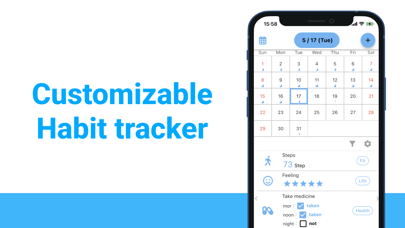
Reco is a customizable habit tracker, graph and calendar application.
It is ideal for diets, muscle training, medications, and hospital visits.
You can also look back on the past with a line graph.

■How to use
(1) Create a habit
First, enter the information you want to manage.
Select the data type (number, checkbox, accumulated time, text, etc.) for each habit.
Next, enter a title, unit, category, etc.

In addition, it is possible to have a notification for each habit.
Set the days of the week and times you wish to enter to prevent omissions.

(2) Entering Values
Once you have decided on a habit, you can actually enter the data.
Tap the habit you have created in the list below the date on the home screen to open a dialog box.
Enter the data on that screen and press OK to complete the recording.
You can also record a memo in addition to the actual data.

(3) Checking the graph
When data is actually recorded, a graph is automatically created.
Press the graph icon in the middle of the bottom of the screen to check the graph.
There are five things you can do on the graph screen.

Display a list of input data
Zoom in on a graph (pinch is also possible)
Filter the graphs to be displayed.
Change the number of days the graph is displayed.
Overlapping graphs

Graphs of your habits will help you to continue your habits and achieve your goals.
It is also ideal for gaining insights from daily life and improving habits.
The graph is displayed as a line graph for numerical values and time, and as colored circles for checkboxes and text.
If a negative number is entered, the graph will also be displayed to the minus sign.
The graph display range is up to 365 days for the free version.

(4) Editing record items
You can edit the information (title and units) of the first habit you created later.
Please edit from the gear mark on the home screen.
In addition to updating information, you can also reorder the record items on the edit screen.
When you reorder the items, the order of the graphs will change as well.


■Main features and functions of the habit tracker Reco

Customize the habits you want to track!
You can set titles and units freely, so you can manage all your daily habits!

You can set any title and unit you want, so you can manage all your daily habits!
You can create a notification for each habit to prevent you from forgetting to do it.

You can also create a notification for each habit to prevent you from forgetting to do it.
You can check your records in a graph list, so you can look back on the past and increase your motivation!

No worries even if you change the model or device!
All data is stored in the cloud, so you can take over your data even if you change devices!

Supports dark mode
The screen can be set to dark mode to reduce eye strain when typing in dark places!

Health Care Support
Supports HealthKit record items (number of steps)!
We are planning to add more record items that can be linked to HealthKit in the future.


■Examples of specific usage scenarios

Muscle training
Dieting
Study time
Meals
Medication-related
Mental health and mood
Bipolar disorder, manic-depression related
Hospital visits
Menstrual cycle
Housework
Diary
Photo album
TODO list
Calendar
Reminders
Weight management
Health management

You can record anything else.
It helps you to look back at the data you recorded and gain a sense of awareness and accomplishment!

■Reco is recommended for

People who have many habits to track
People who like to track their habits
People who like graphs
People who like to see information about past habits.
People who want to manage various habits with one app.
People who want to keep up their habits.
People who have goals they want to achieve.
People who like to record and graph their habits.
Official page on the App Store Also on Google Play

Safety and technology

Found in the app by AppBrain
Price
Free
App size
96.8 MB
Content rating
Everyone

Technologies used by Daily routine app | Reco

Releases

Updates seen on the App Store
Version
4.0.1
Launched
January 2022

No changelog data

Alternatives

Similar apps and more from SPELLA CO. LTD.

Alternatives to Daily routine app | Reco

Daily Chores Checker icon Daily Chores Checker
nihee, LLC
4.2
Free
12 ratings
Habit Management - Pomodoro icon Habit Management - Pomodoro
Shinya Okazaki
0.0
Free
Today's Tasks icon Today's Tasks
Yasuko Shikiuchi
0.0
Free
メモで体調記録と健康管理、写真を添えて残せる毎日のメモ icon メモで体調記録と健康管理、写真を添えて残せる毎日のメモ
LAN CHEN
4.5
Free
12 ratings
Wave Focus icon Wave Focus
Bryan Lee
0.0
Free
Routick: Habit Tracker & To-Do icon Routick: Habit Tracker & To-Do
Yoshinobu Kanetaka
4.0
Free
5 ratings
Quick Chart icon Quick Chart
Piet Jonas
1.5
$0.99
2 ratings
Grid ToDo - Plan 64 Actions icon Grid ToDo - Plan 64 Actions
NAOKI YUSA
4.7
Free
11 ratings

More from SPELLA CO. LTD.

Medication Reminder | Medica icon Medication Reminder | Medica
SPELLA CO. LTD.
4.5
Free
6 ratings

Also available on Google Play

Daily routine app | Reco icon Daily routine app | Reco
株式会社Spella
0.0
Free
5,000+

Rankings

App Store top charts

App Store Rankings for Daily routine app | Reco

This app is not ranked

About the app and developer

About Daily routine app | Reco

Daily routine app | Reco is a productivity app developed by SPELLA CO. LTD.

User Ratings

Daily routine app | Reco is rated 5.00 out of 5 stars. The rating is based on one rating ratings.

App Information

Daily routine app | Reco is freely available from the App Store. The app size is 96.77 MB. The latest version available is 4.0.1. The last update was on March 15, 2024.

Technical Requirements

The app has a content rating of Everyone. The app has been available on the App Store since January 2022.

Developer information for SPELLA CO. LTD.

SPELLA CO. LTD.

Address:

Share Daily routine app | Reco

Price drops on Google Play Apps other people are watching Popular Productivity Apps Top new apps Today's trending apps
Daily Chores Checker icon Daily Chores Checker
Habit Management - Pomodoro icon Habit Management - Pomodoro
Today's Tasks icon Today's Tasks
メモで体調記録と健康管理、写真を添えて残せる毎日のメモ icon メモで体調記録と健康管理、写真を添えて残せる毎日のメモ
Wave Focus icon Wave Focus
Routick: Habit Tracker & To-Do icon Routick: Habit Tracker & To-Do
Quick Chart icon Quick Chart
Grid ToDo - Plan 64 Actions icon Grid ToDo - Plan 64 Actions
Overview Alternatives Reviews Rankings Technology
AppBrain Intelligence premium content

Subscribe now to get full and unlimited access to AppBrain Intelligence. You'll have access to:

  • App Intelligence dashboard (performance timeline, competitor comparison, country rankings, insight cards)
  • Detailed ranking data per app
  • Full timeline per developer
  • Device market shares data per country
  • Unlimited keyword tracking
1 Month

$75/mo
(billed every month)

SAVE 0%
Subscribe
3 Months

$65/mo
($195 billed every 3 months)

SAVE 13%
Subscribe
1 Year

$57.50/mo
($690 billed every year)

SAVE 23%
Subscribe
Each subscription will automatically renew 3 days before the expiration date for the same time period. Subscriptions can be cancelled at any time before the renewal.

AppBrain is an app data site, we track rankings, ratings, installs for all apps and games on Google Play and the App Store. AppBrain doesn't host app files or APKs, all install links go directly to the official store. All trademarks are owned by their respective owners. As an Amazon Associate AppBrain earns from qualifying purchases.

More apps

  • Top Android apps being viewed
  • View Latin - English
  • View Engine Builder Assistant
  • Legendary

App statistics

  • Android statistics
  • Google Play Developer stats
  • Trending Android Apps
  • Trending iOS apps
  • Top popular Apps
  • Buy the best Android phone
  • Buy & sell app businesses

About AppBrain

  • Contact
  • Privacy
  • Documentation
  • DMCA takedowns
  • Articles
  • Blog
  • Free webpage for your Android app
© 2010-2026 - AppBrain