

MyVoltControl
MyVoltControl is made and published by Craftin De Apps LLC. AppBrain is an independent app data site and isn't affiliated with Craftin De Apps LLC. The app name, icon, screenshots and description belong to Craftin De Apps LLC and are shown as published on the App Store.
AppBrain's verdict
Established- Rating on App Store
- 4.24
- 17 ratings
- Last updated
- October 23, 2025
- Size
- 19.7 MB
It doesn't have enough ratings yet to judge what users think.
User feedback
Ratings and reviews on the App StoreComments on MyVoltControl for iOS
We don't have enough comments to show example comments. Please check back later.
Store listing
By Craftin De Apps LLC, from the App Store





Description by Craftin De Apps LLC Written by the developer, not by AppBrain. Click to read.
MyVoltControl requires the use of an OBD adapter that complies with the ELM327 specification (most do). You can use either:
- an OBDLink MX+ OBD adapter (preferred)
- an OBDLink MX-WiFi OBD adapter
- a Bluetooth-Low-Energy (aka Bluetooth 4) OBD adapter. (Classic bluetooth adapters are not supported by iOS.)
- a generic WiFi OBD adapter will work in most cases (but is not recommended).
If you need to buy an adapter, or to see a list of some that aren't ELM327 compatible, refer to the information in our FAQ page at http://www.CraftinDeApps.com/FAQ#MVC
These adapters plug into the OBD-II port under the left side of your dash.
The App itself is free. Use of the functions described below requires one-time in-app purchases to enable each one that you want to use.
MyVoltControl consolidates four functions, long available for other phones, and makes them available for the iPhone and iPad. In addition, the last one is unique to this app. These are known as:
-->> MyVoltHold
-->> MyVoltLifetime
-->> MyVoltDiag
-->> MyVoltAfterblow
-->> MyVolt12v
-->> The Volt Hold function does four things.
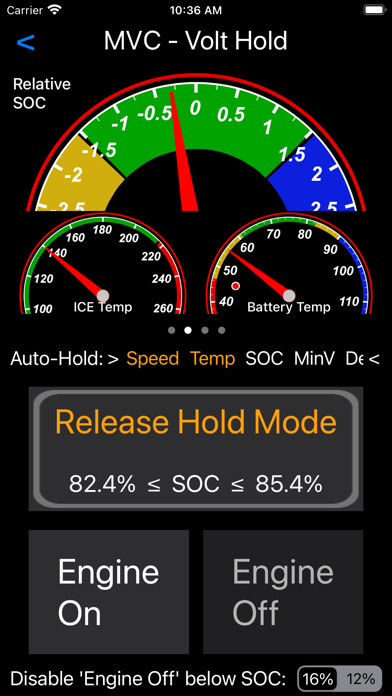
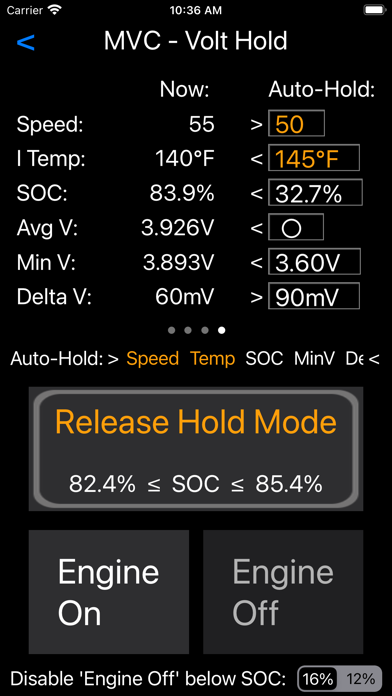
- First, at the top, it has several "information pages" that you can switch between to see information about your car. These are shown in the photos above.
- Second, it allows you to turn on a "Hold" mode which approximates the Hold mode built into the car beginning with the 2013 model. This Hold mode turns on the internal combustion engine (ICE) as needed to try to maintain a State of Charge value that is close to the charge that was present when you turned the mode on. So why, you may ask, would I want that function on a newer car. Very simple really. Since Sport mode and Hold mode are mutually exclusive, this function allows you to use the car Mode button to engage Sport mode, while using the Hold function in this App to achieve Hold mode at the same time! Hold mode can also be automatically engaged based on several factors.
- Next, it allows you to ask the car to run the internal combustion engine. You can use this to get heat from the engine on a cold morning, or to manually simulate your own Hold mode if you prefer.
- Finally, you can also use this function to force the ICE off, which you might want to do if the ICE is running due to low temperature (done for driver comfort).
The Volt Hold function is not available (and would serve no purpose) on the Chevrolet Bolt models.
-->> The Volt Lifetime function allows you to reset the lifetime fuel economy value ("Lifetime MPG" or "Lifetime L/100km") value for your car. You will find this useful if you've purchased a car which has recorded the previous owner's fuel economy results. You can also use this to calculate the distance travelled in both EV mode and on the ICE by entering the Lifetime Economy number shown on your dash. The Volt Lifetime function is not available (and would serve no purpose) on the Chevrolet Bolt models.
-->> The Volt Diag function allows you to run some tests on your high-voltage (traction) battery.
-->> The Volt Afterblow function allows you to control a system that GM added to your car to dry out the A/C vents. This system is OFF by default and the Volt Afterblow function allows you to turn it on (or back off).
This app function is not available for 2013 model year cars.
- You can use the Volt Afterblow feature ONLY if you are using an OBD adapter which supports the SWCAN (aka GMLAN) bus. It must also support the "ST" command set (in addition to the common "AT" command set). Very few adapters offer this support. The known to be good and recommended adapters for this are the OBDLink MX+ or the OBDLink MX-Wifi adapters.
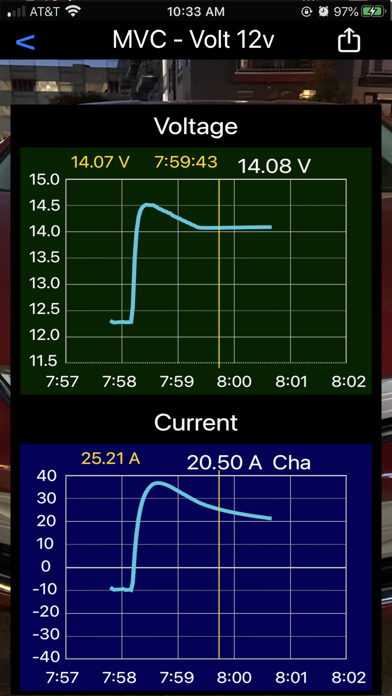
-->> The Volt 12v function displays graphs showing the values of voltage and current on your 12 volt battery.
Safety and technology
Found in the app by AppBrain- Price
- Free
- App size
- 19.7 MB
- Content rating
- Everyone
Technologies used by MyVoltControl
Releases
Updates seen on the App Store- Version
- 2.10.0
- Launched
- January 2020
No changelog data
Alternatives
Similar apps and more from Craftin De Apps LLCAlternatives to MyVoltControl





Rankings
App Store top chartsApp Store Rankings for MyVoltControl
About the app and developer
About MyVoltControl
MyVoltControl is an utilities app developed by Craftin De Apps LLC.
User Ratings
MyVoltControl is rated 4.24 out of 5 stars. The rating is based on 17 ratings.
App Information
MyVoltControl is freely available from the App Store. The app size is 19.73 MB. The latest version available is 2.10.0. The last update was on October 23, 2025.
Technical Requirements
The app has a content rating of Everyone. The app has been available on the App Store since January 2020.
Developer information for Craftin De Apps LLC
Address:
Frequently asked questions about MyVoltControl
Is MyVoltControl free?
Yes. MyVoltControl is free on the App Store.
Is MyVoltControl still available?
Yes. MyVoltControl is on the App Store, and the last update we saw was on October 23, 2025.
How large is MyVoltControl?
MyVoltControl is 19.73 MB.
Is MyVoltControl suitable for children?
App Store rates the content of MyVoltControl as suitable for everyone.
How do people rate MyVoltControl?
MyVoltControl scores 4.24 out of 5 stars, from 17 ratings on the App Store.
Who made MyVoltControl?
MyVoltControl was developed by Craftin De Apps LLC. It is listed in the utilities category on the App Store.
What are the best alternatives to MyVoltControl?
People looking at MyVoltControl also look at these utilities apps: Engine Link - OBD II diagnosis, myVolta, tes•LAX - CAN Bus Explorer, E-Space Car Charging, scan my T3SLA.