

NDICam is made and published by Mark Gilbert. AppBrain is an independent app data site and isn't affiliated with Mark Gilbert. The app name, icon, screenshots and description belong to Mark Gilbert and are shown as published on the App Store.
AppBrain's verdict
Established- Rating on App Store
- 3.93
- 14 ratings
- Last updated
- September 18, 2024
- Size
- 2.99 MB
It doesn't have enough ratings yet to judge what users think.
User feedback
Ratings and reviews on the App StoreComments on NDICam for iOS
We don't have enough comments to show example comments. Please check back later.
Store listing
By Mark Gilbert, from the App StoreDescription by Mark Gilbert Written by the developer, not by AppBrain. Click to read.
NDICam is the original NDI iOS camera built by the world's leading NDI broadcast infrastructure developers - Sienna.
Mature and feature rich, uniquely with both Full NDI and NDI HX3 modes.
The NDI (Network Device Interface) protocol connects to professional vision mixers and other devices, and delivers a high quality, low latency connection. NDICam is compatible with All TriCasters, VMix, Wirecast and hundreds of other professional IP video systems, software and hardware, which support NDI.
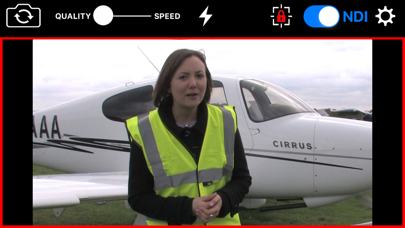
- Simple to use - nothing to configure on your iOS device
- Switch between front and rear cameras during broadcast
- Auto Focus, AF Lock and Tap to Focus
- Auto Exposure, AE Lock and Tap to Expose
- Illumination light on/off
- Audio Mute Control
- Manual Naming of NDI Stream source
- 4 quality / performance levels to suit your device and network, plus NDI HX Option
- Pinch to zoom (where zoom is supported)
- Auto-lens mode for multi-lens cameras
- On screen live / preview tally plus optional use of camera flash as talent tally (with red gel cover).
- Option to prevent iOS device sleep
- Select 25FPS or 29.97FPS standard rate.
- Choice of Full NDI or NDI HX3 compression modes (HX2 at 2 to 20 mBit, plus HX3 Ultra)
- Rotation support for Portrait or Landscape Video Modes.
Front and Rear cameras can be selected at the touch of a button and NDICam features a 4 position quality vs frame rate slider to deliver optimum video suited to the quality of your wifi connection and your iPhone's processing performance. Depending on your iOS device, compression mode selected and Wifi network performance NDICam supports up to 1080 full HD resolution.
Control of flashlight, touch to focus, focus lock, pinch to zoom and audio enable are also included. You can even use the phone's torch as a Tally Light, by covering it with a red gel.
Note: Depending on the performance of your iOS device and your WIFI network, you may not see full frame rates when operating at maximum 1080 resolution with a full HD camera. Using HX3 mode will help if the bottleneck is your WIFI network.
Note: NDI is a high bandwidth protocol designed for local area Gigabit networks. In order to see good results you will need a fast, uncontested wifi connection. If you see slow frame rates, try improving the wifi environment, with a better router, less interference, directional antenna or maybe switch to 5GHz if you are on 2.4GHz. .
NB HX3 Ultra will use around 50mBits of bandwidth, so it's lower than full NDI, but still quite high. Use one of the lower bandwidth HX3 modes if your network connection is struggling.
NDICam is also compatible with wired ethernet connections to iOS devices which can help deliver smooth video compared to a poor quality Wifi network. Good results have been seen with lightning to ethernet adaptors.
You can specify an NDI discovery server in the application settings. Note that you will need to restart the app for any changes to take effect. Specifying a discovery server will disable the standard mDNS (Bonjour) advertisement for the NDI Cam source, so your iOS device must be able to reach the discovery server one the network. If you experience problems - delete the Discovery Server entry and restart the app.
NB: NDI HX3 Ultra mode requires a recent NDI compatible receiver.
Safety and technology
Found in the app by AppBrain- Price
- $9.99
- App size
- 2.99 MB
- Content rating
- Everyone
Technologies used by NDICam
Releases
Updates seen on the App Store- Version
- 7.31
- Launched
- March 2016
No changelog data
Alternatives
Similar apps and more from Mark GilbertAlternatives to NDICam




More from Mark Gilbert




Rankings
App Store top chartsApp Store Rankings for NDICam
About the app and developer
About NDICam
NDICam is a photo & video app developed by Mark Gilbert.
What is the rating of NDICam?
NDICam is rated 3.93 out of 5 stars, based on 14 ratings.
Is NDICam free?
NDICam costs $9.99. The app size is 2.99 MB. The latest version available is 7.31. The last update was on September 18, 2024.
What are the requirements for NDICam?
The app has a content rating of Everyone. The app has been available on the App Store since March 2016.
Developer information for Mark Gilbert
Address:
Frequently asked questions about NDICam
Is NDICam free?
No. NDICam costs $9.99 on the App Store.
Is NDICam still available?
Yes. NDICam is on the App Store, and the last update we saw was on September 18, 2024.
How large is NDICam?
NDICam is 2.99 MB.
Is NDICam suitable for children?
App Store rates the content of NDICam as suitable for everyone.
How do people rate NDICam?
NDICam scores 3.93 out of 5 stars, from 14 ratings on the App Store.
Who made NDICam?
NDICam was developed by Mark Gilbert. It is listed in the photo & video category on the App Store.
What are the best alternatives to NDICam?
People looking at NDICam also look at these photo & video apps: NDI Camera: Easy Streaming, NDI Multiview, NDI Test Patterns, NDI Player, LM-Cam for OBS studio.