



AppBrain's verdict
- Last updated
- August 27, 2026
- Size
- 1.79 MB
User feedback
Ratings and reviews on the App StoreComments on Neat! Chore Timeline for iOS
We don't have enough comments to show example comments. Please check back later.
Store listing
By Dejan Vermeij, from the App StoreDescription by Dejan Vermeij Written by the developer, not by AppBrain. Click to read.
Most chores aren't one-offs — they come back. A normal to-do app treats "clean the bathroom" as something you tick once and forget. Neat! is built around repetition, and around the only question that actually matters: what's due now?
Free. No account. No subscription. Works offline and syncs through your own iCloud.
COLOUR INSTEAD OF DATES
Every chore gets a bar that drifts from green through amber to red the longer it goes undone. Green is fine. Amber means it's getting time. Red means it's genuinely been too long. You never read a date or work down a list — you just see it.
THE TIMELINE
• All your rooms stacked, from today out past two weeks
• A full week visible without scrolling
• Tick off with one tap, undo immediately
• Collapse rooms, filter to one, or filter by what's late
"WHAT CAN I DO RIGHT NOW?"
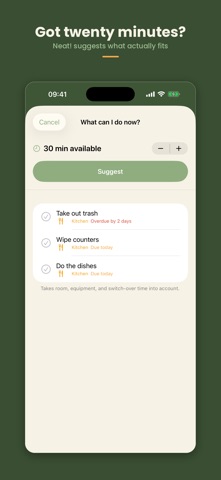
Tell Neat! how many minutes you have and it suggests a plan that actually fits. It starts in the room that's been waiting longest, groups chores in the same room or using the same kit, and accounts for the time switching between them costs.
• From five minutes to a whole morning
• Knows about the vacuum, the mop, the cloth, the machine
• Tick things off straight from the suggestion
NOT TODAY
Bad day? Swipe a chore aside with "Not today" and it moves on by one — without disturbing the underlying schedule. Ill, busy, not in the mood: that happens. The app shouldn't be the thing that holds it against you.
CHECKLISTS FOR THE BIG JOBS
"Clean the bathroom" isn't one tick, it's eight small ones. Give a chore a checklist and it only counts as done when everything is. Get called away halfway through and tomorrow you'll know exactly where you stopped.
• Progress shows on the timeline, e.g. 3/8
• Ticks clear themselves for the next round
• Cleaning the oven and the bathroom come with a checklist ready made
ON YOUR HOME SCREEN
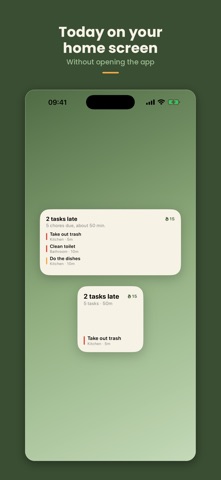
The widget shows what's due today without opening the app: how much is late, how long it all takes together, and what's at the top of the list.
• Small and medium for the home screen
• Also a strip for the lock screen
• Refreshes itself the moment you tick something
ONE NOTIFICATION, NOT TEN
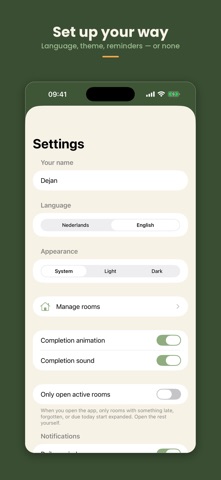
No separate ping per task. One calm summary a day, at a time you choose, plus a weekly recap. Or no notifications at all — also fine.
SEEING THAT IT WORKS
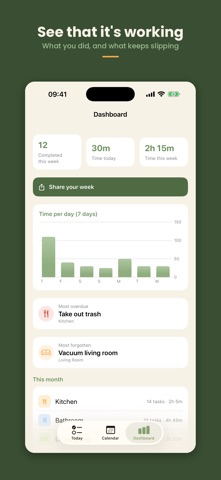
The dashboard shows how much you got done this week and how long it took, with a chart per day. It also points out which chore gets forgotten most and which is furthest behind — usually a sign you scheduled it too frequently, not that you're failing.
SET UP IN A MINUTE
No empty screen waiting for you to type in thirty chores. Pick your rooms and Neat! fills in chores with realistic durations and frequencies. The everyday basics are already on — tick whatever else you want to track and you've started.
RECURRENCE YOU CONTROL
• Every few days, every week, or on fixed weekdays
• Shifts with when you actually finish, or stays on a fixed schedule
• Set how many days of slack each chore gets
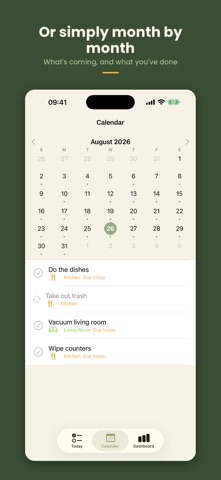
• Calendar view if you'd rather look month by month
ON ALL YOUR DEVICES, WITHOUT AN ACCOUNT
If you're signed in to iCloud on your iPhone, Neat! syncs through your own iCloud account. Your chores come back on a new phone without you ever inventing a password for us. Not signed in, or don't want syncing? Everything carries on working locally.
WE DON'T KNOW WHEN YOU CLEAN YOUR BATHROOM
That's the point. No account with us, no server, no analytics, no ads, no trackers. Syncing runs through your own private iCloud, which we can't reach. The app works in airplane mode — the internet is never a requirement.
Dutch and English, switchable in the app. Dark mode that follows your iPhone. For iPhone running iOS 17 or later.
Made in the Netherlands.
Safety and technology
Found in the app by AppBrain- Price
- Free
- App size
- 1.79 MB
- Content rating
- Everyone
Technologies used by Neat! Chore Timeline
Releases
Updates seen on the App Store- Version
- 1.0
- Launched
- August 2026
No changelog data
Alternatives
Similar apps and more from Dejan VermeijAlternatives to Neat! Chore Timeline


Rankings
App Store top chartsApp Store Rankings for Neat! Chore Timeline
About the app and developer
About Neat! Chore Timeline
Neat! Chore Timeline is a productivity app developed by Dejan Vermeij.
What is the rating of Neat! Chore Timeline?
Neat! Chore Timeline has no ratings yet.
Is Neat! Chore Timeline free?
Neat! Chore Timeline is free. The app size is 1.79 MB. The latest version available is 1.0. The last update was on August 27, 2026.
What are the requirements for Neat! Chore Timeline?
The app has a content rating of Everyone. The app has been available on the App Store since August 2026.
Neat! Chore Timeline is made and published by Dejan Vermeij. AppBrain is an independent app data site and isn't affiliated with Dejan Vermeij. The app name, icon, screenshots and description belong to Dejan Vermeij and are shown as published on the App Store.
Developer information for Dejan Vermeij
Address: