Download Android Apps and Games
AppBrain
  • Apps
  • Apps being viewed right now Trending apps today Most popular apps All-time most downloaded apps Top rated apps
  • Intelligence ▾
    Intelligence overview → Track any Android app or your whole market
    Track & analyze
    Keyword Tracker & OptimizerTrack & improve Play rankings App Performance ReportOne-off PDF for any app StatisticsFree Android & Play market stats
    Promote your app
    Featured Apps App Links
  • Intelligence
  • Pricing
  • Dashboard
  • Sign up
  • Log in
Last updated on: 2026-06-19
App Store Apps > Neon Vision Editor
Neon Vision Editor icon

Neon Vision Editor

0.7.8
Hilthart Pedersen
5.00
6 reviews
Free

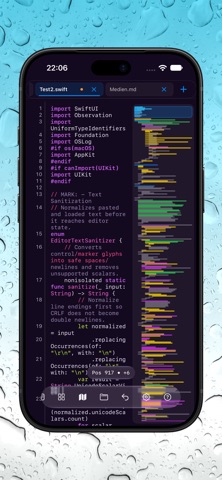
Neon Vision Editor Screenshot 1 of 10
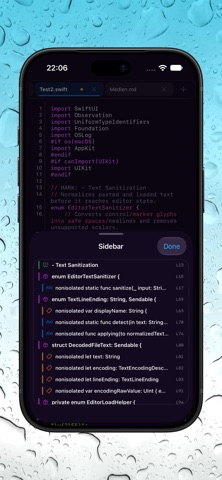
Neon Vision Editor Screenshot 2 of 10
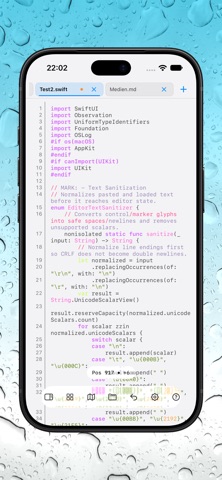
Neon Vision Editor Screenshot 3 of 10
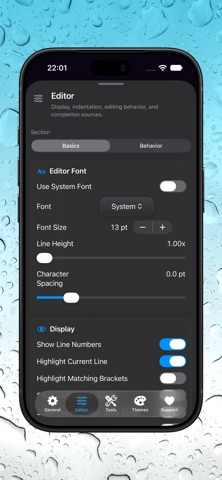
Neon Vision Editor Screenshot 4 of 10
Neon Vision Editor Screenshot 5 of 10
Neon Vision Editor Screenshot 6 of 10
Neon Vision Editor Screenshot 7 of 10
Neon Vision Editor Screenshot 8 of 10
Neon Vision Editor Screenshot 9 of 10
Neon Vision Editor Screenshot 10 of 10
Download from the App Store

About Neon Vision Editor

Neon Vision Editor is an overall app developed by Hilthart Pedersen.

Download Statistics

User Ratings

Neon Vision Editor is rated 5.00 out of 5 stars. The rating is based on 6 ratings.

App Information

Neon Vision Editor is FREE to download. The APK download size is 9.33 MB. The latest version available is 0.7.8. The last update was on June 12, 2026.

Technical Requirements

The app has a content rating of Everyone. The app has been available on Google Play February 2026.

Description
Neon Vision Editor is a native, ultra-fast text editor for macOS, iPhone, and iPad.
Bloat-free. Readable. Built for focused editing without plugins, background indexing noise, or IDE overhead.

Built for macOS 26 (Tahoe) with Apple Silicon as the primary tested target, Neon Vision Editor is designed for fast startup, quick navigation, and clean editing across notes, Markdown, code, configs, and large files.

Highlights

- Broad syntax highlighting for Swift, Python, JavaScript, TypeScript, Java, Kotlin, Go, Ruby, Rust, SQL, HTML, CSS, C/C++, Objective-C, JSON, XML, YAML, TOML, INI, Markdown,
Bash/Zsh, PowerShell, TeX/LaTeX, SVG, CSV/TSV, and Plain Text.
- Fast navigation with Quick Open (Cmd+P), project sidebar browsing, recursive folder trees, and indexed Find in Files workflows for larger projects.
- Markdown workflows with inline preview, PDF export, and cleaner cross-platform preview controls on macOS, iPhone, and iPad.
- Large-file workflows with deferred loading, chunked editor installation, visible open modes, and more stable first paint for huge documents.
- Remote workflows with Mac-hosted SSH sessions, iPhone/iPad attach via broker, remote browse, open, edit, and explicit save with revision protection.
- Multiple independent windows with isolated window state and dedicated toolbars.
- Optional Vim-style keyboard workflow, including iPad hardware-keyboard support.
- Code Snapshot / Share Shot tools for exporting styled editor captures.
- Safe Mode recovery, unsupported-file protection, and stronger startup/session stability.
- Privacy-first design with local editing by default and no telemetry.
- Diff tools

Neon Vision Editor is built for developers, writers, sysadmins, and anyone who wants a fast native editor without Electron, plugin ecosystems, or full IDE complexity.

Privacy

The app does not collect analytics, usage telemetry, advertising identifiers, device fingerprints, or background behavioral metrics. No automatic data transmission to developer-controlled servers occurs.

AI-assisted code completion is optional. External network communication only occurs when a user explicitly enables AI completion and selects an external provider in Settings.

When AI completion is used, the app sends only the minimal text context needed to generate a suggestion, typically the text immediately around the cursor or active selection. It does not automatically transmit full project folders, unrelated files, entire file system contents, contact data, location data, or device identifiers.

API keys for external AI providers are stored securely in the system Keychain and are sent only to the user-selected provider for the completion request. All external communication uses encrypted HTTPS connections. If AI completion is disabled, the app performs no AI-related network requests.

Terms of Use (EULA)
https://www.apple.com/legal/internet-services/itunes/dev/stdeula/
Show more Show less

More data about Neon Vision Editor

Price Free to download
Rating 5.00 based on 6 ratings
Ranking Not ranked
Version 0.7.8
App download size 9.33 MB
Suitable for Everyone

Alternative downloads for the Neon Vision Editor app

API Widgets icon API Widgets
Kamil Kujawinski
5.0
Free
1 ratings
App Ranks & Ratings: Rankor icon App Ranks & Ratings: Rankor
Catspaw Systems LLC
5.0
Free
3 ratings
Smart JSON & XML Editor icon Smart JSON & XML Editor
Ahmet Yilmaz
0.0
Free
Web DevTools+ icon Web DevTools+
Beautification
5.0
Free
2 ratings
Index - SQL Client icon Index - SQL Client
Patrizio Pezzilli
0.0
Free
Terminal File Manager Advanced icon Terminal File Manager Advanced
Aneesh Pradeep
4.5
$0.99
2 ratings
HTML Creator : Editor & Viewer icon HTML Creator : Editor & Viewer
Hardik Khanesa
4.6
Free
14 ratings
Upti: Cloud Status Monitor icon Upti: Cloud Status Monitor
Ismail Perim
0.0
Free

More from Hilthart Pedersen

Metrics Data icon Metrics Data
Hilthart Pedersen
0.0
Free

Changelog of Neon Vision Editor

No changelog data

Developer information for Hilthart Pedersen

Hilthart Pedersen

Address:

Share Neon Vision Editor

Comments on Neon Vision Editor for iOS

We don't have enough comments to show example comments. Please check back later.

App Store Rankings for Neon Vision Editor

This app is not ranked

Technologies used by Neon Vision Editor

Apps other people are watching Apps on sale Today's trending apps Top new apps Popular Overall
API Widgets icon API Widgets
App Ranks & Ratings: Rankor icon App Ranks & Ratings: Rankor
Smart JSON & XML Editor icon Smart JSON & XML Editor
Web DevTools+ icon Web DevTools+
Index - SQL Client icon Index - SQL Client
Terminal File Manager Advanced icon Terminal File Manager Advanced
HTML Creator : Editor & Viewer icon HTML Creator : Editor & Viewer
Upti: Cloud Status Monitor icon Upti: Cloud Status Monitor

Back to top
AppBrain Intelligence premium content

Subscribe now to get full and unlimited access to AppBrain Intelligence. You'll have access to:

  • App Intelligence dashboard (performance timeline, competitor comparison, country rankings, insight cards)
  • Detailed ranking data per app
  • Full timeline per developer
  • Device market shares data per country
1 Month

$75/mo
(billed every month)

SAVE 0%
Subscribe
3 Months

$65/mo
($195 billed every 3 months)

SAVE 13%
Subscribe
1 Year

$57.50/mo
($690 billed every year)

SAVE 23%
Subscribe
Each subscription will automatically renew 3 days before the expiration date for the same time period. Subscriptions can be cancelled at any time before the renewal.

AppBrain is a directory focused on discovering great apps and games. We give statistics, rankings and search options that Google Play and the App Store don't have. All trademarks are owned by their respective owners. AppBrain doesn't offer APKs or binaries, and always lets users install the official version from Google Play or the App Store.

More apps

  • Top Android apps being viewed
  • View Mycall
  • View Tiles Journey
  • Isolde AI: Different Character

Android Statistics

  • Android statistics
  • Google Play Developer stats
  • Trending Android Apps
  • Top popular Apps
  • Buy the best Android phone

About AppBrain

  • Contact
  • Privacy
  • Documentation
  • DMCA takedowns
  • Articles
  • Blog
  • Free webpage for your Android app
© 2010-2026 - AppBrain