

NetSupport Browser
NetSupport Browser is made and published by NetSupport Ltd. AppBrain is an independent app data site and isn't affiliated with NetSupport Ltd. The app name, icon, screenshots and description belong to NetSupport Ltd and are shown as published on the App Store.
AppBrain's verdict
- Last updated
- November 5, 2025
Rankings
App Store top chartsApp Store Rankings for NetSupport Browser
Competitors
Similar apps and more from NetSupport LtdAlternatives to NetSupport Browser


More from NetSupport Ltd





Releases
Updates seen on the App Store- Version
- 2.01.0000
- Launched
- February 2019
No changelog data
User feedback
Ratings and reviews on the App StoreComments on NetSupport Browser for iOS
We don't have enough comments to show example comments. Please check back later.
Technology
Found in the app by AppBrain- Price
- Free
- App size
- 20.0 MB
- Content rating
- High
Technologies used by NetSupport Browser
About the app and developer
About NetSupport Browser
NetSupport Browser is an education app developed by NetSupport Ltd.
User Ratings
The app has no ratings yet.
App Information
NetSupport Browser is freely available from the App Store. The app size is 20.01 MB. The latest version available is 2.01.0000. The last update was on November 5, 2025.
Technical Requirements
The app has a content rating of High Maturity. The app has been available on the App Store since February 2019.
Developer information for NetSupport Ltd
Address:
Store listing
By NetSupport Ltd, from the App Store



Description by NetSupport Ltd Written by the developer, not by AppBrain. Click to read.
When launched, the app interrogates the iOS device to gather key system inventory details and monitor online activity. The data collected is dynamically sent to your local NetSupport DNA Server and is then available for reporting within the NetSupport DNA Management Console. When connected to a NetSupport School Tutor, the app also offers NetSupport’s core classroom instruction tools.
NetSupport School functionality supported on Tablet only.
Supported Browser features:
Real-time monitoring - A DNA Console user can view a real-time summary of all devices in a detailed list view or via real-time thumbnails of each device screen.
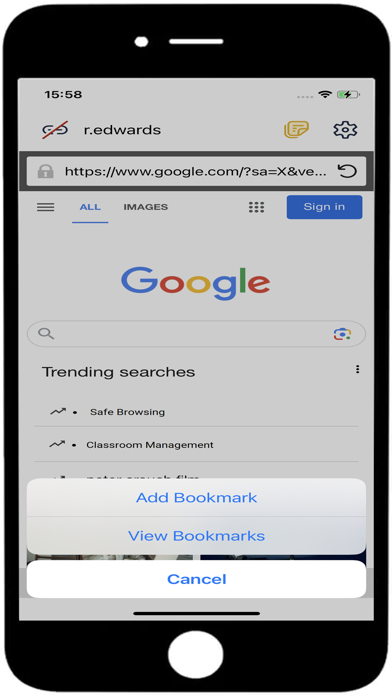
Internet metering - A full summary of internet activity is recorded and approved/restricted website lists can be employed to manage internet use.
Safeguarding Keyword Monitoring (DNA Education version) – This tool helps schools protect students from being exposed to inappropriate online content. It alerts staff when students type or search for any terms that match with those in the DNA keyword database, providing safeguarding and eSafety indicators for self-harm, bullying, radicalisation - and more.
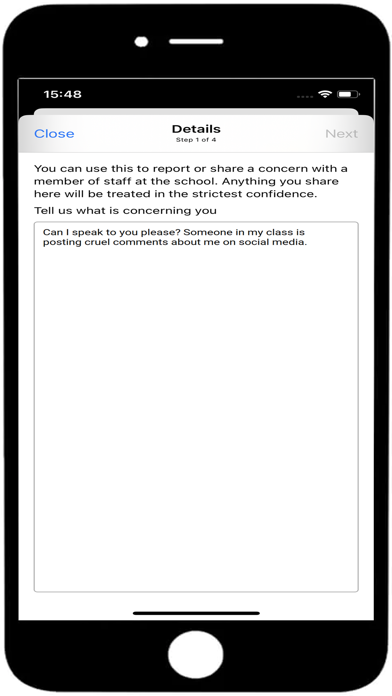
Safeguarding Report a Concern (DNA Education version) - Vulnerable students can discreetly report concerns to nominated school staff.
Safeguarding resources (DNA Education Version) - Provides vulnerable students with instant access to a list of appropriate online support resources.
Hardware inventory - When the Browser is launched on a device, an inventory is dynamically sent to the NetSupport DNA Server.
Enterprise alerting - Real-time alerts enable DNA Console operators to immediately identify any user who has attempted to access a restricted website or triggered a safeguarding keyword.
Collect roaming data– The app can be configured to continue recording browser activity when the device is away from the network. The stored data being collected by the DNA Server once re-connected.
Supported classroom instruction features:
Student register: The teacher can request standard and custom information from each student at the start of a lesson.
Lesson objectives: If provided by the teacher, once connected, students are presented with details of the current lesson along with the objectives and expected learning outcomes.
Sending messages: The teacher can broadcast messages to selected devices.
Chat: The student and teacher can initiate a 1:1 chat session and participate in group discussions.
Request help: Students can alert the teacher when they require assistance.
Lock screen – The teacher can lock the app to gain attention.
Restrict Internet –The teacher can employ a list of approved/restricted websites for use during the lesson.
Question and Answer module: Enables the teacher to conduct instant student and peer assessment. Deliver questions verbally to the class, then select students to answer – randomly, first to answer or in teams. Bounce questions to multiple students and ask the class to peer assess a response.
Class surveys: Teachers can conduct on-the-fly surveys to gauge student knowledge and understanding.
Show screen: While presenting, the teacher can show their desktop to connected devices.
To learn more and to download the required components needed to complete your NetSupport DNA and NetSupport School installations please visit our website. Free 30-day trials available.
With 30 years’ development expertise and a 17 million worldwide install base, NetSupport is a leading producer of educational and corporate software solutions. With our easy-to-use IT management tools, we help our customers increase productivity and security, as well as save time and money.