

Network Tools: Net Toolkit
Network Tools: Net Toolkit is made and published by Pavel Khorenian. AppBrain is an independent app data site and isn't affiliated with Pavel Khorenian. The app name, icon, screenshots and description belong to Pavel Khorenian and are shown as published on the App Store.
AppBrain's verdict
- Last updated
- September 16, 2026
Rankings
App Store top chartsApp Store Rankings for Network Tools: Net Toolkit
Competitors
Similar apps and more from Pavel KhorenianAlternatives to Network Tools: Net Toolkit





More from Pavel Khorenian

Releases
Updates seen on the App Store- Version
- 1.1
- Launched
- August 2026
No changelog data
User feedback
Ratings and reviews on the App StoreComments on Network Tools: Net Toolkit for iOS
We don't have enough comments to show example comments. Please check back later.
Technology
Found in the app by AppBrain- Price
- Free
- App size
- 8.32 MB
- Content rating
- Everyone
Technologies used by Network Tools: Net Toolkit
About the app and developer
About Network Tools: Net Toolkit
Network Tools: Net Toolkit is an utilities app developed by Pavel Khorenian.
User Ratings
The app has no ratings yet.
App Information
Network Tools: Net Toolkit is freely available from the App Store. The app size is 8.32 MB. The latest version available is 1.1. The last update was on September 16, 2026.
Technical Requirements
The app has a content rating of Everyone. The app has been available on the App Store since August 2026.
Developer information for Pavel Khorenian
Address:
Store listing
By Pavel Khorenian, from the App Store





Description by Pavel Khorenian Written by the developer, not by AppBrain. Click to read.
THE TOOLS
• Ping — ICMP latency and packet loss, with a live chart
• Traceroute — the hop-by-hop path, each router named
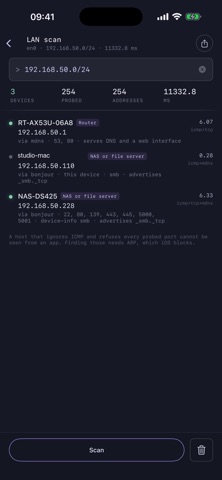
• LAN scan — every device on your subnet, named and identified: routers, NAS boxes, printers, Macs, phones
• Port scan — TCP connect scan with banners and service names, from a handful of ports to all 65535
• DNS — your own wire-format resolver: every record type at once, any public resolver you choose, DNS-over-HTTPS, reverse lookups, and a comparison mode that queries five resolvers and flags the one that disagrees
• HTTP check — status, redirect chain, the DNS/connect/TLS/TTFB split, security headers
• TLS — the full certificate chain, expiry, SANs, cipher suite, and whether the system trusts it
• WHOIS — the referral chain followed to the registrar that actually holds the record
• Wi-Fi — link quality graded against local thresholds, and a walking survey that compares rooms
• Speed test — download, upload, latency and jitter, against Cloudflare or a URL you name
• iperf3 — throughput against your own iperf3 server, up or down, multi-stream
• IP calculator — CIDR maths, masks, host ranges, binary, and subnet division including VLSM
• MAC lookup — 39,000 vendor prefixes, bundled and fully offline
• Wake on LAN — the magic packet, sent to every address that might reach a sleeping machine
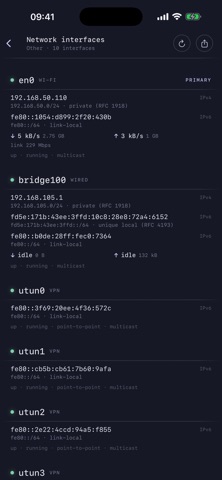
• Network interfaces — addresses, subnets, flags and live throughput
• Telnet — a raw TCP terminal for switches, PDUs and console servers
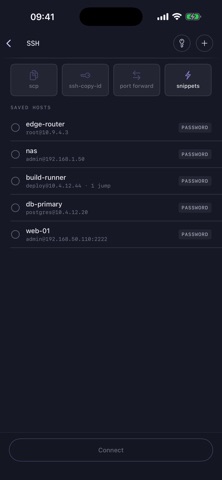
• SSH — see below
A REAL SSH CLIENT
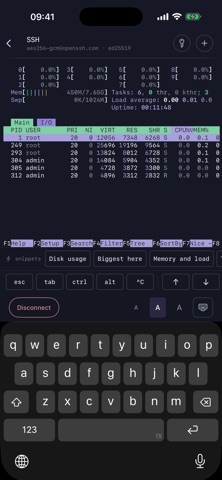
Not a wrapper. The protocol is implemented in Swift, and it does the things you actually need from a phone:
• Jump hosts — reach a machine behind one bastion or several, each hop with its own account, its own credential and its own host key to confirm
• Port forwarding — bind a local port to a service on the far side, then open it in a browser inside the app: a router's web interface, a database, a dashboard listening only on the server's loopback
• scp — send a file up or pull one down, straight to the Files app
• ssh-copy-id — put your public key in a server's authorized_keys without a second terminal
• Keys — generate ed25519 on the device, or import ed25519, ECDSA and RSA in OpenSSH or PEM form, protected or not. Private keys live in the Keychain and can be exported under a passphrase when you need them elsewhere
• Snippets — the commands you always type, one tap above the keyboard
• A proper terminal — a real VT/xterm emulator, so vim and htop work, with esc, ctrl, alt, arrows and F-keys on a row of their own