

NiBoard: Whiteboard Drawing
NiBoard: Whiteboard Drawing is made and published by Enid Hadaj. AppBrain is an independent app data site and isn't affiliated with Enid Hadaj. The app name, icon, screenshots and description belong to Enid Hadaj and are shown as published on the App Store.
AppBrain's verdict
EstablishedLoved by users- Rating on App Store
- 4.59
- 483 ratings
- Last updated
- October 9, 2026
Users love it: 4.6 stars from 483 ratings.
Rankings
App Store top chartsApp Store Rankings for NiBoard: Whiteboard Drawing
Competitors
Similar apps and more from Enid HadajAlternatives to NiBoard: Whiteboard Drawing





More from Enid Hadaj



Releases
Updates seen on the App Store- Version
- 12.1
- Launched
- May 2020
No changelog data
User feedback
Ratings and reviews on the App StoreComments on NiBoard: Whiteboard Drawing for iOS
We don't have enough comments to show example comments. Please check back later.
Technology
Found in the app by AppBrain- Price
- Free
- App size
- 54.3 MB
- Content rating
- Everyone
Technologies used by NiBoard: Whiteboard Drawing
About the app and developer
About NiBoard: Whiteboard Drawing
NiBoard: Whiteboard Drawing is a graphics & design app developed by Enid Hadaj.
User Ratings
NiBoard: Whiteboard Drawing is rated 4.59 out of 5 stars. The rating is based on 480 ratings.
App Information
NiBoard: Whiteboard Drawing is freely available from the App Store. The app size is 54.30 MB. The latest version available is 12.1. The last update was on October 9, 2026.
Technical Requirements
The app has a content rating of Everyone. The app has been available on the App Store since May 2020.
Developer information for Enid Hadaj
Address:
Frequently asked questions about NiBoard: Whiteboard Drawing
Is NiBoard: Whiteboard Drawing free?
Yes. NiBoard: Whiteboard Drawing is free on the App Store.
Is NiBoard: Whiteboard Drawing still available?
Yes. NiBoard: Whiteboard Drawing is on the App Store, and the last update we saw was on October 9, 2026.
How large is NiBoard: Whiteboard Drawing?
NiBoard: Whiteboard Drawing is 54.30 MB.
Is NiBoard: Whiteboard Drawing suitable for children?
App Store rates the content of NiBoard: Whiteboard Drawing as suitable for everyone.
How do people rate NiBoard: Whiteboard Drawing?
NiBoard: Whiteboard Drawing scores 4.59 out of 5 stars, from 483 ratings on the App Store.
Who made NiBoard: Whiteboard Drawing?
NiBoard: Whiteboard Drawing was developed by Enid Hadaj. It is listed in the graphics & design category on the App Store.
What are the best alternatives to NiBoard: Whiteboard Drawing?
People looking at NiBoard: Whiteboard Drawing also look at these graphics & design apps: Whiteboard - Simple, Daydream Doodler, Mockup - UI/UX Design, Calligraphy Calm - Ink Brush, Sticky Notes Widgets: Jot.
Store listing
By Enid Hadaj, from the App Store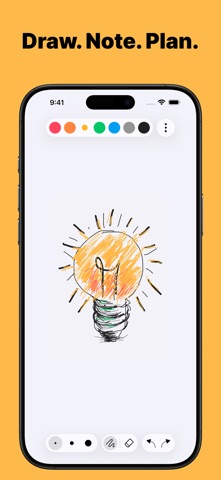


Description by Enid Hadaj Written by the developer, not by AppBrain. Click to read.
Why You’ll Love NiBoard
• Simple from the first tap: Open a board and start drawing without setup.
• Great for Notes, Lessons, and Ideas: Use NiBoard for quick explanations, visual thinking, planning, and sketches.
• Organized Workspace: Keep different notes, sketches, lessons, and ideas in separate boards.
• Apple Pencil Support: Draw with your finger, Apple Pencil, or both for precise control.
• Clean, Minimal Interface: Focus on your ideas without distractions.
Key Features
• Pen & Highlighter: Draw naturally and highlight important notes, diagrams, and ideas.
• Lines, Arrows, Shapes & Text: Create simple diagrams, organize ideas, and add clear labels.
• Editable Objects: Select lines, arrows, and shapes to move, resize, recolor, and customize borders with three size options.
• Shape Fill: Fill supported shapes with color for cleaner diagrams and visual notes.
• Boards: Create, rename, duplicate, and pin boards to keep your ideas and projects organized.
• Infinite Canvas: Expand your canvas and keep drawing without running out of space.
• Canvas Styles: Use Blank, Grid, Dotted, and Lined canvas styles for cleaner sketches and notes.
• Custom Color Palette: Create your own color palette with the full color picker.
• Easy Editing: Use Undo/Redo, Eraser, and Zoom for quick fixes and detailed work.
• Export: Export your boards as PNG or PDF.
• Save & Share: Save your drawings or share them with others.
• Dark Mode: Enjoy a comfortable drawing experience in any lighting.
• Autosave: Your work is saved automatically.
A subscription is required to unlock full access to the app.
Terms of Service
https://www.apple.com/legal/internet-services/itunes/dev/stdeula/