

NoShift - Time tracking
NoShift - Time tracking is made and published by Timmy Savvalas. AppBrain is an independent app data site and isn't affiliated with Timmy Savvalas. The app name, icon, screenshots and description belong to Timmy Savvalas and are shown as published on the App Store.
AppBrain's verdict
- Last updated
- August 31, 2026
Rankings
App Store top chartsApp Store Rankings for NoShift - Time tracking
Competitors
Similar apps and more from Timmy SavvalasAlternatives to NoShift - Time tracking


Releases
Updates seen on the App Store- Version
- 1.0.1
- Launched
- August 2026
No changelog data
User feedback
Ratings and reviews on the App StoreComments on NoShift - Time tracking for iOS
We don't have enough comments to show example comments. Please check back later.
Technology
Found in the app by AppBrain- Price
- Free
- App size
- 30.6 MB
- Content rating
- Everyone
Technologies used by NoShift - Time tracking
About the app and developer
About NoShift - Time tracking
NoShift - Time tracking is a productivity app developed by Timmy Savvalas.
What is the rating of NoShift - Time tracking?
NoShift - Time tracking has no ratings yet.
Is NoShift - Time tracking free?
NoShift - Time tracking is free. The app size is 30.63 MB. The latest version available is 1.0.1. The last update was on August 31, 2026.
What are the requirements for NoShift - Time tracking?
The app has a content rating of Everyone. The app has been available on the App Store since August 2026.
Developer information for Timmy Savvalas
Address:
Store listing
By Timmy Savvalas, from the App Store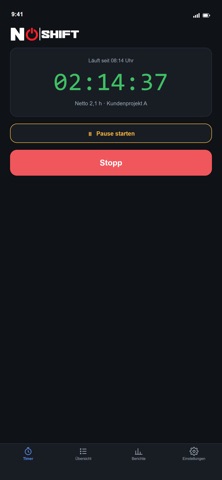
Description by Timmy Savvalas Written by the developer, not by AppBrain. Click to read.
Punch clock with live break
One big start/stop button, project assignment, and a break you start and end right there — break time is deducted automatically.
Overtime balance
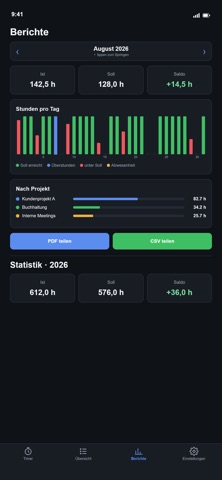
Target hours per weekday, a running balance across months. Positive shows green, negative red — never resets monthly.
Vacation, sick days & holidays
Log absences as a date range. Vacation, sick days and holidays count as fully paid; holidays can be imported via iCal.
Stats & trends
Bars per day and month, a line chart of the overtime balance, and a yearly overview with monthly totals.
Reports & export
Weekly and monthly overview, export as PDF or CSV to share — flagged whenever a time entry was edited after the fact.
Local & private
All data stays on the device (SQLite) — no account, no cloud. Back up to a file and restore it anytime.