

NoteNest - iNotes
NoteNest - iNotes is made and published by Shivang Mishra. AppBrain is an independent app data site and isn't affiliated with Shivang Mishra. The app name, icon, screenshots and description belong to Shivang Mishra and are shown as published on the App Store.
AppBrain's verdict
- Last updated
- January 2, 2025
- Size
- 8.91 MB
User feedback
Ratings and reviews on the App StoreComments on NoteNest - iNotes for iOS
We don't have enough comments to show example comments. Please check back later.
Store listing
By Shivang Mishra, from the App Store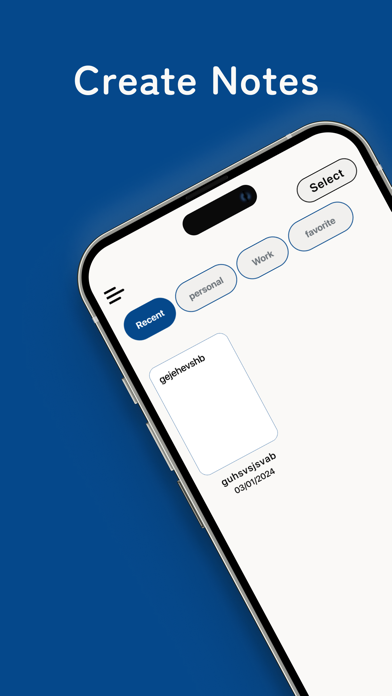


Description by Shivang Mishra Written by the developer, not by AppBrain. Click to read.
Writing something was never easier. We bring you the simplest of apps to draft notes that is easy to use and as effective as anything. NoteNest - iNote is designed to be the most user-friendly app there is, ensuring it can be used by everyone, even the elderly. Whether you’re jotting down personal thoughts, professional ideas, or anything in between, NoteNest - iNote has got you covered.
App Functionalities:
Create Notes
Categorization
Sharing
Favorites
Notes Statistics
Elegant UI
Create Notes:
Make notes at your will in a hassle-free manner. The intuitive interface allows you to jot down your thoughts quickly and efficiently. You can cut, copy, and paste notes anywhere within the app, providing seamless editing capabilities. The app also makes it incredibly easy to share notes through Airdrop and other apps, allowing you to send your notes to friends, family, or colleagues with just a few taps.
Categorization:
Compile notes of a single subject under one heading, such as Personal, Work, Ideas, or any other category you prefer. This helps you keep your notes organized and easy to find. You can prioritize notes based on importance, ensuring that the most crucial information is always at your fingertips. Whether you're a student organizing class notes or a professional managing work tasks, this feature keeps everything neatly arranged.
Favorites:
Mark any notes that you want to refer to again and again as favorites. Access these notes with a simple tap, ensuring quick retrieval of important information. This feature is especially useful for frequently referenced information, like to-do lists, shopping lists, or key reminders. Your favorite notes are always just a tap away, making your workflow smoother and more efficient.
Character Count:
The app provides a real-time character count, helping you to concise your notes and make them shorter when needed. This is perfect for those who need to keep track of character limits, such as students writing essays, professionals drafting messages, or anyone who values brevity in their writing. You’ll always know how much you’ve written and can adjust accordingly.
Statistics:
Get real-time data such as the number of characters, paragraph count, word count, and more. This feature is great for writers, bloggers, or professionals who need detailed information about their notes. Whether you're drafting a long document or just keeping track of your writing habits, the statistics feature offers valuable insights into your note-taking process.
Elegant UI:
NoteNest - iNote boasts an elegant and clean user interface that makes your note-taking experience not only efficient but also enjoyable. The app is designed to minimize distractions, allowing you to focus entirely on your thoughts and ideas. The sleek design is both aesthetically pleasing and functional, making note-taking a delightful experience.
Why Choose NoteNest - iNote?
NoteNest - iNote gives you the freedom to organize your ideas and helps you master your work, whether it is personal or professional. With its simple yet powerful features, you can mark anything as a favorite or share your notes with anyone, making it the perfect tool for students, professionals, and anyone who loves to stay organized. The app’s design is intentionally straightforward, making it accessible to users of all ages, including the elderly.
Whether you're jotting down quick notes, planning a project, or writing down important information, NoteNest - iNote makes the process effortless and enjoyable. Regular updates ensure that the app remains relevant and continues to meet your note-taking needs.
Download NoteNest - iNote now and start typing! Transform the way you take notes, stay organized, and enhance your productivity with the simplest and most effective note-taking app available.
Safety and technology
Found in the app by AppBrain- Price
- Free
- App size
- 8.91 MB
- Content rating
- Everyone
Technologies used by NoteNest - iNotes
Releases
Updates seen on the App Store- Version
- 6.1
- Launched
- January 2024
No changelog data
Alternatives
Similar apps and more from Shivang MishraAlternatives to NoteNest - iNotes








More from Shivang Mishra





Rankings
App Store top chartsApp Store Rankings for NoteNest - iNotes
About the app and developer
About NoteNest - iNotes
NoteNest - iNotes is an utilities app developed by Shivang Mishra.
User Ratings
The app has no ratings yet.
App Information
NoteNest - iNotes is freely available from the App Store. The app size is 8.91 MB. The latest version available is 6.1. The last update was on January 2, 2025.
Technical Requirements
The app has a content rating of Everyone. The app has been available on the App Store since January 2024.
Developer information for Shivang Mishra
Address:
Frequently asked questions about NoteNest - iNotes
Is NoteNest - iNotes free?
Yes. NoteNest - iNotes is free on the App Store.
Is NoteNest - iNotes still available?
Yes. NoteNest - iNotes is on the App Store, and the last update we saw was on January 2, 2025.
How large is NoteNest - iNotes?
NoteNest - iNotes is 8.91 MB.
Is NoteNest - iNotes suitable for children?
App Store rates the content of NoteNest - iNotes as suitable for everyone.
Who made NoteNest - iNotes?
NoteNest - iNotes was developed by Shivang Mishra. It is listed in the utilities category on the App Store.
What are the best alternatives to NoteNest - iNotes?
People looking at NoteNest - iNotes also look at these utilities apps: PROG_CALC, OptOutCode Easy Device Opt-Out, GatewayConfig, MapSwitch - Mapper for Safari, Seeing Assistant Magnifier.