

Notiqa AI is made and published by ALI KILIC. AppBrain is an independent app data site and isn't affiliated with ALI KILIC. The app name, icon, screenshots and description belong to ALI KILIC and are shown as published on the App Store.
AppBrain's verdict
- Last updated
- July 13, 2026
Rankings
App Store top chartsApp Store Rankings for Notiqa AI
This app is not ranked
Competitors
Similar apps and more from ALI KILICAlternatives to Notiqa AI


Releases
Updates seen on the App Store- Version
- 0.1.4
- Launched
- June 2026
No changelog data
User feedback
Ratings and reviews on the App StoreComments on Notiqa AI for iOS
We don't have enough comments to show example comments. Please check back later.
Technology
Found in the app by AppBrain- Price
- Free
- App size
- 46.6 MB
- Content rating
- Everyone
Technologies used by Notiqa AI
About the app and developer
About Notiqa AI
Notiqa AI is an utilities app developed by ALI KILIC.
What is the rating of Notiqa AI?
Notiqa AI has no ratings yet.
Is Notiqa AI free?
Notiqa AI is free. The app size is 46.56 MB. The latest version available is 0.1.4. The last update was on July 13, 2026.
What are the requirements for Notiqa AI?
The app has a content rating of Everyone. The app has been available on the App Store since June 2026.
Developer information for ALI KILIC
Address:
Store listing
By ALI KILIC, from the App Store


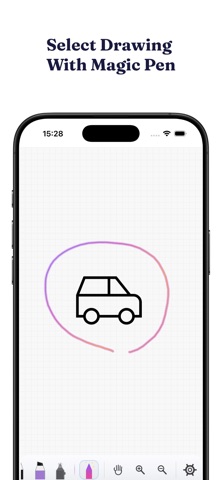

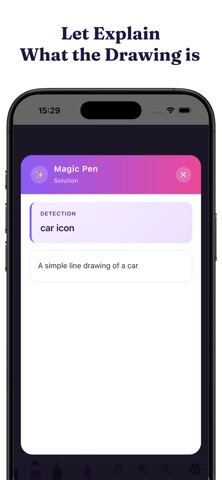

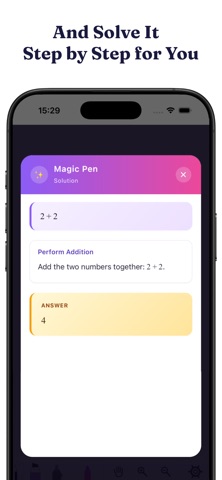

Screenshots by ALI KILIC, from the the App Store listing
Description by ALI KILIC Written by the developer, not by AppBrain. Click to read.
• Magic Pen: Circle a math problem or drawing — AI solves it step by step or identifies what it is.
• AutoDraw: Recognizes your sketches and suggests clean vector icons.
• Canvas: Pen, highlighter, eraser, shapes, lasso select, undo/redo.
• Text Note: Bold, italic, underline, alignment, lists, font size and color.
• 10 Languages supported.
• Cloud Sync: Notes stay up to date across all your devices.
• Sharing: Share notes with friends — grant read, edit, or manager permission.
• Education Level: Primary, middle, high, university — Magic Pen adapts answers to your level.
• Image: Insert from gallery or camera, crop, rotate.
• Search in Images: Search text inside notes and inside images you've added.
• Auto-save: Never lose your work.
• AutoDraw: Recognizes your sketches and suggests clean vector icons.
• Canvas: Pen, highlighter, eraser, shapes, lasso select, undo/redo.
• Text Note: Bold, italic, underline, alignment, lists, font size and color.
• 10 Languages supported.
• Cloud Sync: Notes stay up to date across all your devices.
• Sharing: Share notes with friends — grant read, edit, or manager permission.
• Education Level: Primary, middle, high, university — Magic Pen adapts answers to your level.
• Image: Insert from gallery or camera, crop, rotate.
• Search in Images: Search text inside notes and inside images you've added.
• Auto-save: Never lose your work.