NSEasyConnect is an overall app developed by KENJI WADA.
Download Statistics
User Ratings
The app has no ratings yet.
App Information
NSEasyConnect is FREE to download. The APK download size is 34.98 MB. The latest version available is 2.9.13. The last update was on July 5, 2026.
Technical Requirements
The app has a content rating of Everyone. The app has been available on Google Play July 2024.
Description
Transfer Switch screenshots to your iPhone in seconds. Just scan a QR code to save photos and videos instantly. Share to 6 social networks with auto-generated game-specific hashtags in one tap.
■ Transfer in 3 Easy Steps 1. Select "Send to Smartphone" on your Switch to display a QR code 2. Scan with NSEasyConnect 3. Auto-connect via Wi-Fi → Photos & videos transferred & saved instantly
No complicated setup required. The moment you scan, your Switch and iPhone are connected.
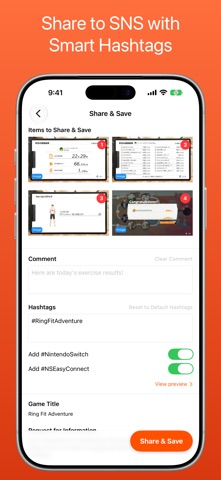
■ Smart Sharing with Game-Specific Hashtags A database of 18,000+ game titles automatically identifies which game your screenshots are from, then generates game-specific hashtags — making social media posts effortless.
Your previous comments and hashtags are remembered, so you never have to re-enter them.
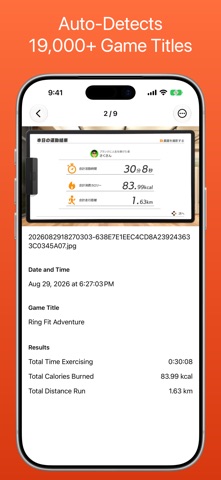
■ Ring Fit Adventure Workout Tracking Simply screenshot your Ring Fit Adventure results screen, and AI image recognition automatically reads your exercise time, calories burned, and distance run. View your workout habits at a glance on the activity calendar.
■ Batch Transfer & Share Transfer and share multiple screenshots and videos at once. ・Free: Select up to 4 at a time ・Premium: Select up to 10 at a time
■ Go Premium for More ・Ad-free experience ・Select up to 10 items at once ・Auto-save transferred images to your Photo Library
■ Please Note ・A Nintendo Switch console is required. ・This app is not affiliated with Nintendo Co., Ltd. For inquiries, please use the in-app contact form.
■ About Subscriptions ・Subscriptions auto-renew unless canceled at least 24 hours before the billing date. ・To manage or cancel: iOS Settings → [Your Name] → Subscriptions → NSEasyConnect ・Charges are billed through your Apple ID account. ・After switching devices, restore purchases from the [Premium] section in Settings.
Each subscription will automatically renew 3 days before the expiration date for
the same time period. Subscriptions can be cancelled at any time before the renewal.