

ObsiKO: AI Note + Mindmap
ObsiKO: AI Note + Mindmap is made and published by Hyojin Kim. AppBrain is an independent app data site and isn't affiliated with Hyojin Kim. The app name, icon, screenshots and description belong to Hyojin Kim and are shown as published on the App Store.
AppBrain's verdict
- Rating on App Store
- 5.00
- 1 ratings
- Last updated
- October 13, 2026
It doesn't have enough ratings yet to judge what users think.
Rankings
App Store top chartsApp Store Rankings for ObsiKO: AI Note + Mindmap
Competitors
Similar apps and more from Hyojin KimAlternatives to ObsiKO: AI Note + Mindmap


Also available on Google Play

Releases
Updates seen on the App Store- Version
- 1.4.2
- Launched
- July 2026
No changelog data
User feedback
Ratings and reviews on the App StoreComments on ObsiKO: AI Note + Mindmap for iOS
We don't have enough comments to show example comments. Please check back later.
Technology
Found in the app by AppBrain- Price
- Free
- App size
- 75.3 MB
- Content rating
- Everyone
Technologies used by ObsiKO: AI Note + Mindmap
About the app and developer
About ObsiKO: AI Note + Mindmap
ObsiKO: AI Note + Mindmap is a productivity app developed by Hyojin Kim.
User Ratings
ObsiKO: AI Note + Mindmap is rated 5.00 out of 5 stars. The rating is based on one rating ratings.
App Information
ObsiKO: AI Note + Mindmap is freely available from the App Store. The app size is 75.35 MB. The latest version available is 1.4.2. The last update was on October 13, 2026.
Technical Requirements
The app has a content rating of Everyone. The app has been available on the App Store since July 2026.
Developer information for Hyojin Kim
Address:
Frequently asked questions about ObsiKO: AI Note + Mindmap
Is ObsiKO: AI Note + Mindmap free?
Yes. ObsiKO: AI Note + Mindmap is free on the App Store.
Is ObsiKO: AI Note + Mindmap still available?
Yes. ObsiKO: AI Note + Mindmap is on the App Store, and the last update we saw was on October 13, 2026.
How large is ObsiKO: AI Note + Mindmap?
ObsiKO: AI Note + Mindmap is 75.35 MB.
Is ObsiKO: AI Note + Mindmap suitable for children?
App Store rates the content of ObsiKO: AI Note + Mindmap as suitable for everyone.
How do people rate ObsiKO: AI Note + Mindmap?
ObsiKO: AI Note + Mindmap has one rating of 5.00 stars on the App Store.
Who made ObsiKO: AI Note + Mindmap?
ObsiKO: AI Note + Mindmap was developed by Hyojin Kim. It is listed in the productivity category on the App Store.
What are the best alternatives to ObsiKO: AI Note + Mindmap?
People looking at ObsiKO: AI Note + Mindmap also look at these productivity apps: 習日, HighMemo, Axis: Habit Tracker & To-Do, 프롬프트노트, Gloss Ink.
Store listing
By Hyojin Kim, from the App Store





Description by Hyojin Kim Written by the developer, not by AppBrain. Click to read.
Plenty of features, none of them talking to each other?
Everyday writing, LLM wikis, ontologies, Zettelkasten, mindmaps, reading logs, codices, schedules, file conversion — one app, no account or subscription. Obsidian vaults (.md/.canvas/.base) open as-is.
(AI runs on your own API key; with Apple Intelligence on, it can run on the device with no key.)
■ You see it first, before anything changes
· AI rewrites arrive as a suggestion card — nothing changes until you press Replace
· The AI agent works on a copy; only what you pick reaches your notes
· Before the first send to an outside AI, it shows what goes where and sends only if you allow
■ Share to the web, sync between devices (GitHub)
· "Share to the web" publishes a note at one address — theme, tables and images intact, comments too
· The text lives only in your GitHub account, never on our servers; "Stop sharing" takes it down
· Sync runs through your own repository and only ever deletes to the trash
■ Write once, it connects itself
· A "color" property colors the tab, header, tree icon, .base and codex cards. Define your own types and relations too
· Type "book" pops a search that fills the rest; "project" adds start/due to the calendar
· Highlight a PDF and quotes collect into a note of the same name, searchable and on the graph
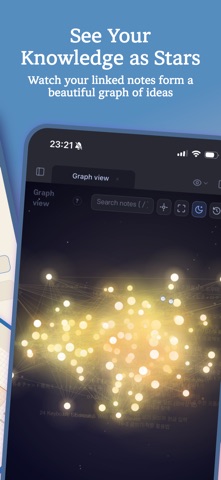
· Wiki links, types, relations and PARA form one constellation — more links, brighter star
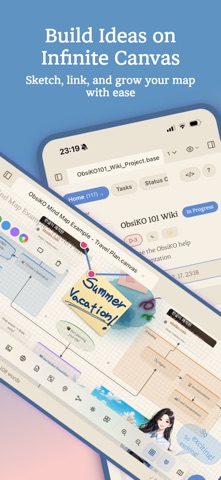
■ Infinite mindmap canvas (.canvas)
· Apple Pencil drawing — turn a sketch into an AI image. Have AI build an editable mindmap, or hand it yours
· Auto-build from a note's links, auto-layout, embeds, groups, relations. 5 styles, 10+ presets. Drop a URL or file to add a card
■ .base files and search
· Projects, kanban, cards, charts, a library (book/paper search), PARA, a budget that pastes receipts. Dataview queries become tables
· Filenames, full text, Korean jamo, semantic search — pin results, bookmark a query, or ask Siri
■ A dashboard and themes you arrange
· 50+ widgets plus query and embed boards — calendars, to-dos, habit trackers, stats. 20+ themes, your own fonts
■ Markdown and a writing helper
· Calm editing tuned for Korean. Format bar and cheat sheet, Mermaid, 20+ charts, inline drawing, video in a note
· 70+ structures across 13 genres (Hero's Journey, Save the Cat, SCQA, character sheets), Socratic questions and style polish
· Spell check, dictionaries, device TTS, a saved assistant role, on-device translation
■ Schedules and viewers
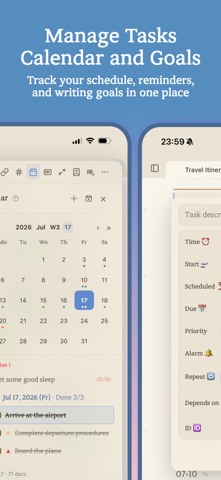
· A date in any file lands on the calendar (Obsidian Tasks compatible) — year/month/week/day, timeline, widget, reminders
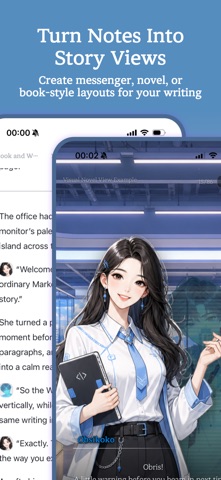
· One frontmatter line switches the viewer: book, web novel, messenger, visual novel, codex
■ Clipping and conversion
· The article body and photos become a note, not just the URL — share button or RSS
· One-click Markdown for doc/docx, PDF, hwp/hwpx — one file or a folder; a read-only panel opens dozens more
· Import from Apple Notes, Notion, Evernote, Bear or Logseq — always into a new folder
· Highlight PDFs and Markdown to insert or quote. AI OCR and transcription (labelled by speaker)
■ AI agent
· Add an API key and go (Claude, Gemini, GPT) — the app is complete without one
· Builds mindmaps and .base tables on your phone and reads existing ones. Read-aloud and images in the editor
· File creation, automatic memory, LLM wikis, ontology and Zettelkasten design, MCP. Bulk work is desktop-only
■ Export, images, and everything else
· Marp properties make a deck. Export to PDF, HWPX, DOCX, EPUB, HTML, ZIP, wiki markup
· Dictate on iPhone (on device), Control Center, Lock Screen and Home widgets, Watch quick notes
· Ready for iOS 27 — Markdown round-trips with Apple Notes, the new Siri can add to a note, 4×6 widget
· Image editing, free image search, colors panel, routines, palette, focus timer, screen lock
All of it is free. No account, no payment, a small download.