Download Android Apps and Games
AppBrain
  • Apps
  • Apps being viewed right now Trending apps today Most popular apps All-time most downloaded apps Top rated apps
  • Intelligence ▾
    Intelligence overview → Track any Android app or your whole market
    Track & analyze
    Keyword Tracker & OptimizerTrack & improve Play rankings App Performance ReportOne-off PDF for any app StatisticsFree Android & Play market stats
    Promote your app
    Featured Apps App Links
  • Intelligence
  • Pricing
  • Dashboard
  • Sign up
  • Log in
Last updated on: 2026-08-21
App Store Apps > Utilities > OCR Text Scanner: Extract Text
OCR Text Scanner: Extract Text icon

OCR Text Scanner: Extract Text

1.15.3
David Serrano Canales
3.40
5 reviews
Free

OCR Text Scanner: Extract Text Screenshot 1 of 4
OCR Text Scanner: Extract Text Screenshot 2 of 4
OCR Text Scanner: Extract Text Screenshot 3 of 4
OCR Text Scanner: Extract Text Screenshot 4 of 4
3.40 · 5 reviews
Download from the App Store Android version

About OCR Text Scanner: Extract Text

OCR Text Scanner: Extract Text is an overall app developed by David Serrano Canales.

Download Statistics

User Ratings

OCR Text Scanner: Extract Text is rated 3.40 out of 5 stars. The rating is based on 5 ratings.

App Information

OCR Text Scanner: Extract Text is FREE to download. The APK download size is 86.87 MB. The latest version available is 1.15.3. The last update was on August 10, 2026.

Technical Requirements

The app has a content rating of High Maturity. The app has been available on Google Play November 2021.

Description
OCR Text Scanner is an OCR reader (Optical Character Recognition) that allows you to scan text from the physical world with your device's camera, extract text, and convert it to digital format quickly and easily.

Features:

- Image to text: scan any text with the camera to extract text and get its digital representation
- Photo to text: scan local images on your device to convert any picture to text
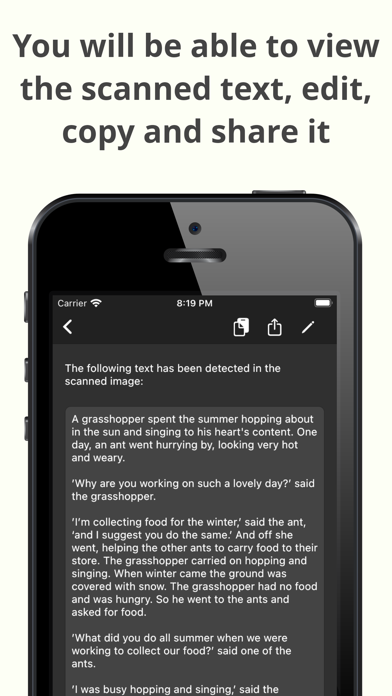
- Copy, edit, and share all the texts you have scanned
- Convert text scanned with the OCR reader to a PDF file
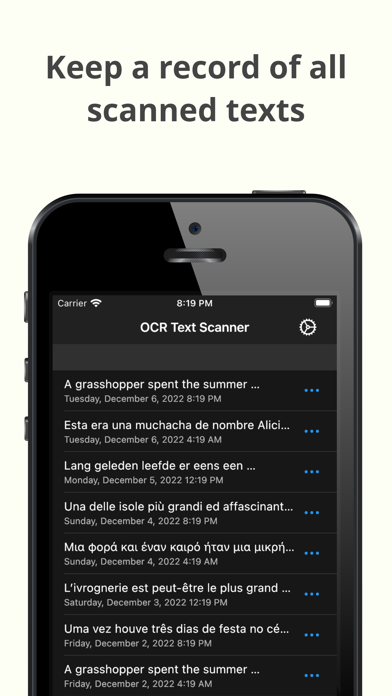
- Review any text previously recognized with the OCR scanner in the History section

> How does this application work?

To start text scanning, all you have to do is open the application, which by default will open with the camera scanner ready to scan text. From there you just have to point at the text you want to scan and press the “Scan” button. The app will show you a preview of the captured image, at this point you can choose to scan only a fraction of the taken image if you don't want to scan it all. The application will then proceed to perform text recognition and show you the recognized characters, allowing you to go from image to text quickly and easily.

> Can I convert an existing picture to text?

Of course! To do a photo to text conversion, go to the image scanning section and press the button to choose an image. A selector will open where you can choose which pre-existing image from your device you want to scan. From this point the process is exactly the same as when scanning with the camera: you will be shown a preview of the image where you can choose to scan it all or just a fraction, then the text recognition will start and you will be shown the recognized characters.

> What can I do with scanned texts?

After using the text scanner function to recognize text, it will be displayed on the screen. Here you can edit the recognized text to make any corrections you deem appropriate. You can then copy that text to use it in any other application on your device, as well as share it with other people or applications through the sharing option. Additionally, users who have subscribed to the Premium membership can also automatically convert scanned text into a PDF file.

> Is there any type of record of the scanned texts?

Yes. All texts that have been scanned with the text reader function, regardless of whether they were scanned with your device's camera or by image file recognition, are stored in the History section. Go to this section to see all these texts and click on any of them to see their details, copy it, share it, or export it to a file in PDF format. Here you can also delete texts that you no longer want to keep.

> Which characters are supported?

The app supports text recognition for Latin, Chinese, Devanagari, Japanese, and Korean characters. Select the character detection mode that matches the text in your image before scanning, so the image scanner can recognise the right type of writing.


In short, OCR Text Scanner is your trusted OCR scanner to extract text from any picture you capture with your camera or any image you already have. It lets you perform all the appropriate actions on your scans and gives you the power of digitisation within your mobile device. Download now to start digitising text!
Show more Show less

More data about OCR Text Scanner: Extract Text

Price Free to download
Rating 3.40 based on 5 ratings
Ranking Not ranked
Version 1.15.3
App download size 86.9 MB
Maturity High Maturity

Alternative downloads for the OCR Text Scanner: Extract Text app

OCR Scanner - Scan PDF & Image icon OCR Scanner - Scan PDF & Image
Inverse.AI
4.6
Free
107 ratings
Image To Text: Mobile Scanner icon Image To Text: Mobile Scanner
Everyday Tools, LLC
4.8
Free
4 ratings
TextScanner - scan text icon TextScanner - scan text
ELSNER TECHNOLOGIES PRIVATE LIMITED
5.0
Free
1 ratings
OCR Text Scanner & Processor icon OCR Text Scanner & Processor
Any Case Solutions
1.0
Free
1 ratings
Scanner OCR Extractor Text icon Scanner OCR Extractor Text
Lindeberguem Santana Neves
4.7
$6.99
6 ratings
Text Summary Tool Automatic AI icon Text Summary Tool Automatic AI
GENOVA Softworks
1.0
Free
1 ratings
Scanner App - Scanner Into PDF icon Scanner App - Scanner Into PDF
Real Vision Ltd
4.7
Free
6 ratings
Text Summarizer icon Text Summarizer
Clixade Ltd
5.0
Free
2 ratings

More from David Serrano Canales

WiFi QR Connect icon WiFi QR Connect
David Serrano Canales
4.5
Free
218 ratings
Birthday Reminder & Alarm icon Birthday Reminder & Alarm
David Serrano Canales
4.7
Free
70 ratings
Super QR Code Reader icon Super QR Code Reader
David Serrano Canales
4.4
Free
63 ratings
Debt Tracker: Personal Debts icon Debt Tracker: Personal Debts
David Serrano Canales
4.8
Free
59 ratings
Weight Tracker: Diary & BMI icon Weight Tracker: Diary & BMI
David Serrano Canales
4.5
Free
29 ratings
Camera Translator (Live) icon Camera Translator (Live)
David Serrano Canales
3.8
Free
5 ratings
Document Scanner (PDF Scanner) icon Document Scanner (PDF Scanner)
David Serrano Canales
0.0
Free

Changelog of OCR Text Scanner: Extract Text

No changelog data

Developer information for David Serrano Canales

David Serrano Canales

Address:

Share OCR Text Scanner: Extract Text

Comments on OCR Text Scanner: Extract Text for iOS

We don't have enough comments to show example comments. Please check back later.

App Store Rankings for OCR Text Scanner: Extract Text

This app is not ranked

Technologies used by OCR Text Scanner: Extract Text

Apps on sale Today's trending apps Apps other people are watching Popular Overall Top new apps
OCR Scanner - Scan PDF & Image icon OCR Scanner - Scan PDF & Image
Image To Text: Mobile Scanner icon Image To Text: Mobile Scanner
TextScanner - scan text icon TextScanner - scan text
OCR Text Scanner & Processor icon OCR Text Scanner & Processor
Scanner OCR Extractor Text icon Scanner OCR Extractor Text
Text Summary Tool Automatic AI icon Text Summary Tool Automatic AI
Scanner App - Scanner Into PDF icon Scanner App - Scanner Into PDF
Text Summarizer icon Text Summarizer

Back to top
AppBrain Intelligence premium content

Subscribe now to get full and unlimited access to AppBrain Intelligence. You'll have access to:

  • App Intelligence dashboard (performance timeline, competitor comparison, country rankings, insight cards)
  • Detailed ranking data per app
  • Full timeline per developer
  • Device market shares data per country
  • Unlimited keyword tracking
1 Month

$75/mo
(billed every month)

SAVE 0%
Subscribe
3 Months

$65/mo
($195 billed every 3 months)

SAVE 13%
Subscribe
1 Year

$57.50/mo
($690 billed every year)

SAVE 23%
Subscribe
Each subscription will automatically renew 3 days before the expiration date for the same time period. Subscriptions can be cancelled at any time before the renewal.

AppBrain is a directory focused on discovering great apps and games. We give statistics, rankings and search options that Google Play and the App Store don't have. All trademarks are owned by their respective owners. AppBrain doesn't offer APKs or binaries, and always lets users install the official version from Google Play or the App Store.

More apps

  • Top Android apps being viewed
  • Fútbol Libre TV
  • SANROCK
  • Acode — Terminal & AI Coding

Android Statistics

  • Android statistics
  • Google Play Developer stats
  • Trending Android Apps
  • Top popular Apps
  • Buy the best Android phone

About AppBrain

  • Contact
  • Privacy
  • Documentation
  • DMCA takedowns
  • Articles
  • Blog
  • Android Interstitial Ads: Best practices to optimize your app's earnings
© 2010-2026 - AppBrain