

Offcue: Teleprompter for Video
Offcue: Teleprompter for Video is made and published by Borys Kusmirek. AppBrain is an independent app data site and isn't affiliated with Borys Kusmirek. The app name, icon, screenshots and description belong to Borys Kusmirek and are shown as published on the App Store.
AppBrain's verdict
- Rating on App Store
- 4.50
- 4 ratings
- Last updated
- October 8, 2026
It doesn't have enough ratings yet to judge what users think.
Rankings
App Store top chartsApp Store Rankings for Offcue: Teleprompter for Video
Competitors
Similar apps and more from Borys KusmirekAlternatives to Offcue: Teleprompter for Video





More from Borys Kusmirek


Also available on Google Play

Releases
Updates seen on the App Store- Version
- 1.1.1
- Launched
- July 2026
No changelog data
User feedback
Ratings and reviews on the App StoreComments on Offcue: Teleprompter for Video for iOS
We don't have enough comments to show example comments. Please check back later.
Technology
Found in the app by AppBrain- Price
- Free
- App size
- 78.6 MB
- Content rating
- Everyone
Technologies used by Offcue: Teleprompter for Video
About the app and developer
About Offcue: Teleprompter for Video
Offcue: Teleprompter for Video is a photo & video app developed by Borys Kusmirek.
User Ratings
Offcue: Teleprompter for Video is rated 4.50 out of 5 stars. The rating is based on 4 ratings.
App Information
Offcue: Teleprompter for Video is freely available from the App Store. The app size is 78.63 MB. The latest version available is 1.1.1. The last update was on October 8, 2026.
Technical Requirements
The app has a content rating of Everyone. The app has been available on the App Store since July 2026.
Developer information for Borys Kusmirek
Address:
Store listing
By Borys Kusmirek, from the App Store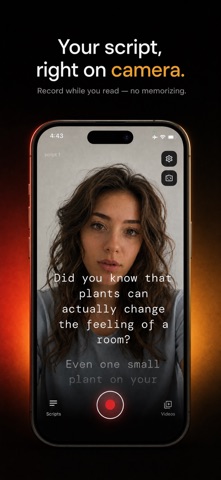



Description by Borys Kusmirek Written by the developer, not by AppBrain. Click to read.
Made for talking-head videos, social clips, vlogs, course lessons, sales pitches, presentations, speeches, self-tape auditions and product demos. Sound natural and stay on message from the first take.
HOW IT WORKS
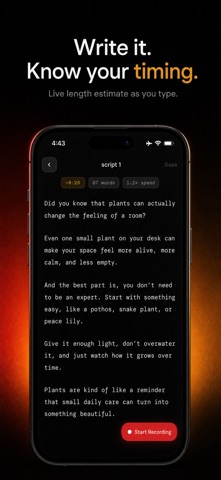
1. Write a new script or paste one you already have.
2. See a live read-time and word-count estimate, so a 60-second video is 60 seconds before you press record.
3. Open the camera, tune the scroll speed and text size, and tap record.
4. Read along as the script scrolls over the camera while you look into the lens.
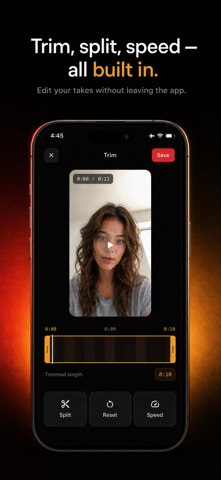
5. Trim the dead air, then save to Photos or share anywhere.
A TELEPROMPTER BUILT FOR FILMING
- Script auto-scrolls over the live front or back camera
- Adjustable scroll speed to match your natural pace
- Adjustable text size, readable at arm's length
- Three reading styles: full overlay, a frosted center band, or a focus line
- Background dimming for legibility in any light
- Left, center or right alignment
- Mirror text for beam-splitter prompter rigs
- Pause and resume mid-take, like a real camera
RECORD, TRIM, POST
- Record in HD and Full HD at 30 or 60 fps (4K with Premium)
- Video stabilization toggle for smoother handheld footage
- Trim the start and end of every take with a live preview
- Every take stays linked to its script, so re-shooting is one tap
- Library with This Week and Favorites filters
- Save to Photos, or share the file to any app
PRIVATE BY DESIGN
Your scripts and videos stay on your device. No account, no login, and your content is never uploaded. Offcue even works offline.
FREE TO USE
The teleprompter, recording, trimming, sharing and up to 5 saved scripts are free — with no watermark on your videos.
OFFCUE PREMIUM (OPTIONAL)
Premium adds unlimited scripts, 4K video capture, and split & speed editing. Choose yearly (includes a 3-day free trial), monthly or weekly.
Subscription details:
- Payment is charged to your Apple ID account at confirmation of purchase.
- Your subscription automatically renews unless it is canceled at least 24 hours before the end of the current period.
- Your account is charged for renewal within 24 hours prior to the end of the current period.
- Manage or cancel your subscription anytime in your App Store account settings; cancellation takes effect at the end of the current billing period.
- Any unused portion of a free trial is forfeited when you purchase a subscription.
Privacy Policy: https://offcue.web.app/privacy
Terms of Use (EULA): https://www.apple.com/legal/internet-services/itunes/dev/stdeula/
Additional Terms: https://offcue.web.app/terms