




AppBrain's verdict
- Rating on App Store
- 5.00
- 1 ratings
- Last updated
- November 14, 2026
- Size
- 245.7 MB
It doesn't have enough ratings yet to judge what users think.
User feedback
Ratings and reviews on the App StoreComments on Offshore Budgeting for iOS
We don't have enough comments to show example comments. Please check back later.
Store listing
By Michael Brown, from the App StoreDescription by Michael Brown Written by the developer, not by AppBrain. Click to read.
Offshore is a free, private budgeting app for iPhone, iPad, and Mac. Use it to organize personal finances, plan around gig work, or track business income and expenses, without connecting to a bank.
Doing the work and collecting the money don’t always happen at the same time. Bills have their own schedules, too. Offshore gives you a place to plan what you expect, record what actually happens, and understand the difference.
BUDGET AROUND YOUR OWN DATES
Create budgets around payday, a calendar month, a week of client work, or a single day. Choose any date range that helps you understand your income and spending.
Keep personal, gig, and business finances in separate workspaces, each with its own budgets, cards, categories, income, and expenses.
PLAN INCOME. RECORD PAYMENT.
Track the income you expect, then record actual income when payment arrives. Use recurring income schedules and the income calendar to organize paydays and review what’s expected or received.
Whether you earn a salary, work changing shifts, or get paid by clients, build your plan around your payment schedule.
KEEP EXPECTED COSTS AND EVERYDAY SPENDING CLEAR
Create reusable presets for recurring costs such as rent, subscriptions, or business overhead. Include them in a budget to create dated planned expenses, then record the actual amounts when paid.
Log everyday purchases as they happen. Set category goals for variable spending such as groceries, gas, or supplies, without predicting every transaction.
UNDERSTAND WHAT REMAINS
Compare income with expenses, review spending trends, and explore savings outlooks. For personal budgets, use that picture to understand your room to spend or save. For gig work or business, review how recorded costs compare with income received over the period you choose.
Try What If scenarios to explore spending changes before changing your real plan.
TRACK SAVINGS AND SHARED BALANCES
Keep a record of savings and decide when to use them toward future expenses or set money aside. Offshore tracks those decisions; you move money between your real accounts yourself.
Use Reconciliations to track split expenses, money owed, and repayments separately from savings.
MAKE THE ROUTINE EASIER
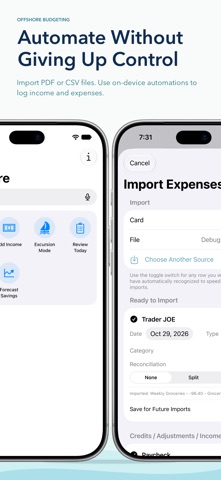
Enter transactions yourself or import supported CSV files, PDFs, and images, then review the entries before saving. Widgets, Shortcuts, and optional automations help reduce repetitive work while keeping you involved.
Customize cards, categories, and presets. Pin and reorder the Home screen information you use most.
PRIVATE BY DESIGN
Use Offshore offline with on-device storage, or enable optional iCloud sync across iPhone, iPad, and Mac. Export workspaces for backup and import them later as separate copies.
No bank connection. No accounts or registration to get started. No subscriptions.
Safety and technology
Found in the app by AppBrain- Price
- Free
- App size
- 245.7 MB
- Content rating
- Medium
Technologies used by Offshore Budgeting
Releases
Updates seen on the App Store- Version
- 2.5.2
- Launched
- February 2026
No changelog data
Alternatives
Similar apps and more from Michael BrownAlternatives to Offshore Budgeting






Rankings
App Store top chartsApp Store Rankings for Offshore Budgeting
About the app and developer
About Offshore Budgeting
Offshore Budgeting is a finance app developed by Michael Brown.
User Ratings
Offshore Budgeting is rated 5.00 out of 5 stars. The rating is based on one rating ratings.
App Information
Offshore Budgeting is freely available from the App Store. The app size is 245.73 MB. The latest version available is 2.5.2. The last update was on November 14, 2026.
Technical Requirements
The app has a content rating of Medium Maturity. The app has been available on the App Store since February 2026.
Offshore Budgeting is made and published by Michael Brown. AppBrain is an independent app data site and isn't affiliated with Michael Brown. The app name, icon, screenshots and description belong to Michael Brown and are shown as published on the App Store.
Developer information for Michael Brown
Address:
Frequently asked questions about Offshore Budgeting
Is Offshore Budgeting free?
Yes. Offshore Budgeting is free on the App Store.
Is Offshore Budgeting still available?
Yes. Offshore Budgeting is on the App Store, and the last update we saw was on November 14, 2026.
How large is Offshore Budgeting?
Offshore Budgeting is 245.73 MB.
Is Offshore Budgeting suitable for children?
App Store gives Offshore Budgeting a medium maturity rating, so it is not meant for young children.
How do people rate Offshore Budgeting?
Offshore Budgeting has one rating of 5.00 stars on the App Store.
Who made Offshore Budgeting?
Offshore Budgeting was developed by Michael Brown. It is listed in the finance category on the App Store.
What are the best alternatives to Offshore Budgeting?
People looking at Offshore Budgeting also look at these finance apps: NestLedger: Family Budget, KISS Budgeting, Budget30, Boring Budget, Budgetized.