

OneCost - AI Expense Tracker
OneCost - AI Expense Tracker is made and published by 希 陈. AppBrain is an independent app data site and isn't affiliated with 希 陈. The app name, icon, screenshots and description belong to 希 陈 and are shown as published on the App Store.
AppBrain's verdict
- Rating on App Store
- 5.00
- 1 ratings
- Last updated
- October 14, 2026
It doesn't have enough ratings yet to judge what users think.
Rankings
App Store top chartsApp Store Rankings for OneCost - AI Expense Tracker
Competitors
Similar apps and more from 希 陈Alternatives to OneCost - AI Expense Tracker


More from 希 陈


Releases
Updates seen on the App Store- Version
- 1.0.11
- Launched
- March 2026
No changelog data
User feedback
Ratings and reviews on the App StoreComments on OneCost - AI Expense Tracker for iOS
We don't have enough comments to show example comments. Please check back later.
Technology
Found in the app by AppBrain- Price
- Free
- App size
- 13.4 MB
- Content rating
- Medium
Technologies used by OneCost - AI Expense Tracker
About the app and developer
About OneCost - AI Expense Tracker
OneCost - AI Expense Tracker is a finance app developed by 希 陈.
User Ratings
OneCost - AI Expense Tracker is rated 5.00 out of 5 stars. The rating is based on one rating ratings.
App Information
OneCost - AI Expense Tracker is freely available from the App Store. The app size is 13.40 MB. The latest version available is 1.0.11. The last update was on October 14, 2026.
Technical Requirements
The app has a content rating of Medium Maturity. The app has been available on the App Store since March 2026.
Developer information for 希 陈
Address:
Frequently asked questions about OneCost - AI Expense Tracker
Is OneCost - AI Expense Tracker free?
Yes. OneCost - AI Expense Tracker is free on the App Store.
Is OneCost - AI Expense Tracker still available?
Yes. OneCost - AI Expense Tracker is on the App Store, and the last update we saw was on October 14, 2026.
How large is OneCost - AI Expense Tracker?
OneCost - AI Expense Tracker is 13.40 MB.
Is OneCost - AI Expense Tracker suitable for children?
App Store gives OneCost - AI Expense Tracker a medium maturity rating, so it is not meant for young children.
How do people rate OneCost - AI Expense Tracker?
OneCost - AI Expense Tracker has one rating of 5.00 stars on the App Store.
Who made OneCost - AI Expense Tracker?
OneCost - AI Expense Tracker was developed by 希 陈. It is listed in the finance category on the App Store.
What are the best alternatives to OneCost - AI Expense Tracker?
People looking at OneCost - AI Expense Tracker also look at these finance apps: 闪记宝-快捷指令极速记账, ZapLog - Snapshot and done, Fixense: Fixed Expense Tracker, 还剩多少钱-AI 聊天记账-Pro, 囤吧-您的AI+金融领航员.
Store listing
By 希 陈, from the App Store




Description by 希 陈 Written by the developer, not by AppBrain. Click to read.
OneCost is a minimalist, AI-powered expense tracker. Just say or type what you spent, and AI figures out the amount, time and category. Or snap a receipt or payment screenshot and it extracts the total automatically.
■ Effortless entry
· Text: type "lunch 28" to record it
· Voice: say "taxi 35" and it's logged
· Photo: snap a receipt or payment screenshot — AI reads the amount and merchant
■ Asset accounts
· Manage cash, bank cards, credit cards, e-wallets and investments
· Transfers and balance calibration; see your net worth anytime
· Entries link to accounts automatically so money flow stays clear
■ Multi-currency
· Support for USD, EUR, JPY, KRW, CNY and more
· Automatic exchange rates; summaries convert to your base currency
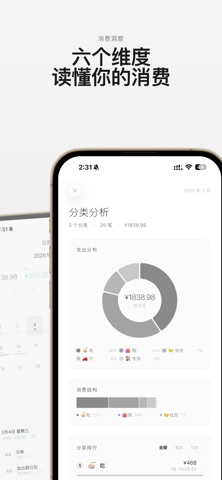
■ Insights
· AI analyzes your spending trends, timing and emotional patterns
· Spending persona, anomaly alerts and impulse-spending hints
■ Widgets & Apple Watch
· Home / Lock Screen / StandBy widgets for today's spending
· Quick entry on Apple Watch
■ Privacy first
· Your data stays on your device and in your iCloud; text/images are forwarded to a third-party AI service through our server only when you use AI recognition
· No ad tracking, no personal data collection
■ And more
· iCloud sync across devices
· Import & export, trash, multiple ledgers
Privacy Policy: https://plums-look-mpw.craft.me/dqFvtDnyTIAIfn
Terms of Use (EULA): https://www.apple.com/legal/internet-services/itunes/dev/stdeula/