

OneScreenTimer is made and published by JUMING LAI. AppBrain is an independent app data site and isn't affiliated with JUMING LAI. The app name, icon, screenshots and description belong to JUMING LAI and are shown as published on the App Store.
AppBrain's verdict
- Rating on App Store
- 5.00
- 1 ratings
- Last updated
- April 6, 2026
- Size
- 1.63 MB
It doesn't have enough ratings yet to judge what users think.
User feedback
Ratings and reviews on the App StoreComments on OneScreenTimer for iOS
We don't have enough comments to show example comments. Please check back later.
Store listing
By JUMING LAI, from the App Store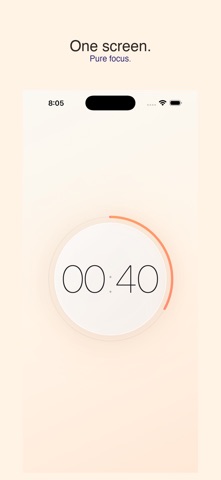



Description by JUMING LAI Written by the developer, not by AppBrain. Click to read.
One Screen Timer is the aesthetic focus timer that actually makes you want to lock in.
Pick your vibe. Set your time. Watch the ring fill up. That's it -no bloated features, no accounts, no data tracking. Just a beautifully designed timer that helps you stay present.
SET YOUR TIME YOUR WAY
Swipe minutes and seconds independently -set anything from 5 seconds to 2 hours.
Smart presets remember your favorite durations. Tap one to instantly start.
PICK YOUR VIBE
6 curated themes -Study, Workout, Meditate, Create, Focus, and Vibe -each with its own color palette, icon, and mood. Switch themes and your app icon changes automatically to match.
Your home screen icon updates to reflect your current vibe -the only timer that lets you personalize your icon.
STAY ON TRACK
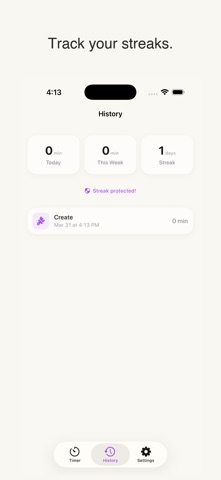
Streak tracking keeps you accountable day after day. Streak freezes have your back when life gets in the way.
NEVER LEAVE YOUR FLOW
Live Activities and Dynamic Island show your timer right on the lock screen and at the top of your display -no need to open the app.
Home screen widgets display your daily focus minutes and streak at a glance.
ZEN MODE
Ultra-minimal interface -just you and the timer. Tap to start, tap to pause. Pure focus, zero distractions.
Screen stays awake during your session -no interruptions, no unlocking.
DESIGNED WITH INTENTION
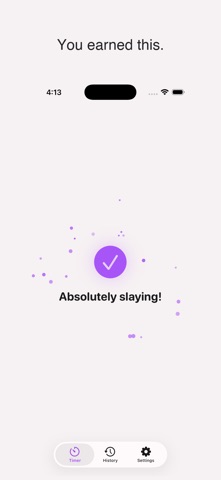
Celebration animations when you complete a session -because small wins deserve hype.
Gentle sound and haptic cues keep you grounded without being jarring.
Beautiful dark mode support that's easy on the eyes for late-night study sessions.
YOUR PRIVACY IS NON-NEGOTIABLE
Fully offline. No accounts. No data collection. No ads. Ever.
BILINGUAL
Full English and Chinese (简体中文) support built in.
Built by an indie studio that believes a timer should do one thing and do it well. No clutter. No distractions. Just focus.
Download One Screen Timer and start your streak today.
Safety and technology
Found in the app by AppBrain- Price
- Free
- App size
- 1.63 MB
- Content rating
- Everyone
Technologies used by OneScreenTimer
Releases
Updates seen on the App Store- Version
- 1.1.3
- Launched
- April 2026
No changelog data
Alternatives
Similar apps and more from JUMING LAIAlternatives to OneScreenTimer


More from JUMING LAI


Rankings
App Store top chartsApp Store Rankings for OneScreenTimer
About the app and developer
About OneScreenTimer
OneScreenTimer is a productivity app developed by JUMING LAI.
User Ratings
OneScreenTimer is rated 5.00 out of 5 stars. The rating is based on one rating ratings.
App Information
OneScreenTimer is freely available from the App Store. The app size is 1.63 MB. The latest version available is 1.1.3. The last update was on April 6, 2026.
Technical Requirements
The app has a content rating of Everyone. The app has been available on the App Store since April 2026.
Developer information for JUMING LAI
Address:
Frequently asked questions about OneScreenTimer
Is OneScreenTimer free?
Yes. OneScreenTimer is free on the App Store.
Is OneScreenTimer still available?
Yes. OneScreenTimer is on the App Store, and the last update we saw was on April 6, 2026.
How large is OneScreenTimer?
OneScreenTimer is 1.63 MB.
Is OneScreenTimer suitable for children?
App Store rates the content of OneScreenTimer as suitable for everyone.
How do people rate OneScreenTimer?
OneScreenTimer has one rating of 5.00 stars on the App Store.
Who made OneScreenTimer?
OneScreenTimer was developed by JUMING LAI. It is listed in the productivity category on the App Store.
What are the best alternatives to OneScreenTimer?
People looking at OneScreenTimer also look at these productivity apps: ProgressTimer - Bar Timer, Dr.Timer - Simple Preset Timer, Focal: Visual Timer & Routine, Antigravity: Procrastination, TableTimer: Design Your Time.