

ProgressTimer - Bar Timer
ProgressTimer - Bar Timer is made and published by Taniguchi Yota. AppBrain is an independent app data site and isn't affiliated with Taniguchi Yota. The app name, icon, screenshots and description belong to Taniguchi Yota and are shown as published on the App Store.
AppBrain's verdict
- Last updated
- October 14, 2026
- Size
- 4.48 MB
User feedback
Ratings and reviews on the App StoreComments on ProgressTimer - Bar Timer for iOS
We don't have enough comments to show example comments. Please check back later.
Store listing
By Taniguchi Yota, from the App Store

Description by Taniguchi Yota Written by the developer, not by AppBrain. Click to read.
ProgressTimer is a minimal landscape timer that turns elapsed time into a full-screen progress bar. For pomodoro sessions, workouts, cooking, presentation rehearsals — anywhere you want to see time at a glance, even from across the room.
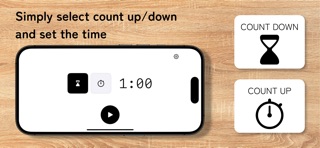
◆ Two modes
Count Down
Set a duration and watch the bar fill from empty to full as time elapses.
Count Up
Start from zero and let the bar grow toward your target duration.
Both modes auto-stop when the target is reached and play your selected alarm tone.
◆ Landscape × giant progress bar
Numbers are secondary — progress is the point. A monochrome bar fills the entire screen so you can read your status from a distance. The time is rendered in a large monospaced number at the center, optimized for legibility against the moving bar.
◆ Lock Screen & Dynamic Island
Full Live Activity support. The progress bar and remaining time appear on your Lock Screen and in the Dynamic Island. Play, pause, and restart the timer without ever opening the app.
◆ Keeps running in the background
Closing the app or locking your screen doesn't stop the timer. When time's up, a local notification fires with your chosen alarm tone — Beep, Chime, Bell, or Digital. Use the system volume or set an in-app volume independently.
◆ Icon-first interface
No text labels — every control is an icon. From mode selection to duration setup to start, you can begin a session in three taps. Designed to stay out of your way.
◆ Features
・Count Down / Count Up modes
・Hours / Minutes / Seconds wheel picker (up to 24 hours)
・Full-screen progress bar (landscape-only)
・Live Activity (Lock Screen / Dynamic Island)
・Pause / Resume / Restart from Lock Screen
・4 built-in alarm tones + none
・System volume or in-app volume slider
・Local notifications for background alarms
・In-app language switching (English / Japanese)
・Theme support (System / Light / Dark)
・Pure monochrome, distraction-free design
・Locked to landscape for fullscreen visibility
◆ Completely offline, completely private
ProgressTimer makes zero network requests. Your settings and timer state stay entirely on your device, never sent to any server. No ads, no tracking. Works anywhere, no signal needed.
◆ Who it's for
・Anyone using pomodoro or time-blocking for focus
・Workout and stretching timers
・Presentation and interview rehearsals
・Cooking timers
・People who want to glance at the timer from across the room
・Anyone looking for a simple, ad-free timer app
◆ How to use
1. Pick a mode (Count Down / Count Up)
2. Set the duration with the wheel picker
3. Tap play
4. Control from your Lock Screen or Dynamic Island anytime
That's it.
Safety and technology
Found in the app by AppBrain- Price
- Free
- App size
- 4.48 MB
- Content rating
- Everyone
Technologies used by ProgressTimer - Bar Timer
Releases
Updates seen on the App Store- Version
- 1.2.0
- Launched
- April 2026
No changelog data
Alternatives
Similar apps and more from Taniguchi YotaAlternatives to ProgressTimer - Bar Timer


More from Taniguchi Yota


Rankings
App Store top chartsApp Store Rankings for ProgressTimer - Bar Timer
About the app and developer
About ProgressTimer - Bar Timer
ProgressTimer - Bar Timer is a productivity app developed by Taniguchi Yota.
User Ratings
The app has no ratings yet.
App Information
ProgressTimer - Bar Timer is freely available from the App Store. The app size is 4.48 MB. The latest version available is 1.2.0. The last update was on October 14, 2026.
Technical Requirements
The app has a content rating of Everyone. The app has been available on the App Store since April 2026.
Developer information for Taniguchi Yota
Address:
Frequently asked questions about ProgressTimer - Bar Timer
Is ProgressTimer - Bar Timer free?
Yes. ProgressTimer - Bar Timer is free on the App Store.
Is ProgressTimer - Bar Timer still available?
Yes. ProgressTimer - Bar Timer is on the App Store, and the last update we saw was on October 14, 2026.
How large is ProgressTimer - Bar Timer?
ProgressTimer - Bar Timer is 4.48 MB.
Is ProgressTimer - Bar Timer suitable for children?
App Store rates the content of ProgressTimer - Bar Timer as suitable for everyone.
Who made ProgressTimer - Bar Timer?
ProgressTimer - Bar Timer was developed by Taniguchi Yota. It is listed in the productivity category on the App Store.
What are the best alternatives to ProgressTimer - Bar Timer?
People looking at ProgressTimer - Bar Timer also look at these productivity apps: Wane Timer, OneScreenTimer, Deadline Bar: Time Progress, Minimalist Progress, TimerBar: Presentation Timer.