

OnLock - Study Timer
OnLock - Study Timer is made and published by Ting Ting Xu. AppBrain is an independent app data site and isn't affiliated with Ting Ting Xu. The app name, icon, screenshots and description belong to Ting Ting Xu and are shown as published on the App Store.
AppBrain's verdict
- Rating on App Store
- 5.00
- 1 ratings
- Last updated
- July 25, 2026
- Size
- 47.7 MB
It doesn't have enough ratings yet to judge what users think.
User feedback
Ratings and reviews on the App StoreComments on OnLock - Study Timer for iOS
We don't have enough comments to show example comments. Please check back later.
Store listing
By Ting Ting Xu, from the App Store





Description by Ting Ting Xu Written by the developer, not by AppBrain. Click to read.
OnLock is the block you can't talk yourself out of.
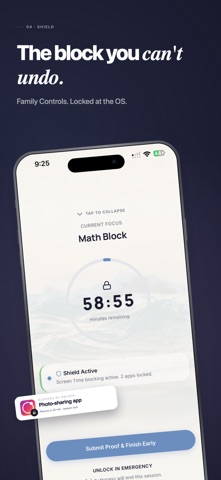
When a session starts, OnLock locks your distractions at the operating system level using Apple's Family Controls. No "5 more minutes." No uninstall trick. The shield holds until you finish.
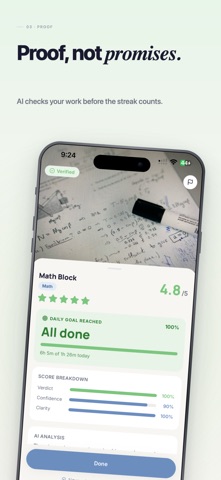
But blocking is the easy part. The hard part is proving the work was real. Before any session counts toward your streak, OnLock's AI reviews a photo of what you did. No proof, no credit.
THE SHIELD
• Un-bypassable OS-level enforcement built on Apple's Family Controls
• Locks the apps that derail you: social, games, browsers, anything
• Holds through restarts, app deletion, and panic uninstalls
• Schedule recurring blocks for the hours you always slip
AI PROOF
• Submit a photo of your notes, work, or finished problem set
• AI verifies the session was genuine study before your streak counts
• Catches the "I just sat there" sessions you'd rather forget
• Builds a streak you actually earned
THE INTERVENTION
• A quiet pause before every session to ask if this is really study time
• Journal your intent so distraction has to argue with your own words
• Reflect after to see what is actually working
THE WHY ON A TIMER
• Plot your exams on a real countdown
• Every session lands against the clock
• See what each lost hour costs you
FOCUS INTELLIGENCE
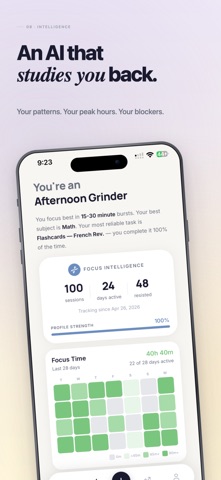
• Learns your peak hours, worst blockers, and patterns
• Tells you when to study and when to stop pretending
• Your data, your insight, never shared
ALWAYS ON
• Home screen widgets in three sizes
• Lock screen complications for glanceable streaks
• Quick Study: one tap and you're locked in
THE AESTHETIC
A calm, editorial interface designed to feel nothing like the apps it replaces. No infinite scroll. No screaming notifications. No dopamine arcade. Just focus.
PRIVACY
• Screen time data stays on your device
• Built on Apple's native Family Controls and Screen Time APIs
• Photos for AI proof are reviewed and discarded
• No tracking, no sale, no leak
FREE
Every feature above is included, free. No subscription, no upsells, no locked tools.
Stop trying harder. Start being unable.
OnLock. The focus you can't undo.
Terms of Use (EULA): https://www.apple.com/legal/internet-services/itunes/dev/stdeula/
Privacy Policy: https://onlock-api.joshuawang2048.workers.dev/legal/privacy
Safety and technology
Found in the app by AppBrain- Price
- Free
- App size
- 47.7 MB
- Content rating
- Everyone
Technologies used by OnLock - Study Timer
Releases
Updates seen on the App Store- Version
- 1.0.1
- Launched
- June 2026
No changelog data
Alternatives
Similar apps and more from Ting Ting XuAlternatives to OnLock - Study Timer


Rankings
App Store top chartsApp Store Rankings for OnLock - Study Timer
About the app and developer
About OnLock - Study Timer
OnLock - Study Timer is a productivity app developed by Ting Ting Xu.
User Ratings
OnLock - Study Timer is rated 5.00 out of 5 stars. The rating is based on one rating ratings.
App Information
OnLock - Study Timer is freely available from the App Store. The app size is 47.65 MB. The latest version available is 1.0.1. The last update was on July 25, 2026.
Technical Requirements
The app has a content rating of Everyone. The app has been available on the App Store since June 2026.
Developer information for Ting Ting Xu
Address:
Frequently asked questions about OnLock - Study Timer
Is OnLock - Study Timer free?
Yes. OnLock - Study Timer is free on the App Store.
Is OnLock - Study Timer still available?
Yes. OnLock - Study Timer is on the App Store, and the last update we saw was on July 25, 2026.
How large is OnLock - Study Timer?
OnLock - Study Timer is 47.65 MB.
Is OnLock - Study Timer suitable for children?
App Store rates the content of OnLock - Study Timer as suitable for everyone.
How do people rate OnLock - Study Timer?
OnLock - Study Timer has one rating of 5.00 stars on the App Store.
Who made OnLock - Study Timer?
OnLock - Study Timer was developed by Ting Ting Xu. It is listed in the productivity category on the App Store.
What are the best alternatives to OnLock - Study Timer?
People looking at OnLock - Study Timer also look at these productivity apps: Pomeow, LockBuddy: Screen Time Lock, StudyTimer, TaskTimer, LockIn – Study Spots, Pomodoro Timer - Pomart.