

OnSiteCAMERA Pro -Field Photo
OnSiteCAMERA Pro -Field Photo is made and published by QAEE CONPUUTENG. AppBrain is an independent app data site and isn't affiliated with QAEE CONPUUTENG. The app name, icon, screenshots and description belong to QAEE CONPUUTENG and are shown as published on the App Store.
AppBrain's verdict
- Last updated
- October 15, 2026
Rankings
App Store top chartsApp Store Rankings for OnSiteCAMERA Pro -Field Photo
Competitors
Similar apps and more from QAEE CONPUUTENGAlternatives to OnSiteCAMERA Pro -Field Photo




More from QAEE CONPUUTENG


Also available on Google Play

Releases
Updates seen on the App Store- Version
- 1.3.4
- Launched
- March 2026
No changelog data
User feedback
Ratings and reviews on the App StoreComments on OnSiteCAMERA Pro -Field Photo for iOS
We don't have enough comments to show example comments. Please check back later.
Technology
Found in the app by AppBrain- Price
- Free
- App size
- 92.9 MB
- Content rating
- Everyone
Technologies used by OnSiteCAMERA Pro -Field Photo
About the app and developer
About OnSiteCAMERA Pro -Field Photo
OnSiteCAMERA Pro -Field Photo is a photo & video app developed by QAEE CONPUUTENG.
User Ratings
The app has no ratings yet.
App Information
OnSiteCAMERA Pro -Field Photo is freely available from the App Store. The app size is 92.86 MB. The latest version available is 1.3.4. The last update was on October 15, 2026.
Technical Requirements
The app has a content rating of Everyone. The app has been available on the App Store since March 2026.
Developer information for QAEE CONPUUTENG
Address:
Frequently asked questions about OnSiteCAMERA Pro -Field Photo
Is OnSiteCAMERA Pro -Field Photo free?
Yes. OnSiteCAMERA Pro -Field Photo is free on the App Store.
Is OnSiteCAMERA Pro -Field Photo still available?
Yes. OnSiteCAMERA Pro -Field Photo is on the App Store, and the last update we saw was on October 15, 2026.
How large is OnSiteCAMERA Pro -Field Photo?
OnSiteCAMERA Pro -Field Photo is 92.86 MB.
Is OnSiteCAMERA Pro -Field Photo suitable for children?
App Store rates the content of OnSiteCAMERA Pro -Field Photo as suitable for everyone.
Who made OnSiteCAMERA Pro -Field Photo?
OnSiteCAMERA Pro -Field Photo was developed by QAEE CONPUUTENG. It is listed in the photo & video category on the App Store.
What are the best alternatives to OnSiteCAMERA Pro -Field Photo?
People looking at OnSiteCAMERA Pro -Field Photo also look at these photo & video apps: ProjectCam - Photo Folders, File Camera, Timestamp Camera: GPS Stamp, Stream - Manage & Find Photos, Annotium - Photo Markup.
Store listing
By QAEE CONPUUTENG, from the App Store



Description by QAEE CONPUUTENG Written by the developer, not by AppBrain. Click to read.
No more relying on memory to sort and rename photos after you get back to the office.
■ Key Features
1. Maximize efficiency with "File Naming & Organization"
・[Auto Rename]: Automatically generate file names at the moment of capture by combining address, date, time, free text (site name), sequential numbers, and more.
・[Folder Creation]: Set up folders in advance for each site or work zone, and captured data is saved straight to that folder. No need to move files later.
・[Tagging]: Add tags like "site name," "inspected," or "date" to photos for easy searching later.
・[History & Pinning]: Recall previously used tags and text from history. Pin your favorites for quick access.
2. Shoot photos that communicate with "Markers & Editing"
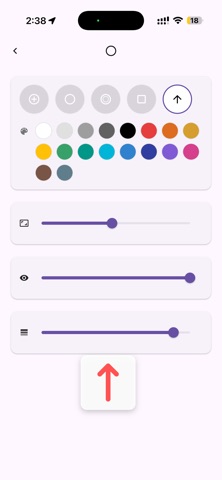
・[Markers & Arrows]: Place arrow or frame stamps on the spot to highlight instructions or correction points.
・[Pen Input]: Tap the screen to add intuitive handwritten marks.
・[Keystone Correction]: Correct distortion when shooting documents or signs before saving.
・[Original Backup]: Keep the unmarked original photo alongside the annotated one, so you're safe even if an edit goes wrong.
3. Record site data with "HUD & Stamping"
・[Address & Map]: Display and stamp the address (town, block number) and a nearby map obtained from GPS in real time.
・[Compass & Blackboard]: Display and record the shooting direction (azimuth) and a construction blackboard (notes) as needed.
4. Field-friendly "Other Features"
・[Volume Button Shutter]: Use physical buttons like the volume button to release the shutter. Great for shooting with gloves on or when tapping the screen is difficult.
・[Flexible Output Settings]: Adjust "processing speed priority / image quality priority" to match your site or device specs. Detailed settings meet professional needs: toggle lat/long stamping on/off, save composite and original photos at once, add hash values on save, and more.
■ About Pricing
Try all features free for 2 months. After that, an auto-renewing monthly or yearly subscription is required to keep using them.
For fieldwork across construction, civil engineering, infrastructure inspection, disaster surveys, surveying, patrols, and sales.
SiteCam Pro dramatically streamlines your site records.
Terms of Use: https://www.apple.com/legal/internet-services/itunes/dev/stdeula/