

Point Book: Survey Field Notes
Point Book: Survey Field Notes is made and published by QAEE CONPUUTENG. AppBrain is an independent app data site and isn't affiliated with QAEE CONPUUTENG. The app name, icon, screenshots and description belong to QAEE CONPUUTENG and are shown as published on the App Store.
AppBrain's verdict
- Last updated
- October 28, 2026
Rankings
App Store top chartsApp Store Rankings for Point Book: Survey Field Notes
Competitors
Similar apps and more from QAEE CONPUUTENGMore from QAEE CONPUUTENG


Releases
Updates seen on the App Store- Version
- 1.0
- Launched
- October 2026
No changelog data
User feedback
Ratings and reviews on the App StoreComments on Point Book: Survey Field Notes for iOS
We don't have enough comments to show example comments. Please check back later.
Technology
Found in the app by AppBrain- Price
- Free
- App size
- 32.3 MB
- Content rating
- Everyone
Technologies used by Point Book: Survey Field Notes
About the app and developer
About Point Book: Survey Field Notes
Point Book: Survey Field Notes is a business app developed by QAEE CONPUUTENG.
What is the rating of Point Book: Survey Field Notes?
Point Book: Survey Field Notes has no ratings yet.
Is Point Book: Survey Field Notes free?
Point Book: Survey Field Notes is free. The app size is 32.33 MB. The latest version available is 1.0. The last update was on October 28, 2026.
What are the requirements for Point Book: Survey Field Notes?
The app has a content rating of Everyone. The app has been available on the App Store since October 2026.
Developer information for QAEE CONPUUTENG
Address:
Frequently asked questions about Point Book: Survey Field Notes
Is Point Book: Survey Field Notes free?
Yes. Point Book: Survey Field Notes is free on the App Store.
Is Point Book: Survey Field Notes still available?
Yes. Point Book: Survey Field Notes is on the App Store, and the last update we saw was on October 28, 2026.
How large is Point Book: Survey Field Notes?
Point Book: Survey Field Notes is 32.33 MB.
Is Point Book: Survey Field Notes suitable for children?
App Store rates the content of Point Book: Survey Field Notes as suitable for everyone.
Who made Point Book: Survey Field Notes?
Point Book: Survey Field Notes was developed by QAEE CONPUUTENG. It is listed in the business category on the App Store.
Store listing
By QAEE CONPUUTENG, from the App Store



Description by QAEE CONPUUTENG Written by the developer, not by AppBrain. Click to read.
Point Book is the other half of the survey: the book the recorder keeps while
the instrument operator measures. One tap on a code button and a point is
written — its number, the time, the prism height and the string it belongs to
all fill themselves in. No typing, no menus, no waiting.
▼ What it records that a total station cannot
· The code. What the point actually is: kerb top, boundary pin, manhole.
· The string. Which points join into one line, so the office is not left
guessing which shots make the edge of the channel.
· The prism height, per point, with every change marked in the book. A height
changed on the pole and not in the instrument ruins every Z until someone
notices — with the log, the office can put it right.
· Skipped numbers, with the reason. A gap in the numbering is a decision, not
lost data, and the sheet says so.
· The state of the thing on the ground, in a note or a photograph.
▼ Photographs with the dimension drawn on
Photograph a pin and mark the witness dimension on the picture with a finger.
The original photograph is never altered — the marks are saved beside it. Both
go into the export, named by point number.
▼ Nothing is ever overwritten
A correction is written as a correction: what was first recorded stays in the
book next to what it became, with the time and the phone that wrote each. Undo
is the same — the shot is marked taken back, and its number stays spent,
because the instrument already called it that.
▼ Straight into CAD
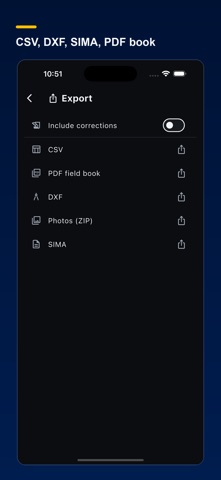
· CSV in the column order your office uses. PNEZD is one tap.
· DXF with the points, their names on their own layer, and your strings as
polylines.
· SIMA (.sim) for Japan, including points that carry no coordinate — the
office joins the two files on the point name, so those must appear.
· A PDF field book laid out like the paper one, with the prism changes ruled
in where they happened.
▼ Two recorders, one job
Hand the book to the other recorder by holding the phones together — the codes
go across by camera, with no network at all. Every entry from both phones is
kept; where both corrected the same point, both are kept and shown rather than
one quietly winning.
▼ Built for outdoors
Four looks: System, Natural, Light and Dark, the dark one black with heavy type that stays readable in direct sun. Every button at
least 64 points across, for gloves. A buzz on each point, so the screen does
not have to be watched. Everything works with no signal; only the address check on a typed coordinate waits for coverage. A Lock Screen widget and a Control open the job you are on.
▼ What it is not
It does not measure. It does not connect to the instrument. It is not a
levelling book — heights are a different job and there are good apps for it.
It has no map screen. It holds the meaning of the points, and hands it to the
office in the format your software already reads.
▼ Coordinates
Copying a value down is one level below the steady flow, with a keypad built
for it. Type it in the job's system — Japan's plane rectangular zones, US
State Plane, or UTM — and the app works out where that is and looks the
address up, as a check.
▼ Price
Recording is free, always, and a job never stops taking points because a
subscription ended. The subscription is for taking the job off the phone:
exports and handing a book over. Everything free for 30 days.
You can subscribe at any time; billing starts when you buy. In the US: US$15.00/month or US$150.00/year. Prices vary by country or region; the price shown on the App Store applies. Payment is charged to your Apple Account at confirmation of purchase. The subscription renews automatically unless cancelled at least 24 hours before the end of the current period. Manage or cancel it in your Apple Account settings.
Terms of Use (Apple standard EULA):
https://www.apple.com/legal/internet-services/itunes/dev/stdeula/
Privacy Policy: https://qconp.com/privacy